Find answers, offer solutions, ask questions


Learn, solve, grow
Level up your skills and find answers across all MYOB products
Featured Places

MYOB AccountRight Ideas Exchange
Add your ideas to improve MYOB AccountRight software and vote on ideas to help us build what is most important to youFeatured Places

MYOB Announcements
The latest news and happenings on the MYOB Community Forum.Featured Places

AccountRight: Getting Started
New to AccountRight? Start your journey here.Incidents & Outages
Check for incidents & outages that may affect your software
Click here to view status page
Featured Content
MYOB AccountRight version 2026.10 will be released on November 11th 2026.
AccountRight updates are typically made available around the middle of every month.
These updates include, new features,...
15KViews
1like
0Comments
Featured Content

We want to let you know that AccountRight v19 and earlier versions will be retired from 28 February 2026.
Key dates:
28 February 2026: AccountRight v19 and all earlier versions will become re...
1.7KViews
0likes
14Comments

Opt-out of Benefit program in Flare
I like the option to use MYOB for electronic onboarding and had noticed the tick box for flare benefits ticked by default. I always unticked this as we do not wish to be a middleman for services or benefits that are unvetted by us. It seems that Flare is still getting the information and may contact staff for offers even if we have unticked the box during the invite. I also find it objectionable to have this ticked by default. This should be opt-in and not opt-out. Please change this to prevent data leaks now or in the future.985Views23likes25Comments
USD Rate Live Updates
Hi, I am using MYOB Premier for multi currency transaction. Today, the rate for AUD-USD is set to $1. I have turned off live updates and overwritten the rate in the currency list, but the rate reverted back to $1 when I turned live rates back on. I have also cleared my local cache, but that didn't fix the problem. I also use CNY, HKD, NZD, EUR, GBP, JPY and PHP and they are all unaffected. Is there a problem with the feed from Open Exchange Rates? I have lots of invoicing to do and expenses to enter in USD and I would rather not have to keep entering a rate in every transaction. Thanks] Claire
AccountRight monthly version release information
2 MIN READ MYOB AccountRight version 2026.10 will be released on November 11th 2026. AccountRight updates are typically made available around the middle of every month. These updates include, new features, updated compliance, improvements and fixes. Users can see what is included in each update through our dedicated AccountRight Release Help Article. When an update is made available AccountRight PC Edition users would be automatically updated to the latest release of AccountRight. You'll be prompted to restart AccountRight to complete the update. *Note that there are no further updates for AccountRight SE after 2026.5 Tip: Shut down AccountRight when you're not using it. If you leave AccountRight open all the time, you may miss out on automatic updates. To give you the best possible performance from AccountRight, we only keep the most recent version in the cloud. This does mean that as new releases become available, you may need to update your software to keep working smoothly. How do I update to the latest version? If you use AccountRight PC Edition, you'll automatically be updated to the latest release. The next time you log in after that, you'll be prompted to restart AccountRight to complete the update. If you see a message that AccountRight needs updating when you open AccountRight, you need to restart AccountRight to install any pending updates. Can I open my offline file(s)? Since the release of 2026.5, offline files can only be opened in Server Edition, or AccountRight PC edition 2026.4 or earlier. AccountRight PC edition 2026.5 and beyond no longer supports working offline. What if I need more help? Check out our help article, Installation troubleshooting, if you encounter any issues when trying to install the update, or alternatively feel free to ask a question in the AccountRight board so the MYOB Community can assist.Incorrect Wage Calculation on BAS
For last month and this month when I have used the prepare BAS/IAS it takes me to the online lodgement page however when I click on the BAS/IAS the wages are incorrect by approximately $10000. I have been using this function in MYOB for the last 12 years without any errors and now I can't make it work. I have tried all the common fixes but none of them apply. I have submitted a support request however I am still waiting after a month...27Views0likes1Comment
Incorrect Billing and Dishonour Fee
Hello, I am hoping someone from this forum can help to resolve my ongoing issue with the billing team. In August, MYOB incorrectly debited my bank account on the wrong billing date and for an unexpectedly high amount without any prior notification. This resulted as a failed payment due to insufficient funds and MYOB subsequently charged us a dishonour fee. After 4 attempts talking to the online support team and 11 email exchanges between the billing department over the past 2 months, my request to have the dishonour fee waived remains unresolved. Firstly, your team blamed system error for the incorrect billing date and charges. Despite this, MYOB proceeds to charge us a dishonour fee resulting from your own system's mistake. I find it completely unreasonable that a customer should be financially penalised for an error caused by MYOB. Why should we be expected to pay a dishonour fee when the circumstances leading to the failed payment were entirely outside our control? No one from your support or billing team would take the responsibility to solve this and it is completely unacceptable. I have been extremely patient and have made every reasonable effort to resolve this matter through the appropriate channels. However, the lack of communication, accountability and customer service from MYOB has been deeply disappointing. I would appreciate someone taking ownership of this matter rather than directing me back to the same support channels that have failed to provide a resolution over the past two months. I look forward to your prompt response and a satisfactory resolution. Thank you.34Views0likes1Comment
Pay Super - ability to future date
With upcoming changes to Payday Super it would be extremely beneficial to be able to create a superannuation payment with a future date, authorise today and the payment is not taken out of the bank account until the future date. I often do payroll in advance when going on leave. With Payday super we need to pay super on the day of payroll. The current Pay Super in MYOB means that although the Pay Super is for a date in advance, that is effectively ignored and the money comes out of the bank account on the date it is authorised. This will put pressure on bookkeepers/payroll staff to have to either login on the payday to authorise super, or put cashflow pressure on businesses to pay super in advance of the payroll which seems illogical.1.8KViews92likes35Comments
Access to old AccountRight installers
Hi Team, I used to use MYOB AccountRight in my business and I need to go back and lookup some historical information in a restored backup. I've tried using 2026.4 however this is generating errors when trying to open the file. My file is from version 2022.9 so Ideally I'd like access to this or the release just after.Solved
Print/Email Invoices function not working in MYOB Account Right
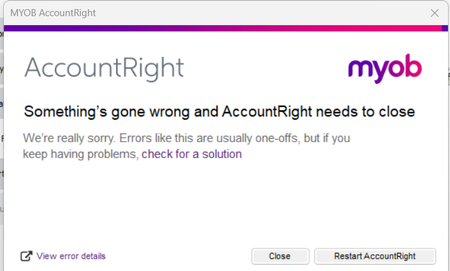
Hello. A couple days ago, I tried to send out Invoices at the start of the month to account holders. Normally I go to Print/Email invoices under sales and set the time period of one month and select my customer and tick all the invoices for that month. However as of the start of the month this function isnt working. When I click on Print/Email invoices, the message comes up not responding and then after a few minutes I get an error message. I have tried restarting MYOB, it happens on multiple computers and I have done live chat with MYOB. I was on live chat with MYOB for 5 hours yesterday and they were unable to resolve it. Has any one experienced this before? Any help much appreciated . Image attached of error message Kind regards Mallory42Views0likes1Comment
Business has been sold....now what
Hi We sold our business back in April 2026. We are awaiting the accountant to finalise the last bits, which may go into next financial year. We are disappointed we can no longer have the file offline, and that causes us issues re keeping records for 5 years. We dont want to keep paying the $165 per month either. As we are not using it to run the business anymore, just for finalisation purposes. Is there another option? Can you please advise the process.60Views0likes3Comments
Salary Sacrifice ( S57A exempt )
Morning, we are a small not for Profit that has PBI status. On the STP finalisation we report the grossed up amount under the S57A. We have an employee who has queried there EOFY finalisation and I have noticed that MYOB has linked the deduction account we use to pay the amount out. See example of STP finalisation. I am know doubting if this is correct - is there anyone else who is in a similar situation and do you record under both. I am thinking because Exempt from FBT is the FBT year , and the other is the financial year, but now have myself confused. Any suggestions appreciated30Views0likes1CommentAuthorising Super with no phone while overseas
At the moment there is no option to authorise super payment without text message code authorisation. When I am out of the country I do not have phone contact unless turning on data roaming which comes with a cost component. Other suggestion given to me from MYOB was to do super before I leave but as I do the wages while away to allow for differing staff hours this is not an option. There should be a choice to have email verification in these situations. I am sure I am not the only person who works remotely and would rather not have to use their personal phone in this manner.562Views15likes7Comments