Invoice PDF for MYOB Solo subscription fails to add to Solo expense
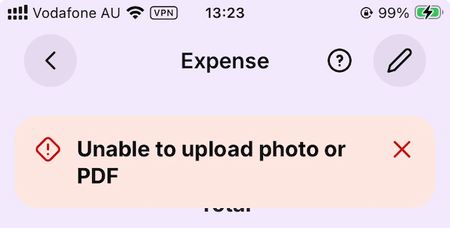
Hi there, Playing around with adding receipts to expenses, and I couldn’t get the PDF I downloaded from my MYOB account to successfully add: The two pages were able to be previewed in the app, so it’s not an outright inability to recognise the content. I opened the PDF on my Mac, did a Print to PDF from the Preview app, and I was able to add that one. Very odd – must be some sort of metadata or other internal content issue. If MYOB uses a PDF-generation library they didn’t create, maybe generated PDFs from other sites using the same library will fail. If they did create their own PDF-generation library, maybe they can figure out what the incompatibility is for us completists :) Sean9Views0likes0Comments
Intray email not get invoices to intray
We have an email forward on our invoices email account to send email on the my myob intray email address. We have checked this in exchange message trace. Even our Myob invoice from Myob didn't get the to intray. The messages are being delivered as can be seen from the message trace. Due to this we have missed paying invoices. What steps can be taken to fix this issue ?
Corupt invoice 1 in 10 -frustrated!
Corupt invoice 1 in 10 very frustrating. I am constantly getting customers coplaining about this. I re-issue the invoice and all seems okay. But the question is WHY! is it happening. Invoice shows a red line on Left hand side. It seems to occur when invoices don't get sent imidiatly and are delayed for some reason wich is also frustrating if a customer is waiting.Solved
Display an alternate business address on customer invoice
In MYOB BUSINESS PRO I have created an invoice template with a logo and I want to display the "trading/site" address which is different from the main business address. My ABN is registered to my home address, but I want my shopfront address on the invoice. The edit template in 'Sales Settings' does not have any option for an alternate address from the one set up in 'Business Settings'.31Views0likes1CommentNew variable for invoice emails
Our company is a cleaning business, we don't want something like the current default in the subject line that feels impersonal. Invoice INV00000964; Invoice from Company Name Pty Ltd in the subject line, it's not that inviting and has an automated feel to it. I suggest a new variable be added (see https://www.myob.com/au/support/myob-business/business-settings/forms/sending-emails/set-up-your-default-email-messages) Something like Invoice for {{customer street address}},{{customer suburb}} The first line of the address would be perfectly fine, so the default subject line in invoices we email out would be something like: Invoice for 123 DirtyHouse Rd, Boganville We currently have to manually delete the default subject line and type it out manually. It would save us a heap of time, and I am sure there's many other mobile service based businesses who would like to have a more personalised approach with their customers. I reckon this would a super simple change for MYOB to implement! Thanks for reading and please upvote if you would find this useful :)134Views0likes4Comments
Can I assign a bill to invoices
I have a Supplier, who also from time to time can be a customer. Currently, I have an invoice for them and I also have many different bills from them. How do I pay them once for the bills (less the invoice) and assign both the bills and the invoice (as being paid) in MYOB?
Showing a discount/credit on an invoice
Hi, I have a customer that paid for a service that they didn’t end up using yet, so i want to show that I have discounted their next invoice by the previously paid amount. How can I do this please? i.e. in June they paid $100 but only used services to the value of $50, leaving them with $50 in credit. In July they have another service for $100 booked. I want to show on their invoice that the service is worth $100, but they only need to pay $50 as I’m applying the previous credit. Thanks!388Views0likes12Comments