Forum Discussion

Crystle's avatar
Crystle
Experienced Cover User
5 days ago

ETP selection button appears but no dropdown

I've spent 2 hours on hold and 30 mins on the phone to MYOB support, and have verified I've actioned everything correctly for ETP payments. 


This includes being advised to ensure the ETP pay category is set to Salary, which is opposite to the online MYOB instructions that say to select Hourly. 

Regardless, either way the end result is - 


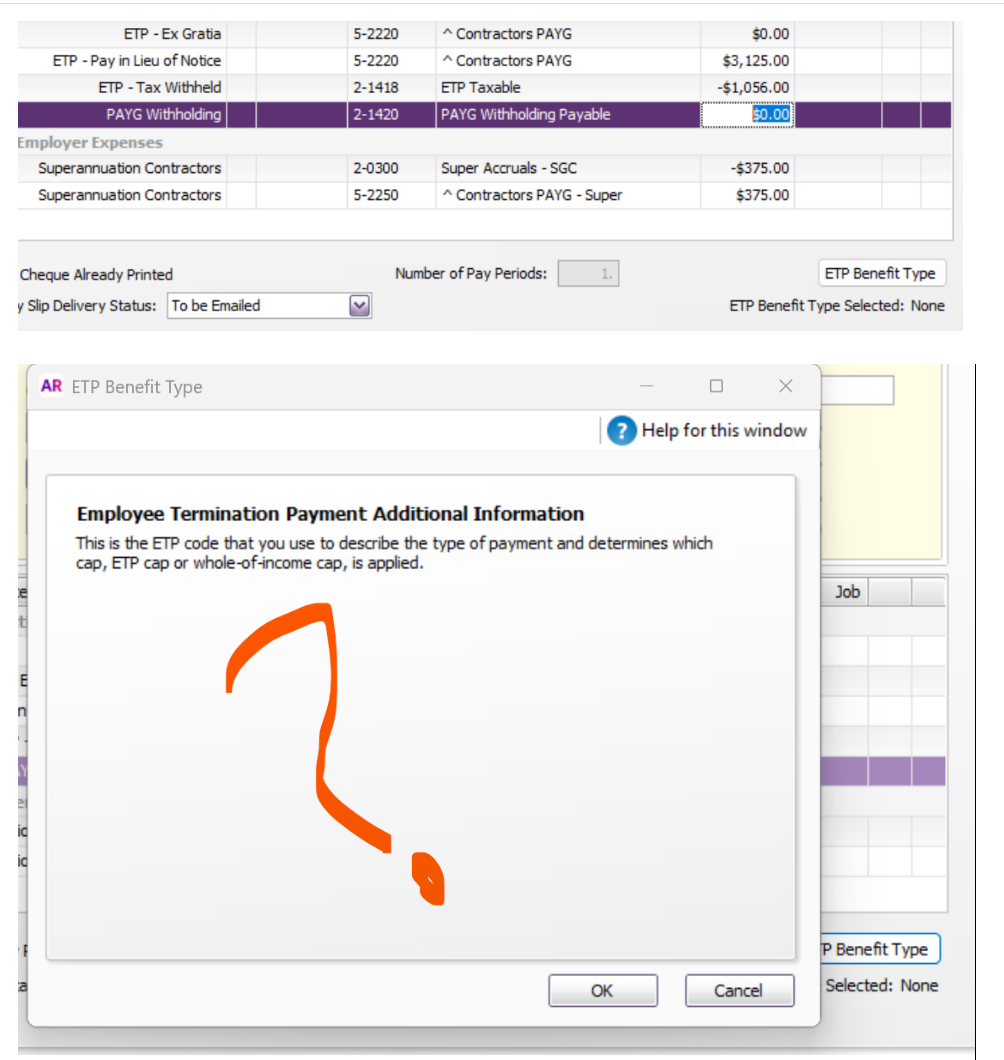
In the Pay Employee wage processing window I can add in the ETP ex gratia amount and then the ETP Benefit Type button appears in the bottom right.

From there I click it and am supposed to see a drop down box to make a choice.


The window is blank.


How do we resolve this?

1 Reply

  • Genreve_S's avatar
    Genreve_S
    MYOB Moderator
    4 days ago

    Hi Crystle


    Thanks for sharing the screenshot.


    Because the ETP Benefit Type button is appearing and the window is opening, the pay is getting far enough to trigger the ETP selection screen. Normally, that window should then show the available benefit type options, so the blank screen in your screenshot isn’t expected.


    This means the issue doesn’t look like a missed step in the pay itself. It looks more like the ETP Benefit Type window isn’t loading the selection options properly.


    I’d start by checking the ETP wage category setup, especially the ATO reporting category, then close and reopen the pay and try again. If the same window still opens blank, that points to the popup not rendering correctly rather than the ETP entry being set up incorrectly.


    Regards,

    Genreve