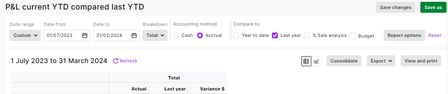
ContributionsMost RecentMost LikesSolutionsRe: Profit and Loss Statement This is possible on the Web Browser version of MYOB - see below for report customisation. I did a this report and the Last Year column uses the same period, but prior year as the Actual YTD (first Column). for report customisation. Re: Migrating Budget Data from Desktop to Browser Also cant seem to manually enter a budget into the browser version - is this possible? Re: Migrating Budget Data from Desktop to Browser Hi Ive tried your step-by-step below, to import a desktop budget to browser version. I have issues with Step 8, as its not letting me export the blank budget from browser to use as a template to adjust and re-import to the browser. Also, step 5 created a TXT file, so I can resave this as a CSV this does this work for reimporting? Re: AccountRight 2016.2.1 now available Thanks StevenR. Apoloigies for late reply, I have been away. My desktop PC does have the 2016.2 SE icon, so I ran the server installer as you suggested, then checked the version in accountright and it still says 2016.2.0. I also downloaded 2016.2.1.0 and it has put another icon on my computer. Do I need to keep the SE version or should I just run with the new icon which appears to be the current version. Re: AccountRight 2016.2.1 now available I have done the update on several computers with access to online 2016.2.1, however one computer has lost the'úpgrade button', though we had pressed it and seemd to loop back to normal screen. I would assume that the upgrade happened, however opening screen says version is 2016.2.0. I can see the tax table revision date is 01/07/16 and current payroll year is 2017, so hoping all current - then why doesn't the version say 2016.2.1?? In the online version, where exactly do I check the verson number, as I can't see file/about in a drop down?