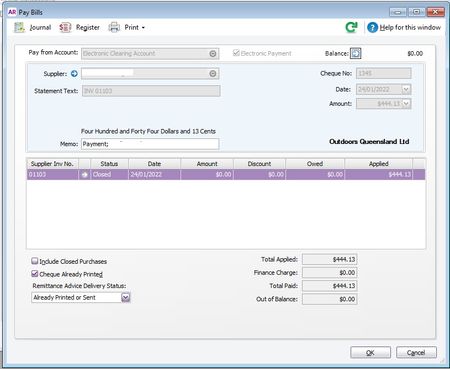
ContributionsMost RecentMost LikesSolutionsBank Recon issuesI have an issue with my Aug 2022 Bank Reconciliation. It is a small account with only 3 transactions in it. The July Rec balanced fine, but this Aug Rec is out of balance by the exact amount of one of the transactions (31.08.22 - $26.27). This amount appears in my bank statement and in my bank rec, but if I select this item my bank rec is out of balance by this exact amount. I have double checked I am entering the closing balance correctly. I have double checked all transactions, including this $26.27 one, have been allocated and recorded. I have wasted 2.5hrs on the phone help with no results and then they disconnected the line. They did ask that I have entered the opening balance correctly, but I said I don't entered it it is in the system. I also just thought to undo the July Rec and redo it and see if that helped at all with the Aug Rec, but no, and strangely enough the July Rec now won't balance, it is out by exactly $26.27. But when I do a transaction search back to 01.01.21 there is only one single transaction for this exact amount and it is the 31.08.22 transaction, so not sure how it is no affecting the July Rec too. There appears to be a glitch with MYOB or something major that I have missed and I am unable to get any help from the Help Desk. Please please please can someone suggest anything? Thank you DawnRe: Approving Bank Feeds with one payment for 2 items Hello Tracey, Sorry for the delay. I have followed your instructions through to... If an electronic payment has been created, click on the zoom arrow to open it and check the Pay from account is the correct bank account. The pay from account is incorrect, MYOB seems to default to one account that we don't use often and I have to manually change it to the one I actually want it to come from, guessing I missed it on this one. The bank statement says it game from an one account (OQ) and MYOB says it came from an another account (QORF). How do I change this to be the correct account? And will that separate the 2 individual payments ($6 and $444.13) so I can reconcile them against the correct individual transactions? They appear in the bank feed as a single item of $450.13. Re: Approving Bank Feeds with one payment for 2 items unfortunately that doesn't resolve the issue. The $450.13 ( $444.13 and $6.00) where from the electronic clearing account. MYOB1 pic I then went into the Prepare Electronic Payments as instructed below and changed the date to the actual payment date MYOB 2 pic, but nothing is displayed so I can't tick the two Pay Bill transactons. these have already been processed with a bank file and now have cleared out of this section. Am I missing something here? Still need help please. Approving Bank Feeds with one payment for 2 items Hello Community, I feel like a dummy on this. Not sure why but my bank feed is displaying a payment amount of $450.13 which actually comprises 2 individual payments, $6 and $444.13. See screenshot below. How do I approve this in the bank feeds? I've tried to FIND the individual transactions and split it, but that doesn't work. When I try PAY BILL, the bills have already been paid in the system so I have nothing to match it against in that person card. Any guidance would be appreciated. Thank you, *Screenshot removed by MYOB Moderator as it contained sensitive information, ^TH SolvedPaying Bill payments via Bpayment I know that I can't entered the Bpayment details into the suppliers CARD and that I have to manually process the actually payment at my bank. That is all good. What I need to know is how to handle this payment in MYOB. One post dated Mark 2017, said to handle it as a Spend Money transcation when it lands in my bank feeds. Is this the best option or is there another solution? If I run it through the Pay Bills function in MYOB, but don't process the ABA Bank File, how do I clear it from the Prepare Electronic payments window? Looking for an elegant and simple way to handle one off Bpay payments. Any help or suggestions you can offer would be appreciated. Solved