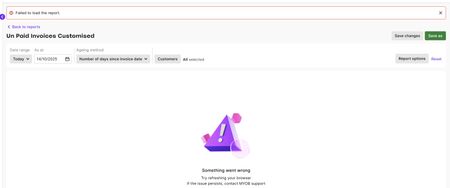
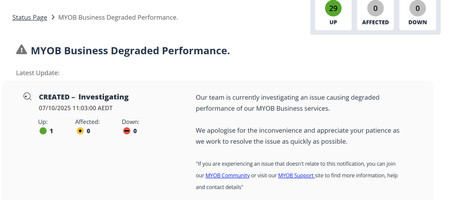
ContributionsMost RecentMost LikesSolutionsRe: Customised Reports - Issues - Status changed to: Open Ok Customised Reports - Issues I raised the following issues on the forum, after much back and forth they have suggested to raise it in this platform. I am going to copy and paste the communications thus far. We are a very project-based business. So, it is useful for us to prepare Project based P&L's. We start off with Quote stage and once contracts signed etc move onto Project. We use the same no with Q and then P. I have noted 2 errors. Please refer to the attached Example Report: Refer to Attachment "Customised P&L" Highlighted in yellow - As you can see, I have chosen 2 Jobs and ticked consolidated jobs. Down below these no's nor the job name does not appear where it should. There are other accounting softwares that would indicate both job no's and both job names. I think MYOB should look into this as well. Refer to attachment "Customised P&L" and then "P&L Transaction Details" Highlighted in pink - When you click into this, you should be able to see the details for the make-up of this amount. However, it pulls up transactions that has nothing to do with the said project. Could you please look into these issues and fix them? Thank You Uma Reply from Myob: Hi Umag, Thanks for such a clear write-up for sharing the example reports. That definitely helped paint the picture. You're absolutely right to question this. What you're seeing comes down to a feature that's not available in customised reports in MYOB Business. Consolidated jobs don't display both job numbers and names the way you'd expect, and the P&L Transaction Details drill-down can pull in transactions outside the selected project. Nothing you've done wrong here, it's just how the report behaves right now. If you need more detailed and flexible reporting, one option worth trying is the AccountRight desktop version. It offers more control around customised reports and job detail, which may suit the way you're tracking projects a bit better. My reply: Hi, I am really confused and surprised by this answer. I am to believe this is possibly an AI generated reply. Allow me to think out loud here: "Consolidated jobs don't display both job numbers and names the way you'd expect" - it may appear to be a cosmetic, thing but when you have to spit out many reports, you want to find out somewhere in the report which job the P&L relates to (the same as the Period/date appears on the report) - you have two designated areas which have Heading Job Number and Job Name - it should have the relavant job no's and job names underneath them. If I untick consolidate jobs, as per attached you could see that job no and job name do appear in the report. This change was made after I raised the issue. Like I have stated earlier this feature is available in one of your competitors reports. "P&L Transaction Details drill-down can pull in transactions outside the selected project. Nothing you've done wrong here, it's just how the report behaves right now" - I know that I have done nothing wrong. The purpose of the drill-down is to get the details of the transactions, that make up the total in the P&L line eg: Total Sales - one might want to know the breakdown of the sales invoices etc. If the drill-down is incorrect - MYOB has two options - a. remove the drill-down - otherwise you are giving incorrect information. b. fix the issue. "If you need more detailed and flexible reporting, one option worth trying is the AccountRight desktop version. It offers more control around customised reports and job detail, which may suit the way you're tracking projects a bit better". This report does not display job no's and job names either. There is no drill down option in the desktop version. In Summary MYOB has not given any acceptable solution. Financial Reporting is a major part of any business. It's core functions, decision making is based and relied upon these reports. So, it is vital the reports are accurate. Reply from MYOB: Hi Umag, Thanks for taking the time to spell out how the job P&L is working for you; your concerns are definitely valid. Right now, the report is behaving as you have described when Consolidate jobs is ticked, but I agree there’s definitely room to improve how that looks and feels. The best way to get that in front of the product team is to pop your suggestions on the Ideas Exchange Board so other users can vote and add their own use cases too. On the P&L details pulling in things that don’t look right, that’s something that's definitely worth digging into properly. The quickest next step is to reach out to our support team so they can jump into the file and see what’s going on. You can either lodge a ticket from My Account or start a chat via MOCA, our virtual assistant, and they can hand you over to a human if needed. So, wondering if you all can really do something about this? Re: Customised Reports - Issues Hi, I am really confused and surprised by this answer. I am to believe this is possibly an AI generated reply. Allow me to think out loud here: "Consolidated jobs don't display both job numbers and names the way you'd expect" - it may appear to be a cosmetic, thing but when you have to spit out many reports, you want to find out somewhere in the report which job the P&L relates to (the same as the Period/date appears on the report) - you have two designated areas which have Heading Job Number and Job Name - it should have the relavant job no's and job names underneath them. If I untick consolidate jobs, as per attached you could see that job no and job name do appear in the report. This change was made after I raised the issue. Like I have stated earlier this feature is available in one of your competitors reports. "P&L Transaction Details drill-down can pull in transactions outside the selected project. Nothing you've done wrong here, it's just how the report behaves right now" - I know that I have done nothing wrong. The purpose of the drill-down is to get the details of the transactions, that make up the total in the P&L line eg: Total Sales - one might want to know the breakdown of the sales invoices etc. If the drill-down is incorrect - MYOB has two options - a. remove the drill-down - otherwise you are giving incorrect information. b. fix the issue. "If you need more detailed and flexible reporting, one option worth trying is the AccountRight desktop version. It offers more control around customised reports and job detail, which may suit the way you're tracking projects a bit better". This report does not display job no's and job names either. There is no drill down option in the desktop version. In Summary MYOB has not given any acceptable solution. Financial Reporting is a major part of any business. It's core functions, decision making is based and relied upon these reports. So, it is vital the reports are accurate. Customised Reports - Issues We are a very project-based business. So, it is useful for us to prepare Project based P&L's. We start off with Quote stage and once contracts signed etc move onto Project. We use the same no with Q and then P. I have noted 2 errors. Please refer to the attached Example Report: Refer to Attachment "Customised P&L" Highlighted in yellow - As you can see, I have chosen 2 Jobs and ticked consolidated jobs. Down below these no's nor the job name does not appear where it should. There are other accounting softwares that would indicate both job no's and both job names. I think MYOB should look into this as well. Refer to attachment "Customised P&L" and then "P&L Transaction Details" Highlighted in pink - When you click into this, you should be able to see the details for the make-up of this amount. However, it pulls up transactions that has nothing to do with the said project. Could you please look into these issues and fix them? Thank You Uma Re: Job P&L does not have the Job no on the report - Status changed to: Open Hi, There, has been some change made on the report already. Which is very nice. As you are already in the process of making the changes, I would also like to bring to your attention that if you choose two jobs (we use the same number with Q for when it's in the quotation stage and then P once it becomes a Project) So, when I want to see in the entirety how much the Project has cost/earned I use the two job codes together) and use consolidated. So when you tick consolidated, the report does not bring the job no and where it says job name it says Consolidated. If that could be amended as well that would be great. Job P&L does not have the Job no on the report The Job P&L - these reports do not print the Job number or the Job name on the report. When you are printing numerous Job P&L's the job no or the job name on the report is rather vital. Is there a way this could be done? Uma Re: Unable to produce unpaid bills and invoices reports Hi Sandy, Mine is working now (for the moment, this is not the first time I had this issue and don't it would be the last time either). some of the suggestions above as absolute BS. Run the report over a shorter date range - there is no date range for Unpaid bills/invoices reports they "as at" Step 2 - does nothing 3. I have not touched my chart accounts in years, so why issues no 4. Not going to do that, Clearing the MYOB cache sometimes helps. Re: Unable to produce unpaid bills and invoices reports The issue is now fixed (for the moment) sorry if I sound skeptical, as repeated dramas with MYOB lately, I want to have one week problem free usage. thank you for your assistance Unable to produce unpaid bills and invoices reports Once again unable to print the most basic reports. This is both on desktop as well on the browser. I have tried clearing the MYOB Cache etc a million times. Re: MYOB Super slow and taking too long to load What does the above mean? Affected 0? Down 0? Becoming almost impossible work in MYOB.