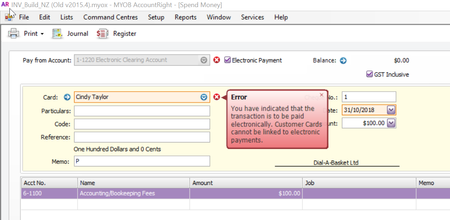
ContributionsMost RecentMost LikesSolutionsRe: Cannot use Spend money using cheque on new customer card Hi MissDiana, Can you please check if you accidentally have not selected the Group with Electronic Payments option next to Pay from Account instead of your Bank Account. I have replicated the issue in AccountRight but can you please check in Banking command centre >>Spend Money >>and untick Electronic Payment. If this is done simply untick the option "Electronic Payment" option then this error goes away. Also, checked Setup >> Linked Accounts >>Sales Accounts and Bank Accounts for customer payments is set up as a bank account and NOT Electronic Payments to rule out. Let us know how you go. Looking forward to hearing from you. Re: I paid a vendor twice for the same invoice - how do I account for that? Hi PloughGuy, Thank you for your feedback! Hahaha.......you made my day and I salute you for your Creativity & awesomeness! Thoroughly enjoyed! Should there be any other queries, please do let us know. Re: I paid a vendor twice for the same invoice - how do I account for that? Hi PloughGuy, Very interesting post! To be honest, I love writing skills!:smileyhappy: To record overpayments or double payment, this is a help article which will guide you Pay a bill twice Apply the first payment to the unpaid (open) bill as you normally do and then record another supplier payment and apply the second payment to the same bill. As this bill is now paid (or closed), you'll need to select the Include Closed Purchases option to see it. A debit for the second payment will be automatically created. You record the payment using the Pay Bills window or by selecting the Pay Bills option in the Band Feeds window. After creating the debt, you can settle it by receiving a refund or applying it to a future bill. For more information on settling supplier debits, see the AccountEdge help (Australia) Hope this helps and let us know how you go. Looking forward to hearing from you. :smileyhappy: