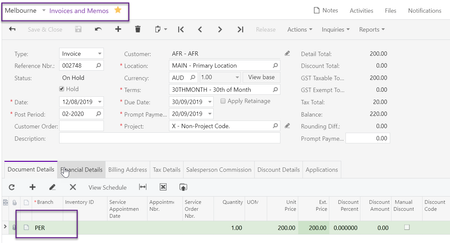
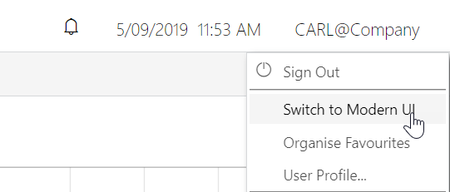
ContributionsMost RecentMost LikesSolutionsRe: EXO Demo Data Hi Phocas I have shared an EXO Demo database SQL backup with you via dropbox, check your email address linked to this account for an email from dropbox. All the best, Carl Will_H thanks for pointing me towards this post Re: How to edit/correct customise Statement Hi Bunny79 What are your payment terms on your invoices, is that causing the invoice 72499 to show as not overdue. All the best, Carl Re: MYOB Exo Staff User Last Logged in list Hi rcg1 Is it not as simple as running this SQL Script select LAST_LOGIN, staffno, name from STAFF If so that could also be developed into a clarity report if required. All the best, Carl MYOB Advanced Release Versions Dear Partners, MYOB have recently released Acumatica 2020R2 as MYOB Advanced 2020.6, this release is an opt in release for our customers and only a small handful of customers have decided to be updated to this version. However new customers from March 29th onwards will be deployed onto this release please keep this in mind when engaging with any new opportunity. One important item to note about this release is the announcement that the endpoints with system Contract Version 2 are no longer supported. This implies that the default/6.00.001 system endpoint, which used Contract Version 2, has been removed. See https://community.myob.com/t5/Advanced-developer-alerts-and/default-6-00-001-system-endpoint-removed-in-MYOB-Advanced-2020-6/td-p/697590 A copy of release 2020.6 is now available through the partner self service portal to download and test with as well as demo sites however will be upgraded to this version. EAP sandboxes will be created before the upgrades so you can verify your integrations and test the new endpoints. We highly recommend all our developer partners/ISVs to test their integrations and packages against this version for compatibility so as to reduce hiccups while onboarding new customers. MYOB are now involved in packaging the release of Acumatica 2021 R1 to be made available to customers mid-May. More on this will be announced as we get ready to make available this release to our business partners and ISV ecosystem. As we progress with making this release available we will be providing the necessary release notes and sandboxes to keep you informed. Incase of any questions, please feel free to reach out to us directly. Carl Brooks Ecosystem Partner Manager - Enterprise MYOB Re: MYOB Advanced Manufacturing Edition Hi Bronski In case there is no responses my advice would be to send an email to biggerbusiness@myob.com to have a consultant chat to you about your requirements to see if MYOB Advanced Manufacturing Edition can fulffill your needs. If there ia an apparent fit a Business partner will be assigned to you to provide a conceptual proof of solution to you after clarifying your requirements. If the proof of concept works, the next steps would be to introduce you to customers already using the solution to get their feedback. All the best, Carl Developer Services Christmas and New Year Shutdown Dates To all Development Partners, The Developer Services team, like you, will be taking a well-deserved break over the holiday period to recharge our batteries and prepare for the year ahead. This break will start from 5pm (NZ time), Friday, December 18 th and we will return back in the New Year on Monday, January 11 th 2021. New enrolments after 5pm (NZ time), Friday, December 18 th to the developer program will be processed after Monday, January 11 th 2021. For our current developer community there will be skeleton crews over the festive period for support and operations. For support, tickets must be logged via https://partnerportal.myobadvanced.com/ by certified developers and for account queries email the operation team at accountsanz@myobadvanced.com We would like to take this opportunity to thank you all for working with us during 2020 and look forward to working together again during 2021. All the best, Carl Brooks, On behalf of the Developer Services Team. Re: CRM Add on AccountRight Hi BKylie There are quite a few choices within our Apps Marketplace, see https://www.myob.com/au/apps/category/tasks?category=crm My recommendation would be to write a wish list of features and functions you want to see and then pick 3 potential candidates to see which one fits best. Hope that helps as a starter, all the best Carl Re: MYOB Advanced - Modern UI disabled Hi scott_e That is strange, it should be available for all users and MYOB are certainly encouraging end users to use Modern UI. The quickest solution would be to ask you partner to disable the option "Show Classic UI by Default" on your user account. All the best, Carl Re: MYOB Advanced - Modern UI disabled Hi scott_e You can change to modern UI using this option To have it defaulting to Modern UI that setting which is greyed out can be changed by your partner through their PARTNERSUPPORT user account. Best regards, Carl Re: MYOB Advanced API Branch Hi mauritz I believe the API would follow the same methodology as if you was manually keying in the data, below you can see I am in Branch Melbourne but posting revenue to Branch Perth. The next step is to associate the AR Trade with PER and this can be done on the financial details tab, see Once the invoice is release, Revenue, GST and AR Trade are all associated with the Perth Branch Does this help?? Carl