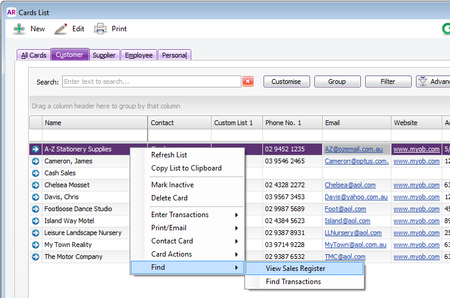
ContributionsMost RecentMost LikesSolutionsRe: AccountRight 2016.3 now available There are actually a whole bunch of great things under the right-click menu, and the options will change depending on whether you are on a customer, supplier or employee card. You can do things like: - Enter a sale for the selected customer - Take a payment for the selected customer - Add a new job for the selected customer - Even get driving direction to their office :-) It's worth having a bit of play around. Good luck! Re: AccountRight 2016.3 now available You can easily find all invoices from the CardList by right-clicking on the customer and then selecting Find->View Sales Register, This will show you all sales for that customer for current month. Simply role back the from date and you will see all sales. I hope this help.