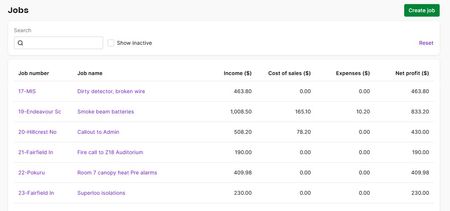
Feature Request: Estimated Income Tax Tracker for Sole Traders
It would be extremely helpful if MYOB could provide an optional income tax estimate for sole traders based on net profit, similar to how GST tracking currently works. MYOB already calculates net profit in real time. Using this figure, MYOB could estimate personal income tax liability for the current financial year and display it on the dashboard. A possible implementation could include: Income Tax Estimate based on ATO Marginal Tax Brackets Using the current Australian resident tax rates for the relevant financial year, MYOB could automatically estimate income tax on the user's net profit. Optional Medicare Levy Toggle Users could optionally include the 2% Medicare levy in the estimate. Optional Custom Tax Rate Because individual tax situations differ (other income, deductions, offsets, HECS, etc.), users could override the calculation with a custom estimated tax percentage if preferred. The dashboard could then display a simple summary such as: Net Profit (FY to date) Estimated Income Tax Estimated After-Tax Profit Adding something like this to the MYOB Business Lite Dashboard would provide valuable financial visibility for many sole traders in the MYOB community. If other sole traders would also find this helpful, please consider voting for this idea so the MYOB team can see the demand.137Views0likes2CommentsAccountRight Bank Feeds - In the Spend Money menu could there be an option to use a Recurrent Transaction ?
Situation at present: I go to the Banking command centre and select Spend Money - then select Use Recurring Transaction, find the payee and record the new instance of that payment (e.g. my monthly phone bill). Next, I go to Bank Feeds, find the payment (often a direct debit) and match it to my new payment. To save time, when I go into Bank Feeds - Spend Money, could there be an option to open the Recurrent Transactions list and select a recurrent transaction, to allocate the Bank Feed payment ? (Kym in Palmerston, outer Darwin - a MYOB Certified Consutant since 2007 and AR user since 1995)309Views3likes10Comments
Invoice Number Sequence
We are currently AroFlo across our business operations. We have four business units, three of which generate invoices through AroFlo, while the fourth operates solely within MYOB. At present, when invoices are imported from AroFlo into MYOB, the invoice number sequence in MYOB is automatically updated to follow the numbering from the imported invoice. This results in the next invoice created directly in MYOB using an unexpected sequence, which creates confusion and inconsistency in our internal processes, particularly for the unit that uses MYOB independently. We would like to suggest that MYOB provide an option to disable or override automatic invoice number sequencing when importing or entering invoices. This would allow businesses with multiple invoicing systems or workflows to better manage and maintain consistent numbering per business unit.156Views0likes3Comments
Add Amount Range (Min/Max) search and filtering to Web Find Transactions
Currently in MYOB Business / AccountRight web browser, the "Find transactions" screen only supports searching for exact text, reference numbers, or exact dollar amounts. It does not allow users to filter or search for transactions within a specific dollar value range (e.g., between $2,000 and $280,000). Proposed Solution: 1. Add dedicated "Amount From" and "Amount To" filter fields to the Find Transactions screen (matching AccountRight desktop functionality), OR 2. Enable range syntax support directly in the Search box (e.g., "2000-280000" or ">2000"). Why this is important: For accountants, bookkeepers, and business owners auditing ledgers, locating transactions within an estimated value threshold is a daily necessity. Currently, users are forced to export reports to Excel or open the desktop software just to apply basic numeric filters. Bringing this to the web browser interface would save significant time.72Views0likes1Comment
LANDSCAPE PRINTING
To all the long-suffering MYOB users - yet another (Why am I surprised), problem has arisen. When printing anything using the browser interface version, everything prints in portrait mode and has no landscape option. Yet the data is formatted to landscape output and is always cut off on the RHS. We're just so frustrated by this almost unbelievable **bleep** software that this is yet another POS. The support in Manilla calls and says there's no solution to what's a fundamental output function. Perhaps MYOB in Infinite Wisdom and I use that term very lightly, is using a no-names PDF generating code that doesn't pick up the page format command. Will these terrible experiences with MYOB only stop when we delete it?242Views1like5Comments