Blog Post


mistyben
4 months agoExperienced User
Hi everyone - just wondering if MYOB will do us the courtesy of updating the tax tables and SGL percentages for the 26-27 financial year on both PC and server editions before 17th June deadline for those of us who will have to resort to using the server edition as we have payrolls to process after 17th June

Mike_MYOB
4 months agoCommunity Manager
Hi mistyben , sorry for a slower reply. I was trying to confirm this internally before posting a response.
SE will have the new tax tables as part of its final update with 2026.5 on June 17th
PC Edition will also have the new tax tables, but that's a given as it will continue to receive monthly updates ongoing for online files. If a customer installs a version of PC edition prior to 2026.5, it will not have the new tax tables
 HoneySandra4 months agoTrusted Cover User
My situation was exactly the same as yours: Two files running concurrently, (one offline and one online - Payroll Essentials) but only one was reporting for STP. (Payroll Essentials). As far as it depended on me, both these data files fully matched to each other in the Payroll Modules.
The problem I had was trying to migrate the 2 payrolls, so they would not duplicate at the ATO. So, a MYOB rep talked me through the process (many hours of researching and back and forth) and finally it was done. The actual process of moving online was probably less than 10 minutes.
We copied over the old BMS id to put in the new online data file, plus we had a new Software Id number that I let the ATO know about through Access Manger, and then an update event brought everything online for the new data file. The records all still match the same: the new online file with ALL my data, matched to the Payroll Essentials online– so as far as I can see, no worries with that. So it seemed to be a success until I investigated further.
Unfortunately, the BMS ID did not get captured in the new online file and DUPLICATE entries were created for all employees under a new BMS ID, even though the employees are all the same and the ABN was correctly entered and linked. I know this for sure because I can see the 2 different BMS ids under the STP reports in the ATO Portal. In addition, because I myself, am paid as an employee, I went into MYGOVid personally and checked my Income Statement for 25/26 year. And there I could see duplicate payroll for myself, exactly the same amounts, duplicated for the same company so I knew that something did not go right. The MYOB rep after this was completely useless, and had had no training in this.
Upon further investigation, calls to the ATO and contacting MYOB community forum, I was told that the old data file needed all its payroll figures zeroed out, just so it would not duplicate payroll. Apparently, it’s a very common thing to do, especially when businesses change structures or if payroll needs to be changed midway a financial year into a new system. Even the ATO confirmed this – on their website and after speaking to their Rep. It seems very strange to manipulate Payroll records like this, but those were the answers I received. You can search: “ato change payroll software during financial year” and it will give you the info, plus ATO phone numbers to ring for support.
So I went to each employee’s cards in the Payroll Essentials file and literally just typed in zero in every field. Sent an update entry and so the old software reporting is all zeroed out now and finalised, and the old subscription will be stopped.
Alternatively, you can wait until the EOFY, finalise all the payroll as you have already been doing, then start a new payroll year with none of the above hassle. Unfortunately, 17th June cut off date from MYOB is not helping, unless you can process all payroll in advance before 17th June, then it will re-set back to zero in the new year.
- mistyben4 months agoExperienced User
Hi HoneySandra
so great to hear from you and that I'm not the only one who's had these issues. Your solution sounds very time-consuming and complicated. My issue is that in my full data offline file there's no longer the option to close a payroll year. Also I'm wondering if having one offline full data file and one online file recording payroll only with different serial numbers for each will create another issue. Hopefully Mike can shed some light for me on the correct way to handle the transition.
- HoneySandra4 months agoTrusted Cover User
You don't normally close payroll years anymore in Account Right. It just recognises which financial year you're in by the dates you use on processing payroll. You just finalise your payroll through STP by marking off the final indicator. You need to do that by July 14 and that's it.
It also doesn't matter about serial numbers. I've got 2 for my files for the same company. I think myob have changed how their serial numbers work because each new file I opened online was under a different serial number to my original.
If I were you, I would change everything to online if you /the client are willing to pay the subscription price. Stops alot if mucking around in 2 files.
- mistyben4 months agoExperienced User
thanks for the update Mike, but you didn't mention if the SGL increase will also be included in the final SE update
- Mike_MYOB4 months agoCommunity Manager
Good morning, yes thats also included.
- mistyben4 months agoExperienced User
Hi Mike
would you please post on the public forum regarding tax table and SGL updates to SE. I'm sure there would be a huge number of users that would find this information helpful
- mistyben4 months agoExperienced User
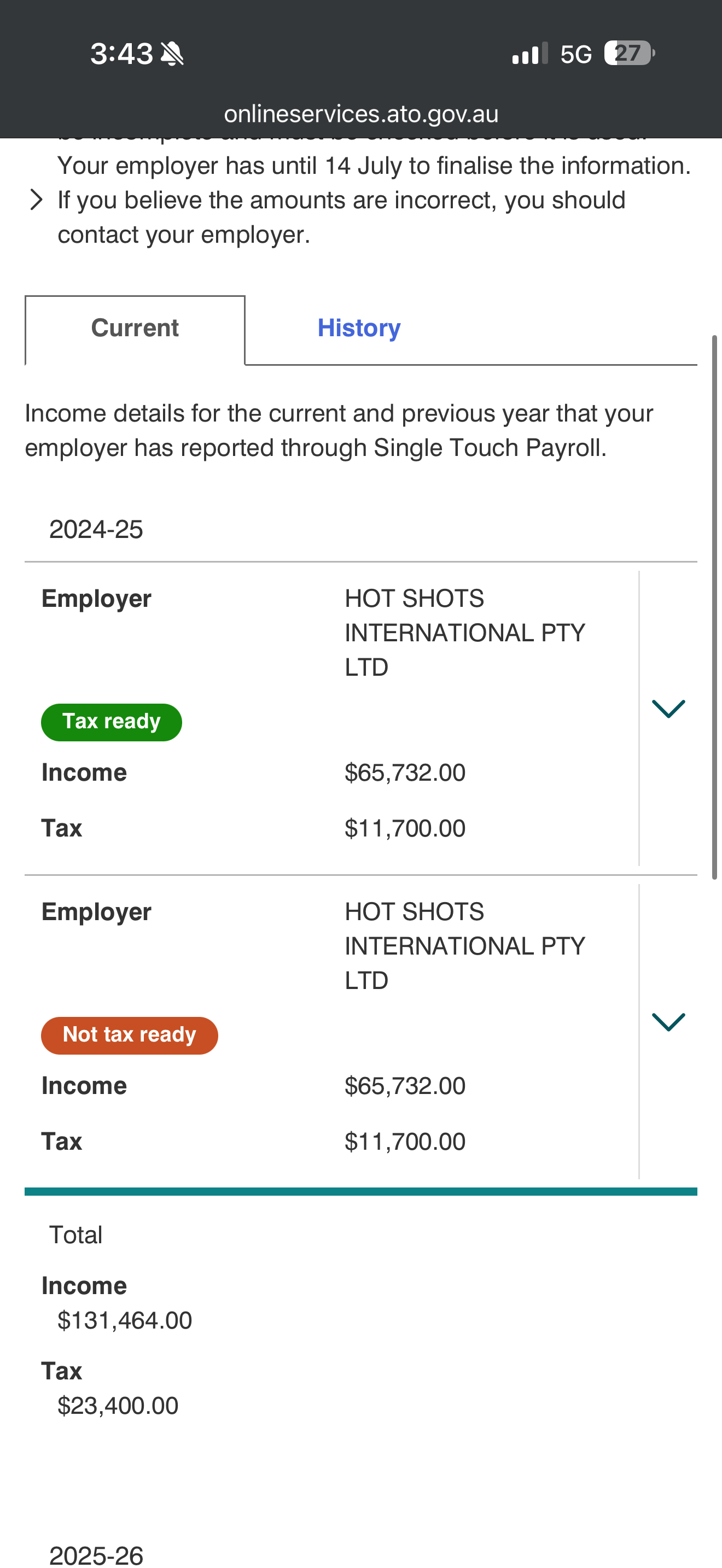
Hi Mike - I have a client for whom I provide a payroll only service via STP2. I also have their full data file offline (which includes their duplicated payroll information). Once I finalize their final fortnightly payroll for 25-26 on 26the June online I want to go online with their full data file. Please advise me on the correct way to do this as the ABN is already online, and in the past with other clients this has caused a duplication problem with the ATO where employees received issues on their MyGov portal (see attached). In the past I've advised them to ignore the "Not tax ready" and I want to prevent this from happening again, so please advise correct procedure.
(In turn has now created issues with ATO querying SGL amounts submitted)
- Mike_MYOB4 months agoCommunity Manager
Hi mistyben , the good news is that you are able to make this a clean transition at end of financial year.
You will need to run the existing online payroll to end of financial year and finalise income statements (payment summaries) *which you have indicated you will do anyway.
Then move your AccountRight file online and start processing payroll within the AccountRight browser.
One thing to note, is that you will need to manually update the employee records for accruals and other data in the AccountRight file when you move online
- mistyben4 months agoExperienced User
Hi Mike I think you may have misunderstood, I duplicate all the payroll entries on my clients offline company file which means all the accruals and other data is already there. How do I finalize the payroll in the offline data file before I upload it after finalizing the payroll online. I've had this issue in the past with other clients whose employees ended up with two reports on their MyGov data for exactly the same amount one saying "Tax ready" and exactly the same information saying "Not tax ready" - which ends up showing double the actual income and tax
Also I will still be using PC desktop version not the browser