Latest topics

AccountRight Single Sign-On EAP
We’re rolling out Early Access for Single Sign On (SSO) in AccountRight. We've selected a small group of users who will be participating in the early access program, if this is you, you’ll see a smoother sign in experience between the desktop and browser. Sign in once to move between desktop and browser Your email address is pre-filled on login screens Works with your preferred password manager Here are a few extra details about how it works: Single Sign On is only available for online files, so your file will need to be online to access this feature. Works with your default browser and password manager You can use password managers that are enabled in your default browser for both desktop and browser sign in. When you sign in from AccountRight, it will automatically open and use the default browser set on your computer. Supported browsers are Chrome, Firefox and Edge. Inactivity timeouts Inactivity timeouts still apply to browser session – you’ll be signed out after 30 minutes of inactivity. If you’re logged into both the AccountRight desktop and browser at the same time, each session operates independently. Being active in desktop doesn’t sign you out of the browser (and vice versa), and the inactivity timers for each session are separate. Single sign-out isn’t available yet. You’ll still need to sign out separately from both the desktop and the browser. If you have any feedback or questions, feel free to leave a comment below – we’d love to hear how the new sign in is working for you.1.8KViews3likes32CommentsNew in AI Business Insights (Beta): More features now available
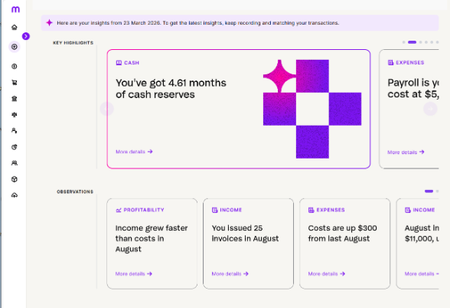
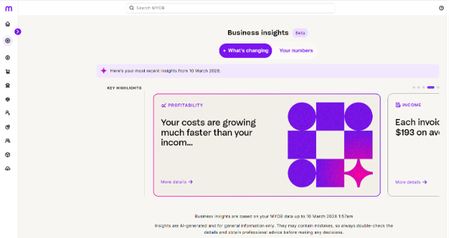
We’re excited to share that AI Business Insights (Beta) has now rolled out its more features giving you a snapshot of your business across cash, profit, income and expenses. What’s new Cash insights Get a simple view of how your cash position is tracking , so you can see how much you have on hand and how long it can cover your regular bills. You’ll also see how money is coming in from customers and going out to suppliers, helping you spot early signs of cash pressure before they turn into problems. These cash-focused insights sit alongside your existing Expenses, Income and Profitability themes, giving you a more complete view of your business in one place. Bite-sized observations Each time you generate AI Business Insights, you’ll now see a small set of headline insights supported by a series of short, bite-sized observations underneath. Insights highlight the key story in your numbers (for example, a change in your cash runway or a cashflow pattern worth paying attention to). Observations give quick supporting details (like which months, customers or payments are driving the change), written in a simple way for you to understand. This structure keeps the main takeaways clear while still giving you enough context to decide what to do next. How to try it Open AI Business Insights (Beta) from the purple banner on your MYOB Business dashboard. On the Business Insights page, generate your latest insights. Look for the Cash theme to see your cash-focused insights and trends. Scan the bite-sized observations under each insight for extra detail on what’s driving the change. Use your usual reports (like Profit and Loss or Balance Sheet) if you want to dig deeper into the underlying numbers. Share your feedback These updates are part of the ongoing AI Business Insights (Beta), so your feedback is important. Use the thumbs up / thumbs down controls in-product where available. Or reply in this community thread to let us know what’s working well and what could be clearer. Thanks!63Views1like0Comments
Welcome!
Hi everyone, and welcome to the AI Business Insights (Beta) Community. We’re thrilled to have you here! Why you’re here You have early access to AI Business Insights, so you can start seeing value sooner. Your experience matters. Before we launch AI Business Insights more broadly, we want to make sure it reflects the real needs of people who will regularly use it for their weekly or monthly business reviews. Your participation helps to: Understand what’s working well for you and what isn’t. Prioritise improvements that directly support your workflows. Share your ideas and expectations so we build what you truly need. Catch and resolve issues early, before they get in your way. Your voice directly shapes the future of AI Business Insights. How to participate This community is your space to help inform what we build next. To get the most out of the beta: Share feedback, ideas, and questions by replying in this thread. Tell us about your use cases and experiences so we understand how AI Business Insights fits into your day-to-day and how it can serve you better. Everything you share helps improve AI Business Insights not just for you, but all customers as we launch more broadly. Thank you Thank you for joining us on this journey. We’re excited to hear what you think! The AI Business Insights team66Views0likes0CommentsNew in AI Business Insights (Beta): Profit Insights and Smarter selectors in Your numbers
We’re excited to share that we have added in more features to AI Business Insights this month. What’s new Profit insights See how your profit and margins are trending over time, so you can tell if revenue is growing faster than costs, spot early signs of margin squeeze, and understand whether you’re moving closer to or further away from break-even. Your numbers: Date range selector for Income, Expenses and Profits Choose the period you want to look at directly in Your numbers, so you can select a custom date range that matters to your business for Income, Expenses and Profit. Report links that remember your time filters When you jump from Your numbers into your reports (like Profit and Loss), any time filters you’ve set are automatically applied. No need to reselect dates – your reports open already aligned with the dates you were just exploring. Accounting method selector (Cash or Accrual) Choose your preferred accounting method to view your numbers in cash or accrual, so you can see performance the way you (and your advisor) prefer and easily compare results across views. How to try it Open AI Business Insights (Beta) from the purple banner on your MYOB Business dashboard. Select Your numbers. Use the Date range selector to pick the period you want to review. Use the Accounting method selector to switch between Cash and Accrual. Scroll down to explore your charts and summaries. Click through to your usual reports (for example, Profit and Loss) — they’ll open with the same time filters and accounting method you’ve already chosen. Share your feedback These updates are part of the ongoing AI Business Insights (Beta), so your feedback is important. Use the thumbs up / thumbs down controls in-product where available. Or reply in this community thread to let us know what’s working well and what could be clearer. Thanks!54Views0likes0CommentsNew in AI Business Insights (Beta): Cash and Profit in Your numbers
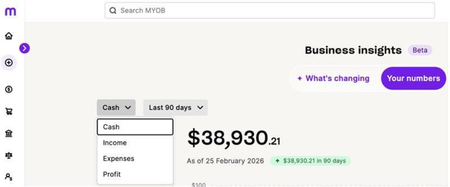
We’ve expanded AI Business Insights (Beta) so you can now see Cash and Profit alongside Income and Expenses in the Your numbers view. This gives you a clearer picture of how money is moving through your business and what you’re really keeping after costs. What’s new Cash view – Track how your cash position is changing over time so you can spot dips or improvements earlier. Profit view – See how your profit is trending, helping you understand if pricing, margins and operating costs are heading in the right direction. All inside Your numbers, with the same interactive charts you already use to compare periods and explore trends. How to try it Open AI Business Insights (Beta) from the purple banner on your MYOB Business dashboard. Select Your numbers Use the filters to choose Cash or Profit and a time period (eg Last Month) Scroll down to review the charts and summaries, and jump into your usual reports (like Profit and Loss) when you want to cross-check the detail. Share your feedback These Cash and Profit views are part of the ongoing AI Business Insights (Beta), so your feedback is important. Use the thumbs up / down controls in-product where available. Or reply in this community thread with what’s working well and what could be clearer. Thanks!149Views0likes2CommentsBeta update: More users, new features
Hi everyone, A quick update on our beta and what’s next. Over the last few weeks, a small group of customers have been using the new experience as part of their everyday work in MYOB Business. Based on these results, we’ve now released the new experience to more customers and will continue to expand access over the coming weeks. We’ve also added some new capabilities. In the “Your numbers” section, you can filter by income and can now see your highest spending customer and best selling product in the Sales Summary section. If you’re seeing the new experience in your account, we’d love your feedback. Use the in-product feedback option or share your thoughts in this thread so we can keep improving it. Thanks again to everyone who’s been part of the beta and early rollout!44Views0likes0CommentsFrequently asked questions
What is Beta? Beta is an early version of a new product or feature that you can try before its official release. It gives you access to new features and lets you share feedback to help shape the final experience. Beta is available only to selected eligible customers as we test specific features before a wider rollout. What’s required from me during beta? We encourage you to use Business Insights as part of your regular workflow. Participation is flexible and designed to deliver value for your business while helping us make the experience better for you and others. Share quick feedback to shape what we build next: Thumbs‑up or thumbs‑down on an insight Occasional short in‑product surveys Post in the private beta community forum What can I do with Business Insights? With Business Insights you can: See key insights and trends about your business performance at a glance. Explore your data using interactive charts and visualisations. Filter and drill in to understand what’s driving changes over time. Do I need to pay to use Business Insights? There’s currently no additional charge to MYOB subscribers to use Business Insights in beta. However, we reserve the right to change the terms and conditions of using Business Insights including the pricing. We will tell you in advance of any changes to pricing in accordance with our Terms of use. How is my data kept secure when using Business Insights? Your data stays within MYOB systems and infrastructure, and insights are generated in our environment under our AI, data, and privacy policies. Business Insights uses your existing ledger and connected bank feeds to create insights and charts; it does not change your records. Access follows your product permissions, so only authorised users can view or generate commentary. How is my data being used by the AI? Your data is used to generate insights for your business only, using your existing MYOB data to create insightful commentary and visuals in Business Insights. Your data is processed within MYOB systems under our AI, data, and privacy policies. How accurate are the AI suggestions? AI insights are generated from your own MYOB ledger and connected bank feeds. AI may generate incorrect or incomplete information, sometimes referred to as ‘hallucinations’.AI Accuracy also depends on how complete and up to date your records are. To improve results, make sure you keep your bank feeds connected and transactions coded. We have guardrails and evaluation measures in place to support the accuracy and safety of Business Insight outputs. If you have concerns about any suggestions that are shown, Business insights allows you to show the context of how the suggestion was made. This means you can see the data source beyond the suggestion, to understand what it was based on. If you still have concerns about a specific output, you can report it to us directly using the in-built thumbs-up/thumbs-down review function. Do I stay in control when using MYOB AI? Yes. You remain in control and can always override AI suggestions. Our AI is designed to support and accelerate your work, not to replace your judgement. Where AI makes recommendations (for example, coding transactions or business insights), you can review, change or ignore them. We recommend that you or a trusted advisor reviews the outputs before making any decisions. Who is accountable for MYOB’s AI features? MYOB is accountable for how our AI systems are designed, developed and operated. This includes how they’re tested, monitored, updated and supported over time in line with the Australian Government’s Guidance for AI Adoption. You, as the customer, remain responsible for how you choose to use MYOB products and for any business, financial, tax or employment decisions you make based on AI suggestions. We recommend you engage a trusted advisor to ensure AI suggestions are validated. Will this change how I currently use the product? No, Business Insights keeps your current features and workflows the same, while adding insights to help you spot trends and understand what’s driving performance. Where can I get the best experience of Business Insights? For the best experience, we suggest using a desktop or laptop browser. You’ll have full access to all functionality there. You can still view the feature on a mobile browser, but some parts may display differently or be more limited. What role and permission do I need to use Business Insights? You will need the Administrator or Accountant/Bookkeeper role to access all functionality of Business Insights. You can view your access here - Manage users How can I share feedback? In the beta community forum where you can ask questions, report issues and suggest ideas Thumbs‑up or thumbs‑down on any insight, with a short reason to help us improve clarity, accuracy, and relevance. Usual support channels for reporting bugs or problems you run into. How do I get support during Beta? You can access support during the Beta. using the usual methods. Our customer experience team are trained to assist with enquiries relating to the Beta.115Views0likes0Comments