microheatExperienced Cover UserJoined 10 years ago28 Posts3 LikesLikes received1 SolutionView All Badges
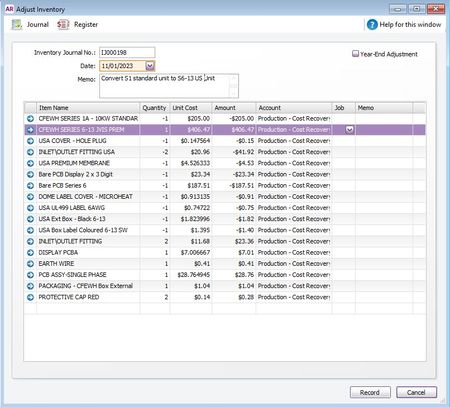
ContributionsMost RecentMost LikesSolutionsWhy the Payables/Receivables with Tax report is out of balance, but the Reconciliations report is not. Our external accountant has highlighted that when we run the 'accounts receivable with tax' reconiliation report and also the 'accounts payable with tax' reconciliation report at the end of the year, then both reports are showing an out of balance amount and yet both ledgers correctly reconcile to the reconciliations report without any variances. To be honest, I have never used these particular reconciliation reports before so was quite alarmed that there were variances showing as I have never been aware of any reconciliation issues previously. On further review, I see that these are to do with our Foreign Currency Suppliers and Customers - and more specifically the currency gains and losses on any deposits that have been made against invoices within these particular accounts. I have no idea why this is occurring and whether there is a set up issue that I am unaware of when dealing with foreign transactions that is affecting this report. I have also just looked on this community board for advice and see that a similar question was raised back in 2020 without any real solution as to what needs to be done. Am I doing something wrong to create this variance or is this a known software issue affecting foreign currency gains and losses? I am at a loss how one report can balance and a related report does not. Any advice would be gratefully appreciated. MH Re: Can't export reports to Excel Thanks Komal for the reply. I have completed an office repair and even uninstalled and reinstalled both MYOB and MS365 with no lock. I also did the Re-Register DLL files and Check/Fix Registry Keys options and everything is correctly pointing to version 9.6 and appearing where it should be as per the instructions. I am confident that I have the same versions of both MYOB and MS365 on both my home and work computers but for some reason my home computer tries to process my excel export request but nothing appears. All other export options work except Excel. I even tried a separate notebook and this worked OK so it must something different with my home computer set up? I'm wondering if this could be a processor issue or RAM issue although saying that I dont have any other problems on this machine with anything else and there is certainly no warning messages. Is there anything else that you can suggest to try. Many thanks MH Can't export reports to Excel Greetings, I don't normally have an issue with exporting reports to excel on my work computer but when I am at home on my home computer I am unable to do this. As far as I am concerned both run windows 10, and Excel 365 which are all up to date. Initially I had the Interface not registered (Exception from HRESULT: 0x80040155) error which I have fixed using community help from previous other posts. However, since I have done this I now have a System.IO.FileNotFoundException: Cannot find this file. Verify the path and file name are correct error which I cannot fix. Not sure what path and file name they are on about? Anyone having the same issues or know how to fix this so that I can export reports to Excel from home? All of the other export options such as PDF, CSV etc are all working - except the one that I really need. I have reinstalled both MYOB and MSOffice 365 with no luck. Many Thanks MH Re: Inventory - amending Auto-build items Thanks again Mike for taking the trouble to reply. I have just tried this method with a build quantity of one and I can see that it works well. My only gripe is where there are different build quantity numbers then you would have to manually enter each line to represent the number of items in that particular build. It works great if you are building one unit at a time and/or there is just one of each item in that build but where these build quantities vary or there are multiples of the same item in the build then I feel this becomes more prone to errors building up the import journal on a manual basis. Also, if item component prices vary from purchase to purchase then this will also have a factor ensuring that any manual upload correctly reflects these changes between builds. Obsviously, this is a shortcoming in the MYOB package for those of us who need to use the inventory system more extensively, and I appreciate the workaround solutions you have given me to get me over this particular hurdle, but I can only hope that MYOB someday extends this functionality for all users in future versions. Cheers Re: Inventory - amending Auto-build items Many thanks Mike for taking the time to reply. Whilst I gratefully acknowledge that this method works a treat and does exactly what I require (see below to convert x1 unit), I wonder if you know whether there is a way to automate this build rather than via a manual Inventory Adjustment? The issue I have is that these will be made in batches and invoiced out at different times, and there may also be further modifications from one unit to another so it would be nice to automate these processes if possible, so that it becomes a simple task of entering in a build quantity and have this update the relevant inventory codes automatically. I assume its the negative adjustments which are causing the issues as I need to put items back into stock? Any further comments/thoughts would be gratefully appreciated. Kind Regards David MH Inventory - amending Auto-build items Hello, We hold numerous stock items and typically build 5 models of a similar unit from them. Over the years we have modified these units with newer parts/modifications as they become available. Recently we were able to buy back a purchase of an older model unit (model 1) from a stockist for us to adapt to one of our other units (model 5) which is in demand and which we are struggling to obtain certain parts for. I have entered the purchase of these older units back into stock but I now want to adapt the build to add the different parts required for the new model and most importantly to deduct the parts that are not required. These deductions fall into 2 categories... a) parts which we can return to stock and b) parts which can no longer be used and will be discarded. I can see from the set up of the autobuild option for the Model 5 unit that I can bring the entire older model unit (model 1) into the build and add the newer items onto this - but I am unsure how I can deduct the components within this model 1 build that I want to change as MYOB wont let me post negative item values that are included in this build. Does anyone have any ideas as to the best approach of how I would go about building our model 5 units in this way? Regards MH SolvedRe: Purchase Refund for two credits Many thanks Tracey for taking the time to reply and provide a solution. The workaround seems obvious now that you have explained it - but at the time I couldn't see the wood for the trees!! Thanks Again David Purchase Refund for two credits Does anyone know if you can allocated a refund from a supplier against two spearate credits in one process? We currently have a supplier who has issued 2 separate credit/adj notes over different months but has decided to refund us with one total repayment to our bank. As far as I can see, MYOB wont allow me to select both credit items to process the repayment in a similar way that we have the option to 'pay all' when selecting a specific suppliers invoices to pay. I appreciate that I can record this as two separate transactions but just wondered if anyone knows a way that these can be combined and allocated against the one refund? Thanks SolvedRe: Purchase Orders - Orders received over several invoices Many thanks Lynn for taking the time to reply. So simple when you know the answer but had me stumped for a while. Thanks again. Purchase Orders - Orders received over several invoices I have a situation where I have issued a purchase order for two new lines of stock from the same supplier and paid this in advance - thus creating a fully paid PO. Unbeknown at that time the supplier delivered the items separately and issued two separate invoices for these items which came in less than the Proforma Invoice on which the PO was raised. How do I convert the order into a bill for the two separate invoices? As far as I can see I can only convert the PO once regardless of the number of items listed on the Purchase order. I would of thought that where goods/items are delivered in mutiple transactions due to supplier/production constraints that this would be a standard requirement. I have tried converting the order into a bill against one supplier invoice and deleting the item line not applicable to that invoice but this effectively assigned the entire PO against that first invoice leaving nothing for the second invoice to be assigned to. There is also the issue that there will be a credit balance left on the account which would be still outstanding on the PO after the two invoices are processed. This is giving me a major headache so any help would be gratefully received.... Solved