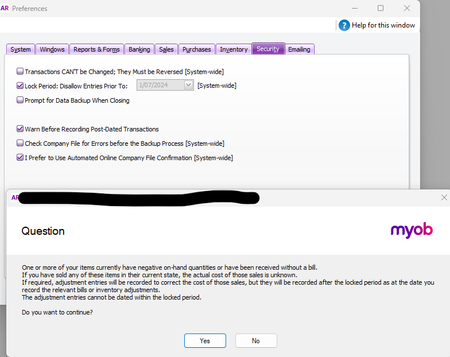
ContributionsMost RecentMost LikesSolutionsDIFFERENCE BETWEEN ACCOUNT RIGHT AND BROWSER VERSION ON P&L CASH REPORT When I run a P&L Cash report in Account Right on Desktop I get very different COS and GP figures compared to the same report run in the Browser version. Markedly different! There doesn't seem to be a difference between the two versions when I run an accrual report. This is very concerning as the accountant only uses the Browser and I mostly use the Desktop. Each transaction seems to be the same, but there is a massive difference in reporting. Surely we can all agree that it is extremely important that both versions produce the same information. Can someone please explain why this is, and which version we should be relying on. Thank you Re: Negative on-hand Inventory quantities or items received without a bill Hi Princess - when I click "Yes" the period gets locked but then each time I click on Security the same message comes up. I always tick "Yes" to continue and everything seems to be OK. I have made the adjustments on the inventory value and can't see any issue with any of the items. On the Purchase Register there is one order where stock has been received without the order being converted to a bill but the order is dated 25th July, which is after the period I am locking. Thank you Re: Negative on-hand Inventory quantities or items received without a bill Hi Princess Thank you for applying the script, however, I am still getting the warning message when I go to lock a period. See screenshot below Re: Negative on-hand Inventory quantities or items received without a bill Hi - I have created an adjustment journal dated 30th June for the items with the negative value and the report is no longer showing any negative values. However, when I go to lock the period up to 30th June, I am still getting the same message. Will it impact the file in any way? If not, I guess I may just have to live with it. Re: Negative on-hand Inventory quantities or items received without a bill OK I will try that. Thank you Genreve. Negative on-hand Inventory quantities or items received without a bill Hi - when I try to lock a period (in this case - 1st July 2024) I am getting the message screenshotted on the attached. I can see this has been asked a few times before in this forum and I have tried the suggestions that have been provided. I have run numerous reports and cannot see any negative on-hand items. There are however, 2 with an negative on-hand value of just -$3 and 1 with a -$.01 These have been screenshotted on the attached. I have also looked at the Purchase Register to see if stock on an order has been received. This is the case for an order dated 25th July but I am trying to lock the period prior to 1st July. Would this be causing the issue? A screen shot is included on the attachment. The Order that has been received is a completely different inventory item to those with the negative value. How do I find the offending inventory item and then how do I fix it? Thank you Re: Moving inventory to a different location Thanks Mike - I had been thinking of setting up a Supplier Card for the interstate location. Kind regards Re: Moving inventory to a different location Thanks for that Gavin - that's a shame that there is no way to record movement between locations! Moving inventory to a different location I am looking for suggestions on how to manage Inventory in a second (physical) location. My client holds stock in Melbourne. They are about to send some of this stock to a warehouse in Adelaide which will be sold to South Australian customers only. I am trying to work out the best way to manage this. Here are some thoughts I had - I would be interested to hear other peoples suggestions. - should I set up a new inventory item for the wine that is specifically for Adelaide and then do an inventory journal to reflect the movement? - I could use the categories function when selling the items which would keep a clear record of the SA sales but I don't think this will help with Inventory - Is there an option to hold Inventory at two different locations within MYOB Account Right? Maybe I should just stick to a spreadsheet!? Any suggestions gratefully received. Thank you!