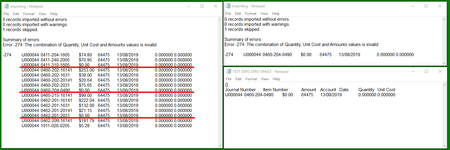
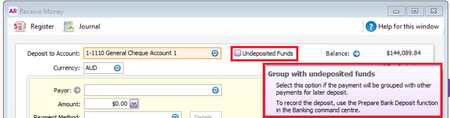
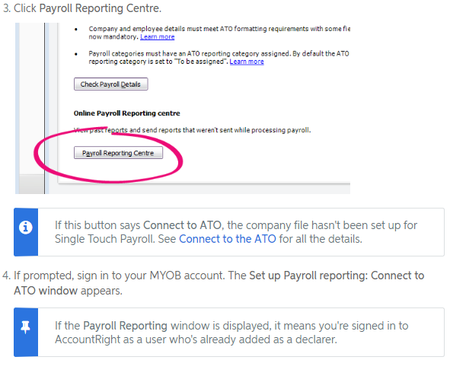
ContributionsMost RecentMost LikesSolutionsRe: Software ID for 2 MYOB Files Hello Jakertie_KJR Broadly speaking, your Software ID will be generated by MYOB software based on a variety of identifiers which vary depending if lodging as a business, or as an agent. This is a unique number in the sense that it is applicable for identification by the ATO, and you notify the ATO of this number. For businesses, this is based off the file, for agents, this is based on other information including ABN Re: Editing invoice template Hello brasstacks Thanks for your post, and apologies for the delay in responding to you. I have found this post customised form on the community forums that may be applicable to your situation. It involves permissions access and sounds like it could be something that may be at play for your issue too. Please feel free to have a read of it and see if it helps. Re: Error -274: The combination of Quantity, Unit Cost and Amounts values is invalid. Hello Domcar Thanks for your post. After testing with your examples I was able to replicate your error. AccountRight will flag this error when you are attempting to enter a journal adjustment with zero$ Amount Quantity and Unit cost. By contrast if these fields have a non-zero amount it should allow this entry. The conflict is that it is an inventory adjustment that has no adjustment made. While you can EXPORT these from AccountRight, it does not allow you to IMPORT these void entries. You can test this by creating a zero adjustment and exporting that entry, and attempt to import it. Removing these entries (see file attached) I was able to successfully import the data. Note that you may need to have qty on hand first, or you will throw a different error. If this has helped understand the issue better kindly consider marking this post as a solution to help others that may be looking for answers. Re: GST gremlin Hello Lani ( LaniOUP ) You may need to check the audit report to see the history of the transaction in the Journal Security Audit Report to see if anything had been changed. Hope that works in bringing up some answers for you. Re: GST gremlin Hello Lani ( LaniOUP ) Thank you for that additional information, much appreciated. I was looking around the forums for any clues on what could be causing this and wanted to see if the situation in this post is applicable at all for you or point you to areas that you might be able to investigate? SOLVED: GST Disappearing. It is odd that the feed amounts are not the same. I may need to consult with some of my colleagues as to what this may indicate. Re: GST gremlin Hello Lani ( LaniOUP ) Thank you for bringing your enquiry to the forums. Are you able to provide a bit more information on any patterns or certain situations where you have noticed this please? You mention that PDFs show the correct statuses, and would be keen to know if this is the case for all PDFs, or if there are certain invoices or all invoices where you are seeing this. Any additional clarification would be greatly appreciated to help try and figure out what is happening. Re: Undeposited Funds / Prepare Bank Deposits Hello 121vk Thank you for bringing your query to the community forums. I hope you will find them and the AccountRight Support pages to be a fantastic resource. I have found these two help articles that may be of use to you. Please have a read of them and see if they are of use to you in dealing with Undeposited Funds and Preparing bank Deposits. Preparing a bank deposit About undeposited funds If I have pointed you to helpful information, kindly consider marking this post as a solution so that others may find answers easier. Re: Deleting an incorrect transaction that has gone into reconciliation Hello LyndaL2 Thank you for your post. I hope you will find the community forums to be a great place of shared information and knowledge. This article from our help pages outlines ways to deal with transactions that need to be deleted after reconciling using AccountEdge Deleting or reversing a reconciled transaction In short, you should be able to simply open the transaction and delete it from the relevant screen, however you may need to re-do your reconciliation for the period that that transaction falls in. If this has helped in pointing you to useful information I ask that you mark this post as a solution so that others may find answers easier. Re: Software ID for 2 MYOB Files Hello Romu Thank you for your post. As the original post applies to what sort of ID should be used for multiple company files, your situation is a little bit different. In Adding a declarer for STP (clickable link within the above Connect to ATO link) you may want to confirm if you are signed in with the appropriate employee if setting up for the first time per employee. (see image below for exerpt from help article) If they have been set up already you can check in What happens after I've set up Single Touch Payroll? Hope that helps you with your issue and kindly consider leaving a kudos if this has solved your problems with STP reporting. Re: Email select invoice numbers Hello Trevor3 Thanks for your post and welcome to the MYOB Community Forums. I hope you will find it to be a fantastic resource and place of information and collective knowledge. I'm sorry to hear that you have not been able to batch email your invoices in a manner that gathers all the requested items you want when using Advanced batch filters To help us understand what might be happening better, are you able to check if any of the statuses of the desired invoices are not set as "to be emailed"? You can see examples of what I mean in Sending forms in a batch as well as this post (type discussed is remittance, but please note comments re: status) For invoices, I would be checking the "Sale Status" dropdown box in the advanced filters as well. It would also be useful to know if there are invoices before filtering in that range that are showing before applying the filter. Let me know how you go with the above information, and it has helped determine the cause, kindly mark this post as a solution to help others find appropriate assistance, or if not, please feel free to elaborate further about the circumstances of your issue.