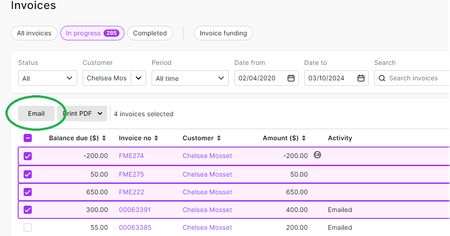
ContributionsMost RecentMost LikesSolutionsRe: How to create bulk invoices Hello JEK, Welcome & great to have you try our product. Once you have applied the correct date range, the Bulk email capability can be accessed as soon as you start to select your invoices by clicking on the checkbox beside them. You should see the "Email" button appear for sending bulk email to all the selected invoices/subs. Here is the link to the Help article in case you need more info: Email, SMS or print sales