Will_HMYOB ModeratorJoined 13 years ago2766 Posts1116 LikesLikes received305 SolutionsView All Badges
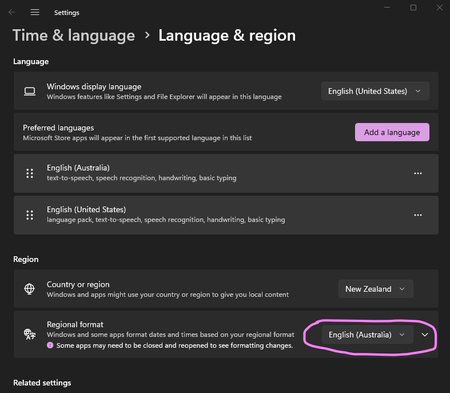
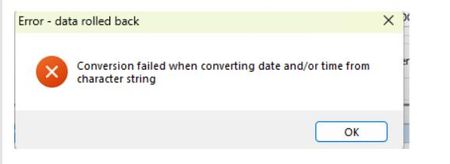
ContributionsMost RecentMost LikesSolutionsRe: Clarification on SMS - 2FA requirements Quick clarification for any Enterprise Division customers reading this. Requirement for SMS to be an available authorization method does not apply to MYOB Acumatica or MYOB Exo Business users. With that said, as someone who has to worry about customer account security, I encourage everyone to use App Based authenticators where possible, as these are most secure. In terms of cyber security threats, App authenticators are safest, SMS is technically easier to intercept, and Email is the least preferable option. The reason is that often if a bad actor has access to your computer they also have access to your emails, but they probably don't have access to your phone. Coupled with it being relatively easy to breach email accounts. Re: NZ Annual leave and averaging Hi Bullswool , MYOB Acumatica community support has been moved to the MYOB boards in Acumatica community forum, to make sure users get answers more relevant to their product. You can reach these boards by using the below link: https://community.acumatica.com/myob-user-discussions-299 This post is read only, so if you need further support please create a new post in the Acumatica board with your specific questions. VERY BRIEFLY: Employment NZ have some discussion of the ACT in their guidance: https://www.employment.govt.nz/leave-and-holidays/annual-holidays/managing-annual-holidays#scroll-to-4 More depth in their detailed guide: https://www.employment.govt.nz/assets/uploads/documents/leave-and-holidays/holidays-act-2003-guidance.pdf Acumatica Payroll allows for calculation of all of the Averaged Daily/Weekly pay methods: Average Daily Pay (ADP), Relevant Daily Pay (RDP) and Average Weekly Earnings (AWE). These are also compared to the Ordinary Weekly Pays: Ordinary Weekly Pay Standard 8(1) (aka Rate Method 'OWP 8.1') Ordinary Weekly Pay 4 Week Av. ($) (aka Rate Method 'OWP 8.2') Ordinary Weekly Pay Agreed Rate ($) (aka Rate Method 'OWP 8.3') These also interact with the Definition of Week settings. There's some fairly extensive discussion in the online help related to this in various places; https://help.myob.com.au/advanced/Docs/Published/UserGuide/MP_PP_40_45.html Because Acumatica Payroll is configurable for a range of businesses, you can set employees to use the rates appropriate for them at your business. If you need help deciding which of the various calculations are appropriate for your business, please refer to Employment New Zealand (The part of MBIE that used to be the Department of Labour), Or contact your payroll advisor/implementing consultant for further advice. Re: Bank Feeds Delay & Old Transactions Appearing Hi Romina_S / DmitryDevineCo , As you've posted in the Customer area of the forum, rather than in the Exo Business Partner area, you've received a response from our MYOB Business/MYOB AccountRight team. There's a post relating specifically to Exo Business partners here: Bank Feeds query - old transactions | MYOB Community We're in process of updating this article which has End User instructions for Hiding Bank Feed transactions to include some further information : MYOB Exo Business Help Centre - Duplicate bank feed transactions If you are an end user of Exo Business, not a channel partner, please refer to the help center link above. Re: Exo Business - Conversion failed when converting date and/or time from character string. - September dates - New Zealand - Windows 11 & Windows Server 2025 Full instructions for changing Windows Language settings are here: Change the Windows regional settings to modify the appearance of some data types in Access databases. You can change your Windows language/regional format settings at: Go to Home and search for "Region settings" In the Region Settings screen, change "Regional format" to "English (Australia) rather than "English (New Zealand)" or "Recommended" Exo Business - Conversion failed when converting date and/or time from character string. - September dates - New Zealand - Windows 11 & Windows Server 2025 We're aware that New Zealand users of Exo Business may experience issues with their software when dealing with September dates. These are most obvious in the Sales Order screen where attempting to save a sales order with a September date will generate the message: Conversion failed when converting date and/or time from character string This is due to a change to Windows Regional Date Formatting, and how it manages the September short month name. Workaround: Change regional format to "Australia" Re: EXO Demo database SQL backup Hi Phocas , I would recommend getting your customer's implementation partner to send you out a copy matching to the version in use at their customer. There can be some pretty big changes between schema versions over time (Notably, big changes to unicode handling in the 2020 release), and as an on-premise based product a lot of customers can be using versions that are quite a lot older than the latest. Re: Adding new Custom Table Schema with MySQL Hi MadelCorvera, Development should definitely be done against MySQL databases in order to keep functionality as close as possible to production MYOB Acumatica instances. Can you confirm: What version of MySQL have you got installed? What version of MYOB Acumatica have you got installed? What screen(s) are you seeing the above behavior in? What error are you actually receiving and when? Please note: I can't offer full support via this channel, full assistance should be via your implementation/support partner's usual channels. Re: How to Create new table and a CRUD screen Hi amhernandeza You can find a few youtube tutorials online for that kind of question, but really if you want to create that kind of screen I recommend doing the full Acumatica developer training, it's available free at: https://www.acumatica.com/acumatica-developer-training/development/ Re: can someone assist , we are struggling to overwrite bom pricing that is set in exo via api Hi Peterdms , You've mentioned EXO, so I'm guessing you're an Exo Business customer? You'll be best off taking this to your implementation partner if so, as Exo is so customizable I can't promise a definitive explanation of how your system works. There are various pricing procedures and methods interacting in Exo, so you really need someone with knowledge of your exact environment to get a full answer. Re: Custom Form Allow Access to People User Licence Hi mauritz , Almost all licensing restrictions are defined by the namespace the report is sitting in. I'd generally try changing the ScreenID for the report to something closer to the Payroll Space, eg: MPXX1001 Where XX is standing in for your chosen development house ID.