🟣 CA FAQ — My client has cancelled their MYOB Business or AccountRight file, why can I no longer access it in CA?
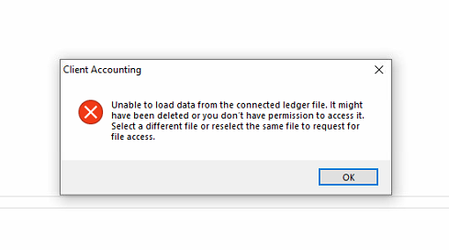
If an MYOB Business or AccountRight file configured in AE/AO has been cancelled, you will likely encounter an error when trying to open the Client Accounting tab, similar to the screenshot below: This is because the ledger data is stored in the underlying online file, not within AE/AO itself. You will be unable to open this client in Client Accounting unless it is reconfigured (for example, to an AE or AO Ledger), or the file is temporarily reinstated. To reconfigure, please contact the Client Accounting team via support channels, and we can assist you with this. To reinstate the file, the Owner of the subscription will need to contact our MYOB Business or AccountRight teams. Please note that there may be limitations on whether this can be done, dependent on how long ago it was cancelled. 🟣 Bonus: To help prevent issues like this, we recommend that practices ask clients to notify them if they plan to cancel a file subscription. Scott Client Accounting MYOB72Views0likes0Comments🟣 CA FAQ — I have created a new period in AE/AO (MYOB Business file), why do I have an out-of-balance?
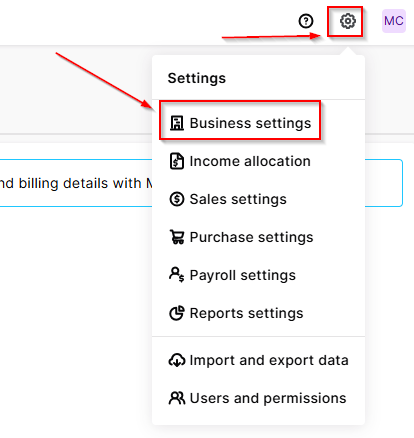
If you have a client in AE/AO configured to an MYOB Business file, you may notice that after creating a new workpaper period, there is an out-of-balance in the Balance sheet (even if you have chosen to roll forward in the Trial balance / Workpapers window). This is because Client Accounting does not automatically roll forward the underlying MYOB Business ledger — this will need to be done as a separate step in the file itself. To resolve this, open your browser and navigate to https://app.myob.com/ Open the relevant client file Navigate to Settings > Business settings > Financial year Select Start new financial year Jump back into AE/AO Open the current workpaper period Under the Tasks menu, select Refresh ledger balances This should resolve the out-of-balance, and you're good to go! ☑️ Scott Client Accounting MYOB53Views0likes0Comments