🟣 CA FAQ — Why am I getting a "access denied" message when opening an AccountRight file in AE/AO?
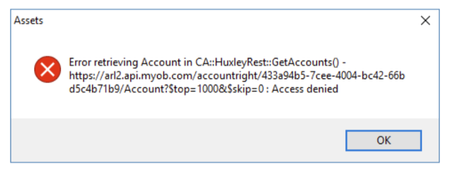
If you use AE/AO, you may encounter an "access denied" error when trying to open an AccountRight file in Client Accounting, similar to the message below: This is often due to the default Administrator user in the AccountRight file being linked to a my.MYOB account or set up with a password. This Administrator account is used by AE/AO in the background to connect to the configured files. If there is a password or email linked to it, Client Accounting will not be able to authenticate, and this throws up the error message. ⛔ You can confirm this by opening the file in desktop AccountRight and checking the following: Create an online MYOB login for this user should be unticked ☐ The Email field should be blank If the Administrator user has been linked to an email address/MYOB login, you will need to create a new user account in desktop AccountRight. You can name this account something like "AO Admin". Leave the above fields blank/unchecked and ensure the user account has administrator privileges selected. Do not enter a password. ❌ Once this new account has been created, you will need to go back into AE/AO and run the CAConfig script to remove the current configuration settings: Running an SQL script in AE/AO From there you will be able to reconfigure, entering the AO Admin (in this case) account in the Username field, and ensure you leave the password blank. Please reach out to the Client Accounting team if you have any questions. Scott Client Accounting MYOB100Views0likes0Comments