Add multiple payments to one invoice at one time!!!
Especially now that payments from Support at Home payers comes in separate payments for each service in the one shift, I can get 8 or 9 small payments for the one shift. To have to individually add each tiny payment to the invoice is sooooooo frustrating! Why can’t the select function then work to match multiple payments at the one time to the same invoice?60Views0likes1Comment
user selectable default bank account for spend money transactions
It would be great to be able to change the default bank account when posting a new spend money transaction, either directly or via Uploads. Everytime we post a new spend money, the bank account reverts back to the default bank account, whereas most of our spend money transactions are actually from a credit card. Either to specify a different default account for different types of bank transactions, or have the last used account for the previous bank transaction be remembered for the next transaction. I know a similar idea was floated last year, I'm hoping that more users will engage this time round.66Views0likes1Comment
Filtering Recurring Transactions in Business Pro
In MYOB Business Pro, in the Recurring Transactions drop down box under Banking - Spend and Receive Money, I wish you could start typing the name of the recurring transaction that you are looking for and have it come up with only the recurring transactions that contain those words (like it does in AccountRight Plus) instead of having to scroll down the long list every time.....62Views0likes1Comment
Bring back the old bank transactions screen
How is it possible that MYOB has decided the new bank transactions screen is an improvement over the old one? Who tested and approved it? Just some of the issues... The consolidation of the withdrawal and deposit column into a single column makes it difficult to read the amounts. It was so much clearer in two columns. The use of negative sign for withdrawals in the single column causes great confusion when you click to dissect and there are no signs on the amounts in the dissection screen. If you need to dissect a tranaction containing expenses and rebates or credits, there is confusion as to which way the signs need to go now. Transactions should not be automatically hidden when they are "coded". AI cannot be presumed to automatically get coding correct. People arent checking the allocations now to see if AI or historical suggestions got it right - and a large portion of the time automated the coding is not correct! Hiding it away doesnt give coders the chance to easily review it like the previous approval process did. The quality of coded data is going to decline substantially. The old way of approving (or not) suggested coding was much better. It really doesnt take any time to click a tick to approve! Similarly if the suggested coding is wrong, the user can fix it then the AI can learn and make better suggestions. There is no chance of it learning now that MYOB thinks the AI is smarter than the user and automatically accepts the AI suggestion and hides it away! Sorting by category no longer works The page spacing is messed up, and there is lots of wasted space (where a second amount column could go for example) Please change the screen back to how it was. There is no way this new version can be considered an improvement. It baffles the mind as to how this got through any sort of focus group or feedback testing. The old screen was much more practical and readable, and provided a much better coding outcome than this terrible new format. It makes it very difficult for those in practice to keep recommending MYOB Business to clients as a good accounting software package, when you can no longer have confidence in how the basic coding process works, and that the quality of the coding is going to decline.160Views5likes2Comments
Remove New Restriction-Allow editing of Category & GST on reconciled transactions without undoing reconciliation
The current restriction preventing changes to Category and GST coding on reconciled bank transactions is creating unnecessary inefficiencies in standard bookkeeping workflows. In practice, bank reconciliations are often completed by one team member, with quarterly BAS reviews performed later by another (e.g. accountant or senior bookkeeper). During review, it is common and necessary to correct coding errors such as misallocated expense accounts or incorrect GST treatment. Currently, MYOB requires users to undo bank reconciliations to make these corrections, which: Forces users to undo potentially multiple reconciliation periods Requires full re-reconciliation of accounts Introduces risk of errors and duplication of work Adds significant time and cost to routine review processes MYOB help documentation confirms that manual reconciliations must be undone to edit transactions , and community responses consistently recommend undoing and redoing reconciliations or using workaround journals — neither of which is efficient for high-volume or multi-user environments. This is a step backward from prior workflows and does not align with real-world bookkeeping practices. Suggested improvement Allow users to: Edit Category and GST code only on reconciled transactions Without requiring reconciliation to be undone While maintaining reconciliation integrity (e.g. no impact on bank balance) This would: Support proper review and BAS accuracy Reduce unnecessary rework Improve efficiency for accounting firms and multi-user files187Views4likes4Comments
Bank feeds data matching needs work
Whilst the new updates to data matching in bank feeds has been great, there are a couple of annoying details that need tweaking ...please! 1. This payment literally has the invoice number in the transaction, yet I get "27 suggestions" and then it is not even in the initial list when you click on suggestions - have to click into 'more suggestions" to find and match. 2. Data matching working here, but the full invoice number is not shown. We need to see the full invoice number at this view, please.112Views1like1Comment
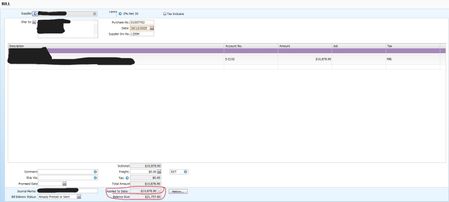
Negative Amounts in “Applied to Date” After Deleting Payments, System Design Issue?
We recently encountered a couple of cases where we needed to delete both customer payments and supplier payments. In both scenarios, the payments had already been approved and applied to their respective invoices and bills. After deleting these payment transactions, we expected all related payment information to be fully removed. However, the system instead automatically generated negative amounts in the “Applied to Date” field, which increased the outstanding balance. We have reviewed all related journals and ledgers but cannot find any transactions or entries that explain or trace back to these negative “Applied to Date” amounts. We have also tried to delete both transactions, but failed as system popped out warnings saying"cannot delete transactions that previously applied payment". Has anyone experienced this before? What could be causing this behaviour, and how can we correct or remove these negative applied amounts? Any guidance or recommended steps would be greatly appreciated.Yesterday button on Bank Reconciliation
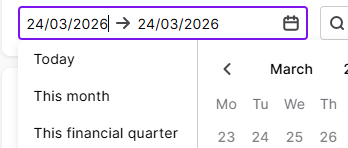
We are large enough that we need to reconcile our bank accounts daily. I am trialling using this function in the browser rather than the desktop version. The software seems to default to a previous quarter. I just want to see yesterday's transactions. There is a button for today. Could there not be a button for yesterday? Otherwise I have to muck around clearing out date ranges.109Views2likes2Comments