Here's a novel idea - FIX ALL THE BUGS. And in particular, recurring transaction reminder alert user selection
When trying to edit a recurring transaction, the user to receive the reminder alert changes to whoever is editing the schedule. Why??? From what I can see, it was a known issue back in 2021. I shouldn't have to reselect it each time, and sometimes I might not even know who it's supposed to be! As other users have reported in archived/closed posts, there's no way to report who receives alerts, so as soon as I open the edit schedule window, I can no longer see who should be receiving the alerts because the system fills in my name... (If there is a way to do it, I haven't found it, and it would be useless after I've accidentally saved it with my name anyway.) There should be a whole other section (if not in the forum, then directly to MYOB) for reporting bugs - these are not 'ideas'. They are things that have broken that your developers and decision-makers can't be bothered addressing.1.4KViews7likes12Comments
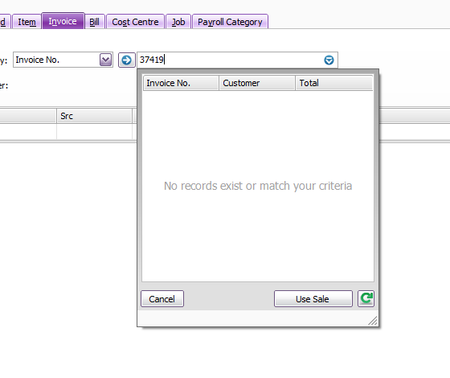
Payroll reporting not working
Was preparing wages and the pop-up window for the declaration is showing the url (https://cdn-stp.payroll.prod.myob.com) can not be reached... No systems are showing as down on the web. Is anyone else having this same issue? Yes, I have cleared the cache.999Views5likes32Comments
Drag & Drop Not Working - in "Bills Attachments" only
Desktop App Works fine when drag and dropping into the "In Tray" from email current MS365 When in a current Bill (or Sale - we are part of the trial for Sales, Journal etc attachments) Drag a pdf (from email) and screen greys out. Have to "close" at bottom to get out (as "Add Documents" greys out too (only after trying to drag and drop). If you close out and go back in and click "Add Documents" you can attach from hard drive without an issue. If the same process is done "In Tray" there's no issue, works fine, so it appears to be an AccountRight issue not a limitation of MS365 or Windows 11. This has been an issue since we upgraded in August.299Views0likes5CommentsWarning Boxes Don't Disappear
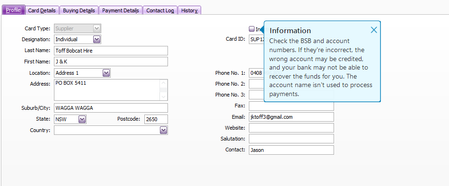
AR Plus Desktop Warning/Info boxes do not cancel when page or tab is changed When a warning box appears it does not go until X is clicked. This one below is a warning from the "Payment Details" tab It is still actually active over the top of this webpage!199Views2likes3CommentsTax code error on Recurring Transaction
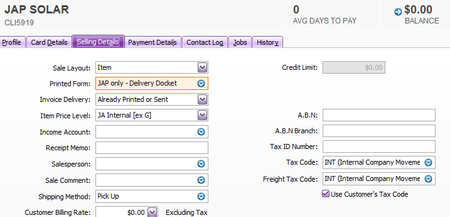
AR Desktop - Using a Recurring Transaction. Default tax code in Customer Card is set to "INT" and "Use Customer's Tax Code" When an item is changed it reverts back to the tax code in the item and not the customer card. Change the item and the tax code changes. It should stay as INT not GST. I tested after recording on the very next line. The tax code stays INT as expected. This issue appears to happen only before the Recurring Transaction is initially recorded.158Views0likes3CommentsRecurring for Sales - Address field changes back to default on customer card
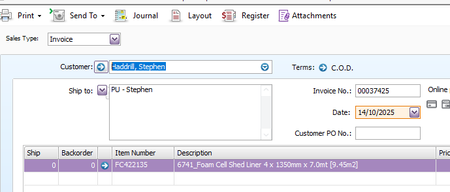
AR Desktop We have recently moved from AR Enterprise to AR Plus. Have found that when using a sales recurring and changing from Invoice to Order (or Quote) the address field defaults back to the customer card. This is very frustrating as when using recurring transactions as a copy function all details need to stay the same. When doing the same thing using "Recurring Purchases" changing from Bill to Order, the address field stays the same as expected. This is very frustrating when you are trying to do a complete copy of the original but need to change from Invoice to Order or Quote.152Views2likes2CommentsItem Description Changes when using Recurring Transaction
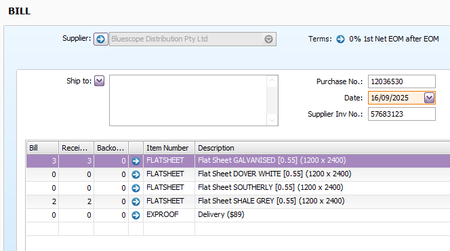
AR Plus Desktop -Save a Recurring Transaction. Use this recurring to create a new Purchase. -Change from Bill to Order All the item lines change from the current description to the default description of the item. Can you please fix this bug? Original Recurring taken from. Open Recurring. Change Bill to Order - All lines change to the item description.137Views0likes2Comments