🟣 CA FAQ — I've set up a new employee, but they can't access Client Accounting
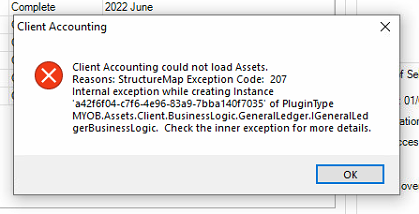
If you have recently set up a new user account for an employee in AE/AO, they may encounter an error referring to "StructureMap Exception Code: 207" when launching the Client Accounting tab for a client. This error message looks scary, but it has a simple solution! 🕵️ They are running into this because Cashbook access has not yet been enabled for the employee. To enable this, do the following: Head over to, and sign into cashbook.myob.com.au (AU) or cashbook.myob.co.nz (NZ) using a different MYOB account (not the affected user's account, but any other account will do) In the drop-down box in the top right corner, click Manage firm users On the list, find the employee that is encountering the error and toggle the button under Access to ON 🟩 That's it! Now the user will just need to close and reopen the client in Client Accounting, and it should load without issue. You can read more about this process here: Error: "Client Accounting could not load Assets. Reason: structure map exception code 207..." when clicking on Client Accounting tab 🟣 Bonus: You can also launch Cashbook via AE/AO directly by clicking the Launch AE/AO ledger button under the Ledger menu in the Workpapers/Trial balance tab. Scott Client Accounting MYOB190Views0likes0Comments