Dark Mode and High Contrast Theme Requests
Hi MYOB Team and Community, I'm writing to suggest the implementation of both a dark mode theme and high contrast themes for MYOB. These accessibility features would significantly improve the user experience for many, especially those who find standard interfaces challenging. Dark Mode: Many users, myself included, find dark mode significantly more comfortable for working with software, especially for extended periods. It reduces eye strain and can be particularly helpful for those sensitive to light or working in low-light environments. High Contrast Themes: High contrast themes are crucial for users with low vision or other visual impairments. They improve readability by maximizing the contrast between foreground and background elements, making it easier to distinguish text and other important information. I understand that theme development takes time and resources, but I believe both dark mode and high contrast options would be valuable additions to MYOB and improve accessibility and usability. Currently, I'm not aware of any workarounds within MYOB itself. I'd be interested to hear if this is something the MYOB team has considered or if other users would also find these features beneficial. Thanks for your time and consideration.427Views11likes6Comments
Searchable Account Name, Account No, Item Name and Item No
It will be a big help to stop keep opening up Account Chart, as you cannot remember the account number of an expense, asset or etc, by enable the search combined. So you don't separate the account search by number, or name, but anything that you put in on the account field, will short list those possible accounts that you want to use, this function is only available when you open up the "account list", it will be great to have this extended to when you are entering transactions in the sales (service), purchases, spend and receive money, journal etc. same thing goes to entering itemise sales or purchases, you can just search my wording, either you only remember partial item no, or descriptions, it will all show127Views4likes2Comments
Font Size
The working population is getting older, the population in general is becoming more myopic. Why ever did MYOB remove font sizing from their program years ago. It would help reduce typos. Most other types of software suites have this facility. Changing the windows screen resolution does not fix the problem. Ever heard of the science of Ergonomics? A resize font option would deliver an ergonomic productivity improvement to a large cohort of your customers. Good Ergonomics makes good economic sense.
"Customise Forms" glitchy and frustrating to use
Customising forms on the desktop version is an exercise in patience. The first main problem I'm having: getting the vertical lines to be 90 degrees (not at a slight angle) - it would be so much better if the line "clicked" to say 5 or 10 degree increments or even have it locked as a vertical line (who actually wants a diagonal line on their invoice?) The second problem is lines disappearing when I save the form. I have just finished editing a form, I go to email it and the pdf has two of the vertical lines missing... I'd love to use the new forms on the web browser version but the web browser does not show our data properly and doesn't allow multiple currencies.411Views3likes12Comments
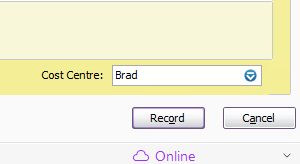
Record Button Change to "OK"
AR Desktop Can we please have the "Record" button change to "OK" following a print preview? It used to happen with AR Premier. It is difficult to know if the sale or purchase has been recorded because the button stays as "Record" until next time you go into it. Before Print Preview After Print Preview Same, sameInvoices to show $0.00 amounts when emailed/printed
Some items have a description but a $0.00 amount. Currently this shows as a blank space in the amount column when the invoice is sent or printed, users would like to see the $0.00 amount displayed in the column to make the invoice make more sense to clients. This idea was originally posted 3 years ago with a total of 4 votes.261Views4likes5Comments