Make Ship To section on invoices Optional and Editable
Hello, Can you please make the Ship To section optional on the Sales Invoice Template? Most of the Ship To address is the same as the Bill To address. It looks silly to have the same information appeared twice on the invoice. Thank you. Sunny101Views1like2CommentsBills screen display
The columns displayed on the Bills transaction screen (Purchases > Bills), aren't wide enough to be able to read the full supplier's name. Users would like the ability to either customise the width of the columns displayed or change the display so that the full supplier's name can be seen. This idea was originally posted 3 years ago with a total of 71 votes and 6 comments.262Views7likes5Comments
Quote Customisation
I would like to customise my Quote template by adding or removing a blank line, such as the invoice template. Add or remove wording to suit our needs eg remove including GST which appears under Total amount of the printed quote. Also emailing a quote to show that the quote has been sent and opened by the recipient.260Views3likes6CommentsMYOB Business display doesn't use the full screen width
Users would like to see the MYOB Business display scaled to the screen width of their monitor instead of having it always centred in the middle as there's a lot of wasted space on the sides. This idea was posted 3 years ago with a total of 48 votes and 8 comments.473Views27likes10CommentsOptions to edit payroll report display
Currently payroll reports in MYOB Business list employees alphabetically by first name, users would like the ability to sort and edit the way payroll reports are displayed on screen. This idea was originally posted 3 years ago with a total of 68 votes and 13 comments.253Views15likes4CommentsInclude customer phone number on invoices
Users would like the option to include their customers phone number and contact details on their invoice template and screen when entering invoices. This idea was originally posted 11 years ago with a total of 24 votes and 11 comments.266Views3likes6CommentsReduce wasted screen space
Hi MYOB , When will you work to make the reports in Business usable? So much of the screen real estate is wasted with all sorts of messages and details at the top of the screen that don't scroll which results in the size of the report window so small it can become close to useless as you need to constantly scroll up and down to see the results. On the many occasions that I have commented to MYOB staff about this, the stock reply is "yes, that will be fixed". When? I thought that was one of the reasons that the Business menu was supposed to be moved to a vertical list on the left of the window that could be minimised. It has not helped in any significant way. For reference, I have attached two screen shots of a balance sheet, one from MYOB and the other from Xero. Which would you prefer to work with?155Views3likes2Comments
Inactivity sign out
Howdy, I've just received the email saying we will now be logged out of MYOB if we don't use it for 20-30 minutes, then we have to manually type in our email address and password - again. While I'm sure we all appreciate the pressures on data security, I think this is way too quick to log people out, much less having to type passwords over and over during the day. I run a small business with 5 fulltime staff, I get called away to help with things and help them get work done, take phone calls, attend online meetings, this means I'm probably going to have to log in 4-5 times per day, and I'm of the opinion typing in your password would leave you more vulnerable to attacks than having a software package open on your desktop. 2 hours and you're logged out maybe, 20-30 minutes is crazy. Thanks, Jason1.1KViews9likes23Comments
Date range frustrating new update
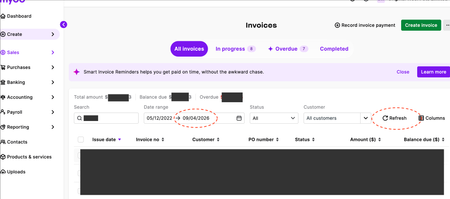
The update has introduced a bit of friction. Previously, the “reset” button would also reset the date range, which made the process quicker. Now, while the new “refresh” button updates the data, it does not reset the date range as expected. As a result, there is an extra step required to manually go back into the date filter and reselect options like “last 3 months.” It would be more efficient if the refresh function also reset the date range to "all time", or if there were an option to enable this behaviour. Please see the thread on the community page here showing users' frustration: Date range new update | MYOB Community It would be much appreciated if this could be fixed ASAP as it's very frustrating and not a nice user experience at all. Thanks heaps!174Views3likes2Comments