Accountants Office Error Message on startup: System.IndexOutOfRangeException
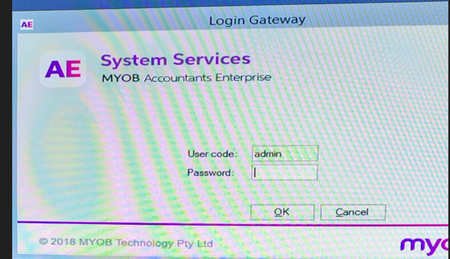
Hi, We are having an issue when trying to connect via network to a MYOB Accountants Office SQL server. When attempting to start the MYOB AO - it gives us an error: see attached I have attempted to resolve the issue via: Turning off their antivirus software (ESET), testing on another profile from the PC, restarting the PC, flushing the DNS, etc. which have all failed. The host machine on the SQL server works fine with the login, no issues. The PC having issues is Windows 10 22H2 and was working fine up until yesterday when we tried to log into the TAX file system Any advice is appreciated.Solved972Views0likes1CommentTroubleshooting AE/AO Installations
Hey everyone. Below is a list of error messages you may encounter when installing MYOB AE/AO on your workstation with the corresponding fix. Hope this helps. Error Solution 'To use this product, MYOB AO needs to set up online data for your practice. You do not have permission to perform this task. Contact your system administrator for assistance.' User with Superuser rights needs to log into MYOB and click on the live icon. Once done, access to AO Live will be granted. You must log on as system administrator to install this software Ensure login has administrator rights when installing on the server and each workstation. Installation wizard has trouble accessing a mapped drive during installation. Disable User Account Control settings for the duration of the install. Computer name is not compatible with this software Computer name must be 15 characters or less. If issue persists click the '?' icon on the bottom left underneath your profile and select 'Log a support case' for further assistance. The regional settings are incorrect. Region selected in product must match the regional settings on your computer. Computer location must be set to Australia and language format as English (Australia). To continue installing software, change selection on the Regional Selection screen in the installation or close the MYOB AO installation menu, update regional settings so that the PC location and language format coincide with the version of MYOB AE and restart installation. The operating system that you are using is not supported by MYOB. Indicates you'll need to upgrade your operating system to before installing MYOB AO. See a list of system requirements and supported operating systems on this page. There was an error with the network connection Ensure network is configured correctly before continuing installation. Issues may be with server service, network or file sharing settings. Contact your system administrator for help. 'Please note you cannot install MYOB AO on this computer because MYOB Accountants Enterprise is already installed.' You are not able to install MYOB AE and MYOB AO on the same computer. You need to run a full version of the installation If installing MYOB AO Lite, ensure Windows Installed, Microsoft .NET Framework, Windows Powershell, Visual C++ and SQL Server are installed on your workstation. Otherwise download and install the full version from the MYOB website. The selected file path location is not on this computer Select a valid file path location on the computer. The selected file path name cannot contain any spaces Select a different file path location or cancel the installation to exit, remove the spaces and attempt installation again. The selected database is not on this computer MYOB AO must be installed on the same computer where your database is located. Error may also occur if you are not installing MYOB AO on a server. 'These routines will export all data from te files DZZTV' Select the '?' icon from the bottom left your Partner Dashboard and select 'Log a support case' for further assistance. You have an existing SQL instance that is on a version of SQL not supported by MYOB Upgrade your SQL server to version 2008 or later. Machine name not unique Instructions to fix will depend on what network environment you are using. Check out this page for more information. SQL Server does not exist or access denied when opening MYOB Restart SQL Server, instructions on this page. Application Template not found Run a repair, ensure all users are logged out of the software first. Cannot obtain unique access - other operators in tax Ensure users are all logged out of tax. If you continue to experience the error, run the EPRESET routine to overcome it. Microsoft SQL Server 64 bit is not supported by MYOB AO' when installing Instructions on this page, requires technical expertise. Could not find a folder for the supplied path name Review System Release (SR) DAL settings and ensures SRDal is running. Review and add relevant firewall instructions. Step by step instructions can be found on this page.899Views0likes2CommentsAustralia Tax 2025 Known Issues
Hey everyone! As the new financial year is upon us, we've published a page with known issues that have been raised and any potential workarounds and fixes. Click on the product you're using below for more information! AE/AO Desktop MYOB Practice Compliance online We will continue to update the pages throughout the 2025 financial year. Click the bell icon on the top right to stay up to date and as always, feel free to reach out if you have any questions!500Views0likes1Comment
Great News! Extended Hours for EOFY Support!
Hey everyone, We know the End of Financial Year (EOFY) can be a busy time, and we want to make sure you have all the support you need! For those who might not have heard, we've extended our opening hours to give you even more flexibility during this period. That's right, we're open longer to help you with any last-minute queries, support requests, or assistance with installation of the new 2025.0 update! From the 28th of June to the 20th of July we are open Mon-Sun. Please see below for our contact hours for phone and chat during these dates: Phone: Mon-Friday 9am-5pm Sat-Sun 9am-5pm Chat: Mon-Friday 9am-7pm Sat-Sun 9am-5pm You can find all our updated contact details and extended hours on our Contact Us page or you can access our new chat bot MOCA via MYOB Practice or now from within AE/AO with the new 2025.0 update! Please visit this page on how to chat with us via MYOB Practice. Wishing you a smooth and successful EOFY! Cheers, Aiden from MYOB400Views2likes4CommentsAustralian Tax FAQ's (DESKTOP + ONLINE)
Hello everyone! We've collated a list of frequently asked questions users have posted on the Forum for your convenience. Check them out below! GENERAL What do I need to do before starting a new tax year? (DESKTOP) Where can I view the tax tables and thresholds for 2025? (DESKTOP + ONLINE) Is there a guide to using online MYOB Practice? (ONLINE) How do I reschedule agent reports for the new year? (DESKTOP) SOFTWARE/INSTALLS Where do I find the 2025 installation guide? (DESKTOP) How do I know what changes were done in the latest update? (DESKTOP) How do I backup my practice software? (DESKTOP) How do I get the latest version? (DESKTOP) Can I update to the latest version on Windows 10? (DESKTOP) Is there a guide I can follow to complete a workstation installation of AE? Is there a guide I can follow to complete a workstation installation of AO? TAX RETURNS Can I move from AO to online and roll over my returns from desktop? (ONLINE) How do I make sure depreciation assets roll over from desktop to online return? (ONLINE) How do I make sure I'm getting activity statements sent to clients for review using the portal? (ONLINE) How do I prepare a tax return from MYOB Practice? (ONLINE) How do I exclude tax returns from rolling over to the next year? (DESKTOP) Getting a blank screen when trying to do tax returns, how do I fix this? (DESKTOP) What can I expect to see if I pre-fill a tax return? (DESKTOP) TROUBLESHOOTING ERROR MESSAGES I'm getting tax validation/authentication errors, how do I know what to fix? (DESKTOP + ONLINE) How do I fix a Status Code 400 error when trying to do returns online? (ONLINE) How do I fix SQL server does not exist or access denied' error when opening MYOB. (DESKTOP) How do I fix 'machine name not unique' error when opening Tax? (DESKTOP) How do I fix foreign income tax offset not calculating properly in a trust return? (DESKTOP) How do I fix a tax return stuck on 'transmitting' in the lodgment manager? (DESKTOP) I've just done my tax upgrade and now when I try to run an estimate, nothings happening. How do I fix this? (DESKTOP) I'm running into an error installing AE/AO, how do I know what to fix? (DESKTOP) Can someone please give me a list of any known issues for the 2025 financial year? (DESKTOP + ONLINE)396Views1like0Comments
preparing BAS function is not working
Subject: Issue with BAS Download Function Hi everyone, I usually use this function to download a filled-in copy of the BAS, which allows me to quickly check the numbers before submitting. However, it's not working for some reason. I have returned the BAS for four entities. Can anyone confirm if they are experiencing the same issue? Regards, KevinSolved199Views0likes2Comments