Forum Discussion


Shella_A
2 years agoMYOB Moderator
Hi Trucn,
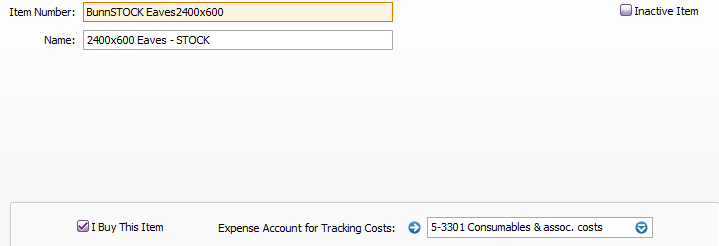
Thanks for your post and for the screenshot of the setup provided. I get that you're having trouble with the GL details report not showing the correct account for an inventory item. This might be a bit tricky and could be due to the way the inventory item's account is set up or how the report is generated.
You could try checking the setup of the inventory item and the 'Consumables' account to make sure they're linked right. Also, make sure the GL details report is set up to show the linked accounts correctly. You can find more information on this in the Creating Items article.
Keep us posted on how things go, and feel free to post anytime you need more help.
If my response has answered your inquiry, please click "Accept as Solution" to help other users find this information.
Kind regards,
Shella

Trucn
2 years agoContributing User
Hello Shella,
We've checked and it was linked right, just on the GL report the item was reported in a different account.
Can you please instruct how we could make sure the GL details report is set up to show the linked accounts correctly?
Thanks Shella!
- Shella_A2 years agoMYOB Moderator
Hi Trucn,
Thanks for the update. I get that you're facing some trouble with the General Ledger (GL) details report not displaying the linked accounts as it should. Here's an easy-to-follow guide to help you sort this out:
- Start by confirming the linked accounts in your MYOB software. You can do this by going to the "Setup" menu and choosing "Linked Accounts".
- Ensure that the accounts tied to your inventory items are correctly set up. They should be linked to the right "Consumable" accounts or any other accounts that are relevant to your business needs.
- If you notice any inconsistencies, you have the option to change the linked account by picking the right one from the drop-down list.
- After making the necessary adjustments, you can run the GL details report again to see if the items are now listed under the correct accounts.
You can also check which accounts are linked to features by visiting the Accounts List window. Here's a helpful article on how to manage linked accounts.
Feel free to post again anytime you require further assistance.
If my response has answered your inquiry, please click "Accept as Solution" to help other users find this information.Kind regards,
Shella
- Trucn2 years agoContributing User
Hi Shella,
I've gone to Setup, then Linked Accounts. But does not give me the inventory items option. Four options I have Accounts & Banking, Sales, Purchases, Payroll.
I went to each, and did not seem to have "intentory".
- Princess_R2 years agoMYOB Moderator
Hi Trucn,
Thank you for providing an update on your progress.
I've noticed that the expense account for tracking costs is listed as (5-3301), which might be causing the issue. To troubleshoot further, try changing the expense account to an expense account. After making this adjustment, run a General Ledger Detail report again to see if it pulls up the account linked to the item.
Feel free to let me know how you get along and if if you need further assistance.
Cheers,
Princess

Looking for something else?
Search the Community Forum for answers or find your topic and get the conversation started!
Learn, solve, grow
Level up your skills and find answers across all MYOB products