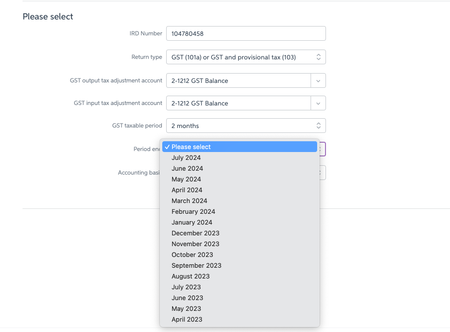
Unable to select correct period to file GST return


Hi AoteaStudios,
If you can't see the current filing periods, it might be because your financial year or GST settings are off. No worries, though—you can double-check and update these in your business settings. For more info, check out this link. Also, if you haven’t rolled over your financial year yet, that could be the reason too.
Cheers,
Princess

Thanks, I will try that.

I am also having the same issue. Above suggestions tried and not change. Any info AoteaStudios

Hi Nurseryman,
If you’re having trouble finding the date correct option even after making sure the date of your file is in the current financial year, the best move is to get in touch with our support team so we can help you sort it out.
You can pop a support ticket through the MyAccount window, or just jump on live chat with our team via MOCA.
Regards,
Genreve

Hi Nurseryman
I had the same issue but got it sorted.
Just go to your business setting (under the "gear icon - top right" and make sure your FY is 2025. If not click on the start new FY year link to start a new FY year. It worked for me.
Search the Community Forum for answers or find your topic and get the conversation started!
Level up your skills and find answers across all MYOB products


