SupportNoteGuyMYOB StaffJoined 11 years ago315 Posts97 LikesLikes received36 SolutionsView All Badges
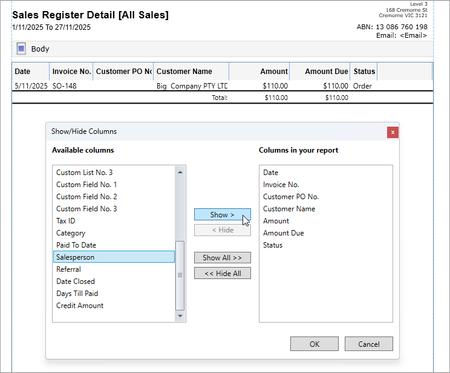
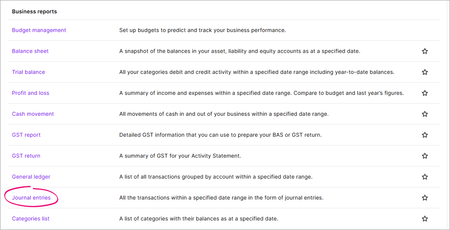
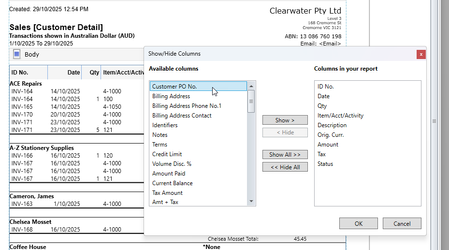
ContributionsMost RecentMost LikesSolutionsRe: Sales Register Format Hi OptimalAccounts - thanks for your question. Unfortunately, you can't add or remove columns from the Sales Register screen. However, you can customise the Sales Register report by adding the Salesperson column. Run the Sales Register report (Reports menu > Index to Reports > Sales tab > Sales Register Detail [All Sales]. Set the required filters for the report. Click the Insert/Modify tab. Click Show Hide. Click the Salesperson column then click Show to add it to the list of columns displayed in the report. Click OK and you'll now see the column added to the report. You can click and drag the column headings to change their display order. You might want to save this as a custom report so you can run it again whenever you like. Here are a couple of help topics that go into these things in more detail: Add and remove report columns Saving and deleting custom reports I hope this helps! Adrian Re: Reports on Desktop vs Business pro Hi Pkara - sorry for the late reply, I've just returned from leave! If a report doesn't show totals, you can easily export the report to Excel and total up whatever fields you like. Take a look at this help topic about exporting reports. I hope this helps! Adrian Re: Number of employee Hi Ken_Wong - if your plan includes 4 employees per month, the employee you're paying on Nov 2 counts as one employee for that month and the new employee you're paying on Nov 16 counts as a second employee for that month. If you'll be paying more than two other employees in November, you'll need to upgrade your plan. Adrian Re: Reports on Desktop vs Business pro Hi Pkara - thanks for your question. The Journal entries report in MYOB Business pro does the job of those 3 desktop reports. When you run the report, set the date range then click Transaction type at the top to choose the source journals you want to include, such as Cash receipts, Cash payments or General journals. I hope this helps! Adrian Re: Number of employee Hi Ken_Wong - thanks for your question. If you've already reached your monthly limit and you need to add a new employee in the same month, you'll need to upgrade your plan. You can always downgrade your plan afterwards, or you can stay on the upgraded plan to keep paying the increased number of employees. More about payroll limits and fees I hope this helps! Adrian Re: MYOB Pay Super & the closure of ATO/Govt-SBSCHouse Hi CSASSOC - thanks for your question. Our developers are still working on the details of how Payday super will be implemented in our products. Rest-assured, we'll provide more details closer to the deadline - and in plenty of time to get ready. In the meantime, take a look at this handy guide that talks more about this change and things you can do now to prepare: Payday Super: A complete small business guide I hope this helps! Adrian Re: Customer sales report Hi Davidz - thanks for your question. The Sales [Customer Detail] report should do the trick (Reports > Index to Reports > Sales tab). Run the report, then go to the Insert/Modify tab, click Show Hide and add the Customer PO No. field to the report. I hope this helps! Adrian Re: Fine Tuning Sales Report Hi Herby-Erb - thanks for your question. Try the Item Transactions report (Reports > Index to Reports > Inventory tab > Item Transactions). You can choose the date range which lets you run the report for a week, a month - or whatever period you like. You can also choose which columns to include in the report by clicking the Insert/Modify tab then clicking Show Hide. I hope this helps! Adrian Re: MYOB Payroll ending Hi 1engine - thanks for your question. Yes - you can migrate to MYOB Business! Even better - our team can help you move. Learn more about moving from MYOB Payroll to MYOB Business. I hope this helps! Adrian Re: Deleting a Supplier Payment Hi Suzanne_H - thanks for your post - and sorry to hear you're in this situation! Because the payment was applied to an order, it's considered a deposit - so it can't be deleted like a regular payment. But not to worry - take a look at this help topic that steps you through how to undo it all. I hope this helps! Adrian