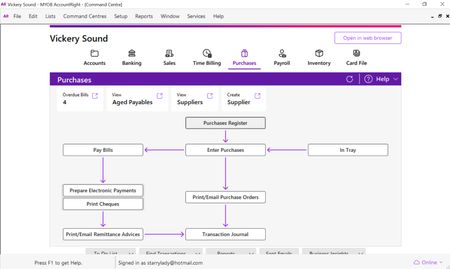
ContributionsMost RecentMost LikesSolutionsRe: MYOB AccountRight Command Centre Changes My workaround is simply to switch the command centre from full screen to multiple. Then I get the main scrollbar on the rhs of screen. Re: MYOB AccountRight Command Centre Changes I can see from the earlier comments that many users have mulitple issues. Apart from likes or dislikes, the display is not functional. The command centre appears to be a fixed size and the menu buttons at the bottom are partly cut off and there is no scrollbar. There doesn't appear to be a way to get to those buttons to read what they say. I can tab to them, but they remain half-concealed. The command centre needs to resize automatically, according to the user's settings, or give us a scrollbar (permanently visible). Re: Can't edit Salary Sacrifice payroll category (no scrollbar) Using the minimise icon was weird - the OK button was partly cut off by the inner window. Adjusting the settings did work. Thank you. Can't edit Salary Sacrifice payroll category (no scrollbar) I am using MYOB Accountright online file. On the company computer, there is no problem. On my laptop, the display for the Salary Sacrifice settings cuts off above the OK button, so there is no way to save the settings. There is no scrollbar. The screen is already maximised. There is no way to make the window smaller. I am not using a browser, just opening MYOB on the laptop and selecting the online file when I log in. Screenshot attached. I think this is a bug in how the window displays on the screen (perhaps to do with screen size and resolution). I think there should be a scrollbar. Screenshot attached. Solved