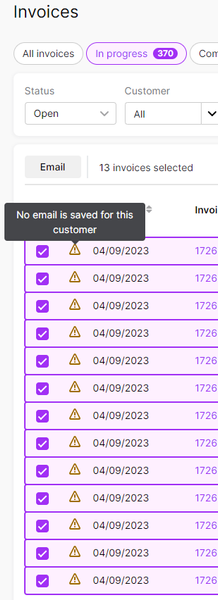
ContributionsMost RecentMost LikesSolutionsAccountright crashing when sending invoices through Outlook Hello, We just upgraded a PC and when we try to email invoices from the desktop Accountright through Outlook we are getting this error. We tried a repair or Outlook and it didn't help. Does anyone know how to fix this error? AccountRight Application Error Report ===================================== Application Version: 2025.10.1.3 Application File Version: 2025.10.1.5 Incident Id: e392fd19-d330-4fe9-9c0f-59ac8c29a878 Time: Thursday, 4 December 2025 11:52:47 AM Code: System.InvalidCastException Message: Unable to cast COM object of type 'Microsoft.Office.Interop.Outlook.ApplicationClass' to interface type 'Microsoft.Office.Interop.Outlook._Application'. This operation failed because the QueryInterface call on the COM component for the interface with IID '{00063001-0000-0000-C000-000000000046}' failed due to the following error: Element not found. (Exception from HRESULT: 0x8002802B (TYPE_E_ELEMENTNOTFOUND)). Stack Trace ---------------------------------------- 1 : System.InvalidCastException ---------------------------------------- System.InvalidCastException: Unable to cast COM object of type 'Microsoft.Office.Interop.Outlook.ApplicationClass' to interface type 'Microsoft.Office.Interop.Outlook._Application'. This operation failed because the QueryInterface call on the COM component for the interface with IID '{00063001-0000-0000-C000-000000000046}' failed due to the following error: Element not found. (Exception from HRESULT: 0x8002802B (TYPE_E_ELEMENTNOTFOUND)). at mscorlib!0x0600434a!System.StubHelpers.StubHelpers.GetCOMIPFromRCW(Object objSrc, IntPtr pCPCMD, IntPtr& ppTarget, Boolean& pfNeedsRelease) at Microsoft.Office.Interop.Outlook!0x06002365!Microsoft.Office.Interop.Outlook.ApplicationClass.CreateItem(OlItemType ItemType) at Huxley.MsOffice.Integration!0x06000079!MYOB.Huxley.MsOffice.Integration.OutlookEmail.OutlookEmailProvider.SendMessage(String emailAddresses, String subject, String body, EmailResourceType resourceType, String documentNumber, IEnumerable`1 attachments) +0xde at Huxley.UI.Controllers!0x06003579!MYOB.Huxley.UI.Controllers.Helpers.NotificationHelper.<>c__DisplayClass49_0.<SendMessageWithForm>b__1() +0x68 at Huxley.UI.Controllers!0x060028e2!MYOB.Huxley.UI.Controllers.Helpers.NotificationHelper.TrackAndPerformSendEmailLocally(Func`1 sendEmail, EmailResourceType resourceType, Nullable`1 companyDataFileId, Nullable`1 invoiceId, String body) +0x5e at Huxley.UI.Controllers!0x060028d8!MYOB.Huxley.UI.Controllers.Helpers.NotificationHelper.SendMessageWithForm(MessageWithFormParameters parameters) +0x2b8 at Huxley.UI.Controllers!0x0600182a!MYOB.Huxley.UI.Controllers.SalesAndPurchases.SendEmailController.SendEmail(String emailTo, String subject, String message, IEnumerable`1 attachments) +0x1f1 at Huxley.UI.Controllers!0x06001829!MYOB.Huxley.UI.Controllers.SalesAndPurchases.SendEmailController.SendEmail(String emailAddresses, String subject, String message) +0xb at Huxley.UI.Forms!0x06001916!MYOB.Huxley.UI.Forms.SalesAndPurchases.SendEmail.<OnOkClicked>b__37_0() +0x0 at Huxley.UI.Forms!0x06003611!MYOB.Huxley.UI.Forms.BaseForms.BaseViewContainer.PerformAction(Action methodToPerform) +0x16 at Huxley.UI.Forms!0x060018ee!MYOB.Huxley.UI.Forms.SalesAndPurchases.SendEmail.OnOkClicked(ButtonClickedArgs args) +0x74 at Huxley.UI.Forms!0x060032e8!MYOB.Huxley.UI.Forms.BaseForms.BaseViewForm.CallButtonClicked(Action`1 execute, ButtonClickedArgs args, String buttonText) +0x12 at Huxley.UI.Forms!0x06003261!MYOB.Huxley.UI.Forms.BaseForms.BaseViewForm.btnOk_Click(Object sender, EventArgs e) +0x30 at System.Windows.Forms!0x06001167!System.Windows.Forms.Control.OnClick(EventArgs e) +0x19 at DevExpress.XtraEditors.v17.1!0x06000d4f!DevExpress.XtraEditors.BaseButton.OnClick(EventArgs e) +0x2e at DevExpress.XtraEditors.v17.1!0x06000d48!DevExpress.XtraEditors.BaseButton.OnMouseUp(MouseEventArgs e) +0x1d at System.Windows.Forms!0x0600124e!System.Windows.Forms.Control.WmMouseUp(Message& m, MouseButtons button, Int32 clicks) +0x184 at System.Windows.Forms!0x0600125e!System.Windows.Forms.Control.WndProc(Message& m) +0x49f at DevExpress.Utils.v17.1!0x06002708!DevExpress.Utils.Controls.ControlBase.WndProc(Message& m) +0x2e at DevExpress.XtraEditors.v17.1!0x06000256!DevExpress.XtraEditors.BaseControl.WndProc(Message& msg) +0x0 at System.Windows.Forms!0x06006400!System.Windows.Forms.Control.ControlNativeWindow.OnMessage(Message& m) +0x0 at System.Windows.Forms!0x06006403!System.Windows.Forms.Control.ControlNativeWindow.WndProc(Message& m) +0x8e at System.Windows.Forms!0x0600314e!System.Windows.Forms.NativeWindow.Callback(IntPtr hWnd, Int32 msg, IntPtr wparam, IntPtr lparam) +0x25 ========== MODULE: DevExpress.Utils.v17.1 => DevExpress.Utils.v17.1, Version=17.1.7.0, Culture=neutral, PublicKeyToken=b88d1754d700e49a; G:b8c34c059b804930811d5f6d50999b6c; A:1 MODULE: DevExpress.XtraEditors.v17.1 => DevExpress.XtraEditors.v17.1, Version=17.1.7.0, Culture=neutral, PublicKeyToken=b88d1754d700e49a; G:6df94e55f5bd4444b910d4b2a37076a4; A:1 MODULE: Huxley.MsOffice.Integration => Huxley.MsOffice.Integration, Version=2025.10.1.3, Culture=neutral, PublicKeyToken=947f70fecdd4159f; G:04dd72d7f4974a55955521553d536617; A:1 MODULE: Huxley.UI.Controllers => Huxley.UI.Controllers, Version=2025.10.1.3, Culture=neutral, PublicKeyToken=947f70fecdd4159f; G:f0f428ecb14d4a3ba5ee7f2b86b345b9; A:1 MODULE: Huxley.UI.Forms => Huxley.UI.Forms, Version=2025.10.1.3, Culture=neutral, PublicKeyToken=947f70fecdd4159f; G:dc714949513943a3bf6daad9cf616e91; A:1 MODULE: Microsoft.Office.Interop.Outlook => Microsoft.Office.Interop.Outlook, Version=15.0.0.0, Culture=neutral, PublicKeyToken=71e9bce111e9429c; MODULE: mscorlib => mscorlib, Version=4.0.0.0, Culture=neutral, PublicKeyToken=b77a5c561934e089; G:552febfc334842ecb384601d58fc202a; A:2 MODULE: System.Windows.Forms => System.Windows.Forms, Version=4.0.0.0, Culture=neutral, PublicKeyToken=b77a5c561934e089; G:705b915100924d21bde2f5344b7a3325; A:1 "No Email is Saved for this customer" & "One or more selected invoices don't have a customer email." Hello, We are trying to use the online version for reminders and finding we can't send the emails in bulk. The system says "No Email is Saved for this customer" for all customers and we we try to click email an error message says "One or more selected invoices don't have a customer email.". However, all of them have email addresses saved and we can go into each invoice individually and send an email just fine. Does anyone know how to fix this? Re: AccountRight and MYOB Business outage When is this going to be fixed? There have been no updates since last night.