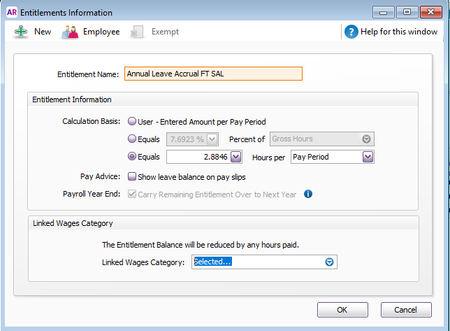
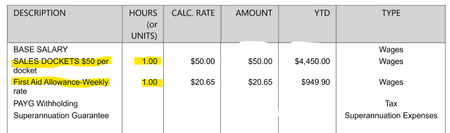
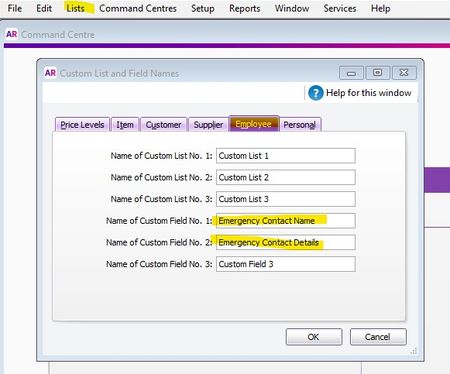
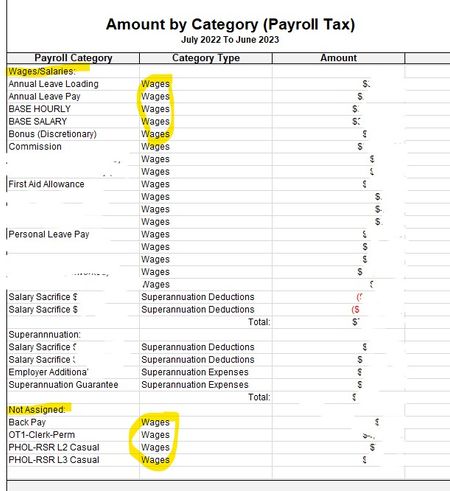
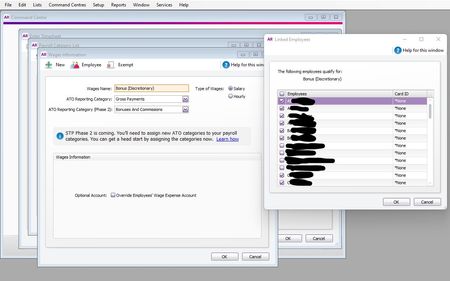
ContributionsMost RecentMost LikesSolutionsRe: Difficulty understanding leave accrual, and how to adjust leave entitlement balances in Carry over and Year-to-date columns Apologies for the late reply, thank you so much for your help. Difficulty understanding leave accrual, and how to adjust leave entitlement balances in Carry over and Year-to-date columns I have been manually keeping records as I had issues with automatic leave entitlement accrual due to never having been able to understand how to correctly set up the leave entitlement categories for our permanent full time staff. I found the article link below and I "think" I have now set up the leave entitlement categories correctly. https://www.myob.com/au/support/myob-business/payroll/leave-and-entitlements?productview=Desktop For now, I have used the Calculation Basis Hours per pay period, with the formula as follows: 20 (days annual leave per year) x 7.5 (working hours per day) = 150 hours 150 hours ÷ 52 (pay periods in a year) = 2.8846 Then to reduce balances when leave is taken, under the Linked Wages Category I ticked the applicable payroll categories e.g. Annual Leave Pay, Cashout annual leave in service, and Unused Annual Leave-ULT. If I should be using the Calculation Basis Percent of Gross Hours, could someone please advise where the "Gross Hours" comes from. Is it from the Hours in Weekly Pay Period? e.g: If I now have the accrual set up properly, my second issue is that I am unsure how to correct the leave entitlement balances on the employee cards. I can see that I can manually adjust the "Balance Adjustment" column, but I don't know how to correct the Carry Over and Year-to-Date columns. For example, I need to correct the employee below to show that they have 968.2694 hours in the Carry Over column, and 31.7306 hours in the Year-to-Date column. Is there a way to do this? Any assistance or link to another article would be appreciated. Thanks and regards Narelle SolvedRe: Difficulty understanding leave accrual, and how to adjust leave entitlement balances in Carry over and Year-to-date columns Hi Isaiah, thank you so much for this as well. I think I am on the right track now... part of my confusion I think is because I had deleted one of those default categories, but have now recreated. Kind regards Narelle Re: Difficulty understanding leave accrual, and how to adjust leave entitlement balances in Carry over and Year-to-date columns Hi Earl, firstly I apologise for the delay in replying. Thank you so much for this. I will manually update and process a zero-dollar payroll. I initially went with Hours per Pay Period I think because I couldn't figure out what payroll categories are picked up (or how to exclude certain ones e.g. if they cash out leave in service, or for some who have "sales dockets" which go onto their pay under the Hours column, and those who get the First Aid Allowance etc) If you see this, could I please ask one more thing (or please advise if I should make a new post).... We now have someone we would like to convert from casual to permanent part-time. I think I need to do the following: Set up new entitlement category for Annual leave PT hourly (I think I must have deleted the category that was in the system by default) which calculates percentage Then exempt every payroll category except BASE HOURLY? (I guess this is the only way for gross hours to be what is entered: Then apply that entitlement to the relevant Employee. Then adjust the employee card to include Annual Leave Pay and Loading, and to have 20 hours in their Weekly Pay Period. For these types of employees, does it mean that each week I will have to input their agreed hours each working day similar to how I do for casual? (Otherwise I'm not sure how the system will pick up the 20 hours). Or, should I also be changing this employee to Pay Basis "Salary". I'm sorry I don't think I'm explaining myself very well, and maybe not quite understanding where the % of "Gross hours" is pulling from. Re: Assigned Custom Field Names not showing on report Hi Princess, Thank you so much for this. I haven't been back to this for a couple of months, I will be revisiting it tomorrow. Regards, Narelle Assigned Custom Field Names not showing on report For employee card files, I have created a custom report to show Name, Address, Phone, Email, Notes, Emergency Contact Name, and Emergency Contact Details. I created the Emergency Contact Name, and Emergency Contact Details fields by going into Lists > Custom Lists and Field Names > Employees (see screenshot below) These field names are visible on the employee cards as below: However, when I create my custom report (Reports > Index to Reports > Card > Card List [Detail] > Card Type [Employee] and then want to show \ hide the required fields, it still shows as "Custom Field 1" etc: and so when I run the report, it comes out as below. Also, does anyone know how to delete the default report name i.e. Card List [Detail].... I've tried, but couldn't so I just moved it about the page. I can export this report to .pdf, but can't export it to excel (the option is greyed out) otherwise I could have done a find and replace for those field names. I had hoped to give each employee a copy so that they could check and update their details. My workaround for now has just been to tell them what the custom field name is for if the details aren't recorded. Thanks and regards, Narelle Re: Query re MYOB report "Amount by Category (Payroll Tax)" - Not assigned I think I have been able to correct my issue after reading another post answered by Sam_R on this post: STP Phase 2 Payroll Tax Reporting ) I checked to see whether each of the categories showing as "not assigned" were set up as taxable or non-taxable. As per Sam_R instructions.... "To check this, please navigate to the 'Setup' dropdown > 'General payroll information' > 'Set up Payroll Tax' > please check here if the category in question has a 'tick' next to it or not. If the category isn't ticked, this means you do not wish tax to calculate on it, hence - not reflecting on the Payroll Tax report. " After ticking my 4 categories showing on the report as "Not assigned" they have now moved back up with all the other Wages categories. I guess the next thing I'm going to have to worry about is whether I now have to sort out something to do with tax. I'm thinking since the tax year has passed it is possibly too late. Query re MYOB report "Amount by Category (Payroll Tax)" - Not assigned I have just run the report "Amount by Category (Payroll Tax)" for 2022-2023 (Reports > Payroll > Payroll Tax > "Amount by Category (Payroll Tax)". I am not sure why some of my Wages payroll categories are not in the top section of the report under "Wages/Salaries" but have ended up at the bottom of the report separated in a section called "Not assigned". Below is an image of the report, I've blanked out bits that I thought aren't needed. Also below are the examples of the payroll categories that landed in the "Not assigned" section. I would greatly appreciate it if anyone has any suggestions on why this happened, and how\if I can correct it. The categories do have staff assigned to them. The staff are still current employees. Re: Payroll category existing and assigned not visible for selection in timesheet Thank you so much Steven! I do remember now... I need to be progressed to where I can make individual adjustments on their payslip (e.g. like when we were making jobkeeper topup entries etc.) before it is "sent". I'm very grateful for your quick reply (and embarrassed!) thanks again. Payroll category existing and assigned not visible for selection in timesheet We are using Accountright Server Edition 2022.2 (the most current) We have an existing payroll category for Bonuses (Type: Salary), which is assigned to several employees. See screenshot. It is definitely set up correctly and we have used this payroll category several times in the past. We wanted to pay a bonus to some employees during our current payrun, but when we went to select it in their line options in their timesheet for this payrun, it was not available (for any employee to whom it is assigned). See 1 employee example timesheet screenshot. We therefore did a test by adding a different previously existing (and assigned) payroll category (also Type: Salary) to an employee), but it also wasn't showing as available to be selected. Yes we did save and exit, then relaunch the payrun. We then did another test by adding an existing payroll category (this time selecting Type: Hourly) to another employee, exit and relaunch, and it showed as available to be selected. I feel this is a software bug under the "Type: Salary" I have been using this software for 4 years and frequently set up new categories and new employees, so I know it's not something I'm missing. Has anyone else noticed this or have any suggestions? I can't pinpoint exactly when it started happening as I haven't had to pay a bonus for a few months. Thanks for any advice. Solved