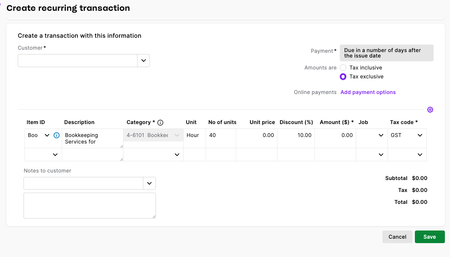
ContributionsMost RecentMost LikesSolutionsPrint receipt when payment received A receipt used to be given to a customer as proof of payment of an invoice. Now in MYOB BUS PRO., we have to follow the process below: "In MYOB Business Pro, there isn't a dedicated standalone "print receipt" button. Instead, the standard practice is to provide the customer with an updated copy of the invoice, which automatically displays any applied payments and serves as a valid receipt. " Unfortunately it does not show what date the payment was made nor the transaction # i.e. "CR313750". If MYOB take away the ability to print a receipt, which would normally include the following: Date payment is made Total amount paid Type of payment i.e. Cash, Direct Deposit, Bank Transfer etc Transaction # The word "PAID" And the user is expected to reprint and "updated copy of the invoice", then MYOB BUS PRO must automatically include the above information on the "updated" invoice. THIS IS A REQUIREMENT FOR THOSE OF US WHO DEAL WITH THE MANY DIFFERENT GOVERNMENT ORGANISATIONS. Please see attachments. Need more user customisation MYOB BUS PRO MYOB seems to have forgotten that not all businesses fit into the same pigeon holes. Since becoming cloud based,so much user customisation has been removed from your software which makes the using MYOB very clunky and time wasting. Example # 1: Invoice customisation. I invoice for martial arts clients using the martial arts address logo and bank details. I also invoice businesses using the yoga location logo and bank details. But because my ABN is registered to my home address & so this is the address in the business settings, both types of invoices show my home address, which I do not want! 2 streams of income under the one ABN, but I need 2 different invoice designs because the businesses invoice information is different to that of the individual invoice information. Example # 2: Contact card customisation. The martial arts customers have different payment terms than the businesses I invoice. Yet on the contact cards there is no option for specific payment terms for clients or businesses. Add Payment Terms to each individual contact/customer card Please add the option to add individual payment terms to different customer contact cards in MYOB BUSINESS PRO. Not all my clients have the same payment terms. For example; a new client has 7 days to pay their first invoice from our company. Afterward they then have 14 days to pay subsequent invoices. Some times I have given long standing clients up to 30-90 days to pay when the need arises. For about half the time 14 days in "Sales" settings works. I just need to be able to set difference payment terms for different clients. Thank you in advance! Re: Quotes: Insert Lines, Insert Text Lines & ability to move above or below existing lines. Actually solve this PLEASE! Often times when quoting on large work, you'll have revisions to quotes as new information becomes available or as situations change to do with the quoted job. The Quote line items layout needs to be more flexible to be moved up or down, a line inserted between other line items and also a blank line to be inserted for particular pieces of information that isn't chargeable. Re: Remove New Restriction-Allow editing of Category & GST on reconciled transactions without undoing reconciliation I want to add source documents as they become available to reconciled transactions without that item being unreconciled next time I do a bank rec. Again time wasted. Invoice - Recurring Transaction set up When creating a 'Recurring Transaction' for an invoice, the ability to add a blank line is missing. Whereas when creating an invoice there are 3 dots on the right hand side of the each line which has the ability to add a blank row for additional comments. Please add these options for creating a recurring transaction - for invoices. See attached images. CREATE INVOICE SCREEN IMAGE BELOW - NOTICE THE 3 DOTS ON THE RIGHT WITH INSERT BLANK ROW OPTION. Re: Quotes & Invoices Please widen UoM column Quotes & Invoices Please widen UoM column Following up on this request. I voted as per your suggestion 8 months ago. Today I've created an invoice template and noticed the UoM column still cuts part of the unit off. What is happening with this, please? It shouldn't be that hard, the ability to alter the column width was in previous software versions! Display an alternate business address on customer invoice In MYOB BUSINESS PRO I have created an invoice template with a logo and I want to display the "trading/site" address which is different from the main business address. My ABN is registered to my home address, but I want my shopfront address on the invoice. The edit template in 'Sales Settings' does not have any option for an alternate address from the one set up in 'Business Settings'. Quotes: Insert Lines, Insert Text Lines & ability to move above or below existing lines. Actually solve this PLEASE! CHANGING QUOTES Here are just a few previous requests that are falsely marked solved.. the functionality is already available in the invoice feature. And Yes, I have previously put the idea on the "Ideas board", what you fail to understand is that the people who want these changes are actually WORKING in their jobs and not constantly watching to vote on your "Ideas board" And Yes, I am very frustrated!! Your online software is a very sad far cry from your previous MYOB AccountEdge Pro. MYOBuser10 Member 1 year ago Status: Closed Insert Line to Quotes The ability to be able to insert lines is essential for us in creating quotes. Including inserting a line prior to any transaction lines (which doesn't seem possible in invoices). The ability is already there for invoicing - please make is available to quotes asap. Anna18 Experienced User 7 months ago I would like to add notes/comments in the body of the quote that go accross the page, instead of in the item description space, that pertain to the quote line items (out side of the comments section at the bottom of the page). Princess_R MYOB Moderator to Anna18 7 months ago Hi ,Being able to drop notes right into your quotes or invoices would be so convenient, especially if you'd love adding personal touch for your clients. At the moment, there isn’t a way to insert notes or comments right in the middle of the quote itself, but you can still tweak your templates or add terms and conditions at the bottom of the page. If this is something you’d love to see in future updates, you might want to share your suggestion on our Ideas board. Our product team pays close attention to feature requests with lots of votes from users.Cheers, Princess Tony40 Member 7 months ago Solved Changing Quotes How do I add a line into a quote, just for text and not assign a category Also how do I rearrange the lines in a quote after they are filled. Can do this with an invoice but having trouble doing it with a quote. Thanks, Tony SupportNoteGuy7 months ago Hi - thanks for the question.You can add text into the Description field in a line on the quote without having to add any category, item or pricing info.But unfortunately you can't adjust the position of the lines in a quote the same way you can in an invoice.I hope this helps.Adrian Anna18 Experienced User to SupportNoteGuy 7 months ago 13/08/2025 Hi SupportNoteGuy, Adding text in the Description field in a line on the quote is not an acceptable solution. The space is too small for "precise" information to be imparted, and can lead to a simple one page quote blowing out to three pages. Reading through the forum this suggestion has been raised by others over the past couple of years and developers need to address it, and not mark as solved with "You can add text into the Description field in a line on the quote without having to add any category, item or pricing info.". And same goes for 'Changing the order of line items in a quote', I note this has also been requested and suggested by others in the forum. Whilst your voting system on suggestions is great in theory, it's seems to be failing those of us who are typing QUOTES in MYOB daily and need the flexibility to: Change the order of line items in a quote Add a text line item that uses the full width of the page, (not just the small description field) I really hope this message finds the right person that will get these changes done in a timely manner. Thank you in advance! bluegardens Member 1 month ago I couldnt agree more with this post. It is so incredibly frustrating that we cannot add/reorder the lines in a quote. It's enough of a deterrent for me to start considering the move to Xero. MickSleep Member to bluegardens 27 days ago Completely agree with this - it needs to be addressed and fixed ASAP. It makes no sense to me why this function doesn't already exist, or can't be added now... Is it possible to display an alternate company (site) address on a customer invoice without creating a separate company in MYOB BUSINESS PRO? In MYOB BUSINESS PRO I have created an invoice template with a logo and I want to display the "site" address which is different from the main business address. Can this be done? The edit template in 'Sales Settings' does not have any option for an alternate address from the one set up in 'Business Settings'.