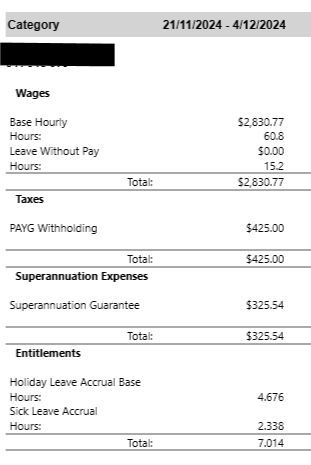
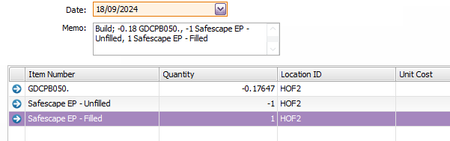
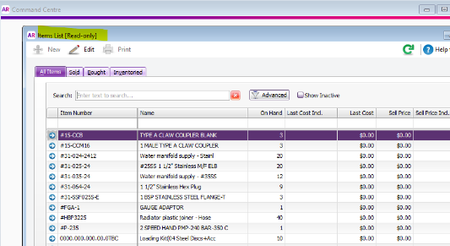
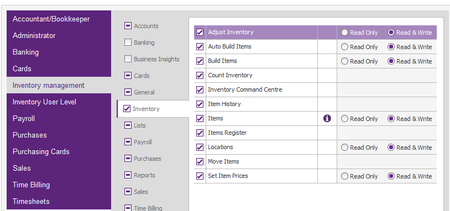
ContributionsMost RecentMost LikesSolutionsRe: Payroll Reports Incorrect Hi Earl_HD, Thank you for your response. Running the reports based on payment dates does fix the discrepancies which is a huge relief as when I spoke to someone on chat I was advised to reverse the payroll entries and reprocess. Previously we have always ran our reports for management purposes based on payroll periods (annually and quarterly) and have never had an issue as STP reporting has always balanced to our Myob reports. Again thank you for your time. Jodi Payroll Reports Incorrect Hi Everyone, I've recently come across an issue with our Myob payroll reports and I am wondering if anyone is having the same issue. As it was picked up when I recently completed our BAS returns, I believe the issue is recent and may be related to the latest update. It's a hard one to explain but I have a lot of examples I can post if needed. The below is an example. Please note that the issue is only affecting some processed pays in the payroll run and the errors are not just affecting one payroll category. Here's the example. Payroll Activity [Summary] 21/11/2024 To 4/12/2024 Employee Wages Deductions Taxes Net Pay Expenses XXX $2,830.77 $0.00 $425.00 $2,405.77 $325.54 Payroll Register Processed Payroll As per the above, the payroll summary and register are the same however the processed payroll is correct and reported under STP. The register report has removed 15.2 hours from Base hours and applied it to leave without pay. There were other errors relating to other personnel like taking hours from base and applying to paid leave etc. however as mentioned, the issues are not linked to certain personnel or any one payroll category. Any help would be appreciated as I have spoken to Myob and their only suggestion was to reverse all pays and reenter them, which is impractical given the number of personnel affected and the multiple financial years. Thanks Jodi Re: Autobuild error. Hi Doreen_P, Nothing has changed my end. I will contact try to contact support directly. Thanks Jodi Re: Autobuild error. Hi Doreen, Details are 7614 and ID 9. Thanks Jodi Autobuild error. Hi Everyone, we are again having issues with entering AutoBuilds which are appearing with an error message noting 'The value of your inventory may not be less than zero (item number Safescape EP - Filled). As you can see below, we are adding an item to EP-Filled, therefore we are not understanding why we are receiving this message. This message also appears when we try and adjust the inventory number for this item. One thing I have noticed which I have not seen before is under this particular item, N/A is noted in the current value and average cost. This is something that can not be manually typed in or changed so I am not sure why it is appearing rather than have zero dollar value? Your help is appreciated. Thanks Re: User Access - Inventory Management Hi Doreen_P Wondering if you have seen my response and if you have any further ideas as he still does not have access to add items. Thanks Jodi Re: User Access - Inventory Management Hi Doreen_P , thank you for your reply. I have checked that on both of his accounts (different email addresses) and that option is already ticked yet he is still unable to add items? Do you have any other suggestions? Thanks Jodi User Access - Inventory Management Hi, we modified one of our users from Inventory Management to Inventory User Level however for some reason they lost the ability to add new items. We checked the rules around Inventory, in both level of users and also checked the, Manage Role section and everything seemed ok as it stated they should be able to read and write, however this was not the case. We then made that account inactive and set up a new account using a different Username and email address and gave Inventory Management access however they still can not add an item under this new user. Can someone please help to rectify this issue. Thanks Jodi