ItaiMYOBMYOB Product ManagerJoined 3 years ago39 Posts4 LikesLikes received3 SolutionsView All Badges
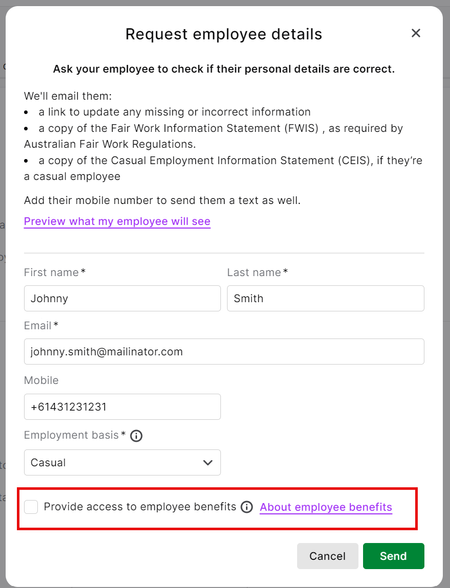
ContributionsMost RecentMost LikesSolutionsRe: Employee Self- OnBoarding - when submitted, what is the next step Hi Rampant Thanks for raising this to us. We identified a system issue when updating the employee details early last week and a fix was put in place late last week so you should no longer encounter this issue. If you are still seeing this, please could you let us know and we'll take a look but it should be fixed now. Regards Itai Re: MYOB & Flare employee benefits program Hey jenni I'm glad I could help you. We've actually had a great response to the benefits program and so most people are choosing to opt in. The intention is that it will be opt in by default going forward, and the screen will be adjusted in the coming weeks. I just wanted to transparently call that out for you so that you don't get caught off guard when that change comes through. Separately, if you would be willing to send me a private message, I'd love to hear your thoughts as to why you don't want to use the Flare Benefits program, and I do understand there could be various reasons. I love collecting feedback of all varieties from our customers as it helps to form important decisions in the future. Thanks Regards Itai Re: MYOB & Flare employee benefits program Hi jenni Thanks for raising your concern to us. You are correct in saying that if you are not signed up to benefits, you are meant to be able to choose whether an employee is invited to the Flare benefits program or not. Below is a screenshot of the Information Request you can send to employees. I've placed a red circle around the section you can opt out of. (This screenshot is from the browser, but the same applies to desktop). If you do not see this option, then it means the business file may have been inadvertently signed up to benefits at one point. In which case, I'd be happy to help you reverse that for you. Please have a look and see if you have the option above, and if not, please send me a private message with your business serial number. To answer your second question about what the employee receives if they do get the invite from the business, you can preview the screens they'd see towards the bottom of this page: Getting employees to check their details (myob.com) The email would simply be instructions to download the app itself. In terms of what is offered in the app, that does change over time, so the best way to investigate that would be to use that invite you've sent yourself to access the app and have a play around. I hope this helps. Regards Itai Re: Issues with the Flare HR onboarding Tool Hi Donna. I will send you a private message to follow up. Thanks Itai Re: Self- 0nboarding form Hi CF22 Apologies for being late to the party on this one. In some situations, particular screens in the update flow are not shown to the employee. You can see a note on this page, Getting employees to check their details (myob.com), which says: "The employee might not be shown some of the tabs you see below depending on the information they need to complete. For example, if you've set the employee's payment method to cash or cheque in MYOB, they won't be shown the Bank details tab. Similarly, if you've already entered a tax file number for them, the Tax details tab won't be shown." A remedy for you in this scenario would simply be to remove the TFN from the employees record prior to sending out the information request. This will trigger the TFN declaration step in the information request and the employee can then fill in the appropriate updates. I hope this helps. Regards Itai Re: Issues with the Flare HR onboarding Tool Hi Ari. Thanks for messaging us about this, it is definitely not ideal! I have sent you a private message with some follow up questins so I can try help get to the bottom of this. Thanks Regards Itai Re: Employee Onboarding using same Email Address Hi Aiw. The Employee Self Onboarding functionality requires a unique email address as technically, it's meant to be sent directly to the employee and it stores on record that email as the employees email. It also attaches the benefits invite, if any, to that email address. I understand the scenario you are working through. The best approach would be to use the employees email address and then they open it while at the agency, or jump on a call with the agency and forwar them the email with the link and walk through the questions together. If netiher of these is possible, many email systems support using a "+text" suffix to an email address and still route it to the same place. An example of what I mean is where the standard email address is "person@example.com", you could try "person+john@example.com" or "person+othertext@example.com". You could give that a try and see if the agency is able to receive the email? Let us know how you go. Regards Itai Re: Self- 0nboarding form Hi There. You can simply update the incorrect entry directly in MYOB if it has already been submitted by the employee. Alternatively, from the AccountRight desktop app, if you'd like the employee to update it themselves, you can send a review request to the employee with the instructions here: Getting employees to check their details (myob.com). Regards Itai Re: Flare Employee benefits. Hi Kerry10 Apologies for the late response to your question. You can see the Woolworths discount gift card if you head to the "Everyday" section -> Storecards and select "Shop all" to view all the gift card options, including Woolworths. Regards Itai Re: Flare Employee benefits. Hi WYS2019 Sorry for the delay in replying, I was just going through some older messages to see if they were answered. I can confirm there is no cost the the employer, it's 100% free to offer benefits. Regards Itai