Julie_A_CUltimate Cover UserJoined 15 years ago3404 Posts390 LikesLikes received524 SolutionsView All Badges
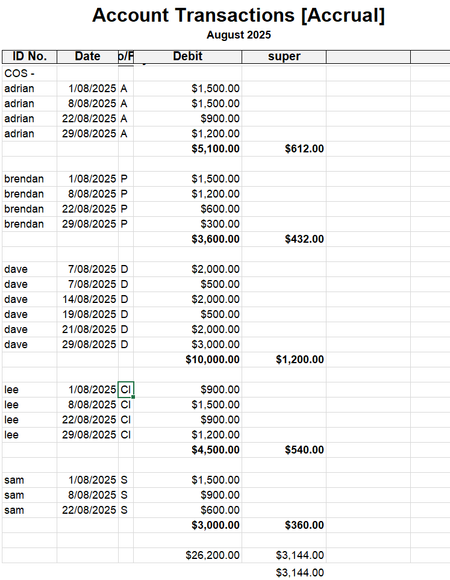
ContributionsMost RecentMost LikesSolutionsRe: How do I produce a reconciliation report? hi Jane7737 you could also try invoice transactions (accrual) select the customer and date range and exportto excel. Then needs a bit of manipulation to get this Invoice Transactions [Accrual] 1/07/2025 To 2/02/2026 Src Date Account Payments 00004359 677 00004296 17/10/2025 1-1180 $86.65 00004359 CR 17/10/2025 1-1180 $413.35 $500.00 00004359 CR 3/11/2025 1-1180 $19.98 00004395 CR 3/11/2025 1-1180 $320.02 $340.00 00004395 CR 14/11/2025 1-1180 $129.98 00004396 CR 14/11/2025 1-1180 $370.02 $500.00 00004263 CR 5/12/25 1-1180 $46.87 00004396 CR 15/12/2025 1-1180 $79.98 00004407 CR 15/12/2025 1-1180 $373.15 $500.00 00004407 CR 29/01/2026 1-1180 $76.85 00004414 CR 29/01/2026 1-1180 $423.15 $500.00 Re: How do I produce a reconciliation report? Then you need to do the slow process of find transactions, enter the customer name and date range and drill down on the payments, which will show you how allocated. Print the screenshot so you can then try and marry with what the customer tells you how they wanted allocated. Some may have been allocated correctly and others not. Re: How do I produce a reconciliation report? hi Jane7737 Try running sales register detail (all sales), then filter to the custmer in question and the date range you want. once you run the report then go to insert/modify tab, over on the right hit the show/hide, scroll down on available columns and choose date closed, go back to filters tab and run report. This will then show you all the ones close on a certain date (i.e.paid off with the deposit received from client). Advise the clients to send a remittance advice in future so their money can be allocated how they want, or to pay each invoice individually with the invoice number as a reference. I have a few clients who this happens to, and even though more work saves time in the long run when things like incorrect allocations happen. You should get the client to send you details of what they wanted monies allocated to and then need to unallocate and redo correctly. Be very careful when doing this though, take a note of your last reconciled balance, make sure you have no interuptions while doing this, and reconcile again once completed. Re: Incorrect Member Number Hi SDMR To process your payment today you could do one of two things, change the member number to all 9's and hope the super company match it with all other details there or pay everyone but the one person causuing the problem. I had this happen to an employee with AMP and I had to do a search via the ATO portal for the correct member number and USI, so you could also try that first. if no luck and details are correct I would suggest the first option whilst you sort out the employees number, which may have changed, or myobpaysuper get back to you. I don't think you will have any luck ringing the actual super company as they can be very unhelpful due to privacy laws and it may be bst for the employee to ring their super company and verify their member number is correct and maybe if both numbers and letters are required. Re: Paying GST Hi user113 Yes it is for payments made to contractors in specific fields of work and the GST exclusive amount of their labour only. Check the ATO site regularly as they add new occupations. At present it is the construction industry, cleaner, couriers & road freight, IT and security, investigation or survellience. Re: In tray Invoice bill -Tax codes not right hi leibholdqpbc , Doreen_P Please go back over the whole discussion. You shouted, REPEATED, at Doreen and did not even read her post which suggested you tick the Use Supllier tax code, which you had listed in the card as N-T. You shouted, SHOULD at me. Your next post then shouted, STOP at me, you were then condescending (not nice) in advising me that my suggestions were not relevant and to leave the conversation. I did not actually shout at you when I typed the above reminder in caps and bold, to remind you of the terms and conditions of all community sites, as you seem to have forgotten. When you ask people if they can assist you with a problem, don't be rude back to them. Especially when the first suggestion by Doreen should have solved the problem. I have read other posts you have started and it seems to be a pattern with you, so don't worry, i will never assist you again. Re: Contactors hold with ABN at lot of people have had trouble with MYOB being able to report to the ATO for subcontractors via payroll and it was mentioned a year or so ago that MYOB does not have the proper systems in place to be able to report as the ATO wants. Therefore it may be best to use this suggestion Pay the contractor via spend money expensed to contractors, chq number for each subbie is their first name or surname. At the end of the month or quarter run the accounts transaction report filtered to the contractor expense and display. I will then hide fields not needed i.e. Src, job no. I then export to excel. Sort the data by the ID no column containing their name. Insert a line at end of subbie payments, add the auto sum formula, in the cell next to that I enter the formula cell x 0.12. Once done for first subbie i will copy that line and then insert that line after each subbie. At the bottom of them all i have all the super amounts adding to give a total and also have a cell working the total of payments made for the month times the super rate, for my crosscheck. Both should agree. If the subbies charge for something other than labour, it should not be expensed to the subcontractors expense so should not come into the equation. As this is being done via account transactions report then the amount expenses to that account will be net of GST which is what super should be calculated on. If you use MYOB as your clearing house for paying super, you unfortunately can't get the subbies into that unless you do process them via payroll. You would therefore lodge the super return with your default super fund and pay it to them. copy of my spreadsheet attached. Re: In tray Invoice bill -Tax codes not right hi leibholdqpbc Please look at your original post Use suppliers tax code - NOT SELECTED. I have suggested you select it. Please also look at how many posts I have, how many solutions I have, how many likes I have and take note that I have been using MYOB for 30years and am a qualified Accountant. PLEASE ALSO NOTE THE TERMS AND CONDITIONS OF NOT ONLY MYOB BUT EVERY COMMUNITY SITE, OF POLITENESS, TWICE NOW YOU HAVE BEEN VERY RUDE IN YOUR REPLIES. Re: In tray Invoice bill -Tax codes not right then try ticking the box to use supplier's tax code and see what happens. Re: Sales and purchases not recording This seems to be a widespread problem now so MYOB need to sit up and take notice and get something done NOW. Not give a ridiculous list of things to be done by it's subscribers (as given to AndrewsA and others) to fix a problem that has been caused by their updates. MYOB is starting to get a very bad name in the public and people are shying away from using it when I suggest it as my preferred program.