MYOB AO running slow on workstations in local lan
Hi all I am new to this forum and I am hoping someone can point me in the right direction. I have a feeling this issue is related to the network and I have added the log below. Basically AO runs fine on the server but all workstations take over a minute to open a tax return or even open AO. I have had MYOB check all the registry settings and everything is pointed correctly but even they are stumped. I am particularly perplexed by the "unexpected network error" message. I am guessing it is some stupid setting somewhere so please let me know. Thanks all Date Time Type User Machine Application Description System Release Event Log 03/06/2026 10:16:13 Stop KKESH KOUROSH S6:\\ALPHA\MSSQL\AOTAX1\TAX\Tax2016 Unexpected network error 04/06/2026 13:12:53 Info andre ALPHA C:\MYOBAO\AOSQL\Tax\SYSTEM\OP Config routine completed for SYSWINZ 04/06/2026 13:16:39 Info andre ALPHA C:\MYOBAO\AOSQL\Tax\SYSTEM\OP Config routine completed for SYSCDS 04/06/2026 13:24:01 Info andre ALPHA C:\MYOBAO\AOSQL\Tax\SYSTEM\OP Config routine completed for SYSCDS 04/06/2026 13:24:05 Info SUPERVIS ALPHA C:\MYOBAO\AOSQL\Tax\SYSTEM\OP Page setup named "Capital Gains" font styles corrected 04/06/2026 16:37:27 Info andre ANDREWASUS \\Alpha\myobao\AOSQL\Tax\SYSTEM\OP Reset routine initiated in silent mode 04/06/2026 16:37:27 Info andre ANDREWASUS \\Alpha\myobao\AOSQL\Tax\SYSTEM\OP Reset routine completed 04/06/2026 17:27:19 Alert Unable to find the full licence file. Please contact your System Administrator. 05/06/2026 09:55:53 Info ptrov PETES-LAPTOP \\Alpha\myobao\AOSQL\Tax\SYSTEM\OP Reset routine initiated in silent mode 05/06/2026 09:55:54 Alert TROVAS PETES-LAPTOP \\Alpha\myobao\AOSQL\Tax\SYSTEM\OP User code TROVAS forcibly logged out by Reset routine 05/06/2026 09:55:54 Info ptrov PETES-LAPTOP \\Alpha\myobao\AOSQL\Tax\SYSTEM\OP Reset routine completed 05/06/2026 10:13:53 Info andre KOUROSH \\Alpha\myobao\AOSQL\Tax\SYSTEM\OP Reset routine initiated in silent mode 05/06/2026 10:13:54 Info andre KOUROSH \\Alpha\myobao\AOSQL\Tax\SYSTEM\OP Reset routine completed 05/06/2026 10:19:13 Stop TROVAS ANDREWASUS S6:\\ALPHA\MSSQL\AOTAX1\TAX\Tax2022 Unexpected network error 05/06/2026 10:19:15 Stop TROVAS ANDREWASUS S6:\\ALPHA\MSSQL\AOTAX1\TAX\Tax2022 Unexpected network error 05/06/2026 10:19:16 Stop TROVAS ANDREWASUS S6:\\ALPHA\MSSQL\AOTAX1\TAX\Tax2022 Unexpected network error 05/06/2026 14:08:28 Stop KOUROSH Cannot register debug window class: Class already exists. 09/06/2026 10:41:38 Stop KKESH KOUROSH S6:\\ALPHA\MSSQL\AOTAX1\TAX\Tax2018 Unexpected network error 09/06/2026 10:42:04 Stop KKESH KOUROSH S6:\\ALPHA\MSSQL\AOTAX1\TAX\Tax2019 Unexpected network error 11/06/2026 14:13:26 Info ptrov PETES-LAPTOP \\Alpha\myobao\AOSQL\Tax\SYSTEM\OP New user with login code "TROVP" added via User Import 11/06/2026 14:14:00 Stop Machine name not unique 11/06/2026 14:14:26 Stop Machine name not unique 11/06/2026 14:22:38 Stop Machine name not unique 11/06/2026 14:22:50 Stop Machine name not unique 11/06/2026 14:23:09 Stop Machine name not unique 11/06/2026 14:23:25 Stop Machine name not unique 11/06/2026 14:24:02 Stop Machine name not unique 11/06/2026 14:28:44 Stop Machine name not unique 11/06/2026 15:20:59 Alert Unable to find the full licence file. Please contact your System Administrator. 11/06/2026 15:21:11 Alert Unable to find the full licence file. Please contact your System Administrator. 11/06/2026 15:57:46 Alert Unable to find the full licence file. Please contact your System Administrator. 11/06/2026 15:58:53 Alert Unable to find the full licence file. Please contact your System Administrator. 11/06/2026 16:02:07 Alert Unable to find the full licence file. Please contact your System Administrator. 12/06/2026 14:17:10 Stop TROVP PETES-LAPTOP S6:\\ALPHA\MSSQL\AOTAX1\TAX\Tax2023 Unexpected network error 12/06/2026 14:17:11 Stop TROVP PETES-LAPTOP S6:\\ALPHA\MSSQL\AOTAX1\TAX\Tax2023 Unexpected network error 15/06/2026 19:20:13 Stop TROVAS ANDREWASUS S6:\\ALPHA\MSSQL\AOTAX1\TAX\Tax2022 Unexpected network error 15/06/2026 19:20:15 Stop TROVAS ANDREWASUS S6:\\ALPHA\MSSQL\AOTAX1\TAX\Tax2022 Unexpected network error 15/06/2026 19:20:20 Stop TROVAS ANDREWASUS S6:\\ALPHA\MSSQL\AOTAX1\TAX\Tax2023 Unexpected network error 15/06/2026 19:20:22 Stop TROVAS ANDREWASUS S6:\\ALPHA\MSSQL\AOTAX1\TAX\Tax2023 Unexpected network error 16/06/2026 14:58:21 Info andre ALPHA \\Alpha\myobao\AOSQL\Tax\SYSTEM\OP Reset routine initiated in silent mode 16/06/2026 14:58:22 Alert SUPERVIS ALPHA \\Alpha\myobao\AOSQL\Tax\SYSTEM\OP User code SUPERVIS forcibly logged out by Reset routine 16/06/2026 14:58:22 Alert KKESH ALPHA \\Alpha\myobao\AOSQL\Tax\SYSTEM\OP User code KKESH forcibly logged out by Reset routine 16/06/2026 14:58:22 Alert TROVP ALPHA \\Alpha\myobao\AOSQL\Tax\SYSTEM\OP User code TROVP forcibly logged out by Reset routine 16/06/2026 14:58:22 Info andre ALPHA \\Alpha\myobao\AOSQL\Tax\SYSTEM\OP Reset routine completed 16/06/2026 14:59:06 Info andre ANDREWASUS \\Alpha\myobao\AOSQL\Tax\SYSTEM\OP Reset routine initiated in silent mode 16/06/2026 14:59:07 Info andre ANDREWASUS \\Alpha\myobao\AOSQL\Tax\SYSTEM\OP Reset routine completedSolvedSR DAL Error 6522 - Solution
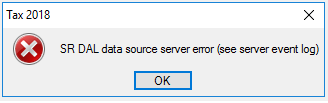
Hi Community, We have been seeing a spate of these errors on client sites, it seems to be a result of a recent .Net Framework security update, installing a new SystemMessaging.dll file. This file is required by the SRDAL to interact with the Tax database, in a VIZPOST scenario (sites without PM Plus). The issue presents with the following: SR DAL data source server error (see server event log) Assuming the SR DAL service is running and working correctly (and appropriate Windows firewall rules are in place), then the next thing to check is the event log error message. In the Event Log: Applications and Services Logs -> MYOB look for the following: System Release DAL SQL error 6522: [Microsoft][SQL Server Native Client 11.0][SQL Server]A .NET Framework error occurred during execution of user-defined routine or aggregate "MSync_SqlMsmq2SendMSMQMessage": System.IO.FileLoadException: Could not load file or assembly 'System.Messaging, Version=4.0.0.0, Culture=neutral, PublicKeyToken=b03f5f7f11d50a3a' or one of its dependencies. Assembly in host store has a different signature than assembly in GAC. (Exception from HRESULT: 0x80131050) See Microsoft Knowledge Base article 949080 for more [SELECT CURSOR] Once this is confirmed as the issue, you then need to confirm the current version of .Net and update the assembly security in the Tax database. 1. Open Windows Explorer 2. Browse to C:\Windows\Microsoft.NET\Framework 3. Confirm the folder with the highest number, this is currently v4.0.30319 4. Open SQL Management Studio and login as an administrator account 5. Ensure all users have exited MYOB AE and perform a backup. 6. Select the New Query button 7. Select your AETAX database from the drop down, please note this may not be called AETAX. 8. Enter in the following to the SQL Query, where the folder version number is the one confirmed in step 3. For this example, I will use the current version of 4.0.30319: ALTER ASSEMBLY [System.Messaging] FROM 'C:\WINDOWS\Microsoft.NET\Framework\v4.0.30319\System.Messaging.dll' 9. Press F5 or select the !Execute button to run the script 10. You should receive a message the change was made successfully. 11. Confirm Tax now opens and the data can be accessed. Please note: for sites running Profiles, it is also possible to correct this issue by running the AETAXConfigUpdate.exe routine from the MYOB BIN folder. Just make sure all staff are out of MYOB AE and a backup has been performed. As always, this information is provided "as is" and no responsibility will be taken for its misuse or damage caused by these steps. If you are do not understand what the above steps do, please do not attempt them. If in doubt, contact MYOB support :)