Single Touch Payroll (STP) Connection Troubleshooting Steps
If you are getting an Unable to Connect error when using STP or a Something's gone wrong at our end message with STP, there are 2 instances this normally happens with: 1. When you're running through the Readiness Check. 2. When you're setting up STP. If it is happening when you're running the Readiness Check, or Checking Payroll Details, it most commonly relates to the Internet connection, try restarting your Router and try again. If this fails, try flushing your DNS Cache on the computer To Flush the DNS Press the Windows Key on your keyboard Type in: cmd In the list of results, right-click on cmd.exe and choose Run as Administrator A command prompt window should appear At the flashing cursor, type in: ipconfig/flushdns Hit Enter on your keyboard and a confirmation message should be displayed - If not, retry steps 4-5 and ensure the command is typed correctly After the confirmation message, close the window Close AccountRight then re-open the software Firstly, you'd want to check that the version of Internet Explorer on your computer is Version 11, the latest version. Once updating that, close and reopen AccountRight and attempt to open this screen. If no changes, follow the steps below (Ensuring you restart AccountRight after each one) Ensure you are using TLS 1.1 & 1.2 in Internet Explorer Open Internet Explorer Click onto the Cog in the top-right Go to: Internet Options → Advanced Tick Use TLS 1.1 Tick Use TLS 1.2 Click Apply and then OK Close AccountRight then re-open the software Reset IE default settings Open Internet Explorer Click onto the Cog in the top-right Go to: Internet Options → Advanced Click Reset to restore the Advanced Settings Close AccountRight then re-open the software Clear the Internet Explorer Cache Open Internet Explorer Click onto the Cog in the top-right Click Internet Options Click Delete on the first tab Delete Browsing History (Temporarily files and cookies) Click OK to begin deleting this Close AccountRight then re-open the software Add as trusted site in Internet Explorer Open Internet Explorer Click onto the Cog in the top-right Click Internet Options Go to the Security Tab → Trusted Sites → Sites Add: https://*myob.com Close AccountRight then re-open the software Can you try on a different PC? If you are online, try the file offline Go to: File → Work offline (Check out) If you are the Owner/Administrator, you can continue to check out the file One the checkout process has completed, attempt to go use STP again If this is successful, you can then check the file back: File → Work Online (Check in) Flush the DNS Press the Windows Key on your keyboard Type in: cmd In the list of results, right-click on cmd.exe and choose Run as Administrator A command prompt window should appear At the flashing cursor, type in: ipconfig/flushdns Hit Enter on your keyboard and a confirmation message should be displayed - If not, retry steps 4-5 and ensure the command is typed correctly After the confirmation message, close the window Close AccountRight then re-open the software Try setting Internet Explorer as the Default Browser Navigate to Settings. You can get there from the Start menu. Select Apps Click Default apps in the left pane Click Microsoft Edge under the "Web browser" heading. If there's a different default browser, you'll see that program's icon under "Web browser" instead. Select the new browser (ex: Internet Explorer) in the menu that pops up You'll see that your new selection is now listed under "Web browser." Close AccountRight then re-open the software Enable Access Across Domains in Internet Explorer Open Internet Explorer Click onto the Cog in the top-right Click Internet Options Go to the Security Tab → Trusted Sites → Custom Level Enable: Miscellaneous → Access across domains Enable: Miscellaneous → Launching programs and files in IFRAME Close AccountRight then re-open the software Lower the Security Settings in Internet Explorer Open Internet Explorer Click onto the Cog in the top-right Click Internet Options Go to the Security Tab → Trusted Sites → Security Level for this Zone Set this to Low Click Apply then OK Close AccountRight then re-open the software This next option may have other potential security risks if actioned, speak to your IT person if unsure In Server Manager, under local server turn Enhanced Internet Explorer Security Settings 'off' If none of the above steps work you will need to contact an IT professional to further look into this error. Still having troubles? Let us know by Starting a Post and write down the details of the issue and we'd be happy to help4.6KViews0likes0Comments
STP Not available
After the update to 2025.9.1.3 last night we are currently experiencing an error message saying STP Not Available - Your organization is not registered for Single Touch Payroll. We have reconfirmed our ATO STP link and are still getting the error. We can get around it by going manual lodging through Payroll Reporting. Has anyone else had this error? Thanks DebSolved1.7KViews20likes48CommentsDeducting Monies in Lieu of Notice
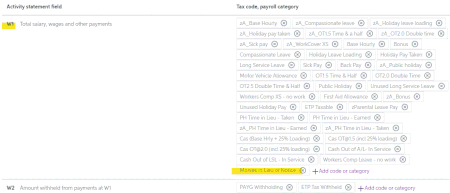
When processing an ETP, you're usually PAYING the employee monies in lieu if they were terminated by the company, and so we assigned the Monies in Lieu of Notice payroll category to W1 in the Activity Statement fields. Under our EBA we are able to withhold monies in lieu of notice when an employee resigns without giving appropriate notice, so this is a DEDUCTION rather than a payment. We processed a termination pay recently where no notice was given and entered a negative amount against the Monies in Lieu of Notice category. When lodging the May IAS, the W1 amount calculated has not deducted the Monies in Lieu of Notice (see breakdown on the attached Payroll summary report). Do I need to create a Payroll Deduction (so it is included as a W2 withheld amount) rather than using a negative amount in the Monies in Lieu of Notice Wages category so it will be recognized by STP?Solved1.7KViews0likes5Comments
Employee has provided incorrect bank details - how do I deal with this?
After processing a batch (ABA) payroll, one of the pays was bounced back and recorded in bank feed as the employee has provided incorrect bank details. Do I record this bounced payment as receive money in bank feeds, then pay to the correct bank account through spend money? Thanks! JenniSolved1.1KViews0likes1Comment
Unable to delete a pay - even if it hasn't been reported/sent to STP/ATO yet
I've read what seems like a gazillion other posts on this topic but all the official MYOB responses I read seemed to indicate that the requirement to reverse instead of delete a pay, only applies if the declaration has already been sent to the ATO. So, I changed my procedures and I don't send the report immediately. I've been waiting a few hours after sending payslips each week, in case any employees come back to me with discrepancies. Then, my theory was, I could make any necessary adjustments easily, and send the declaration as my last task before heading home. However, this theory has been tested today. I have an adjustment to make (not even really an adjustment, I simply left off a job number - no changes to amounts, categories or anything!!!!!!). And still, MYOB is saying I need to reverse the pay instead of deleting. In this case, I will simply use a journal to reallocate but this is a nightmare. I've taken pride in being able to keep my MYOB files neat and tidy for my entire working career but now, my files are getting messy because I can't make simple adjustments, when I or other staff members make mistakes. There has got to be a better way for this to be implemented. I understand the theory of the audit trail etc but if all MYOB is sending to ATO is YTD figures, then surely it could send an updated (reduced) YTD report when the pay is deleted - as part of the deletion process? It is such a headache. I'm curious to know what user-testing was done before the changes were made. Or were discussions only had with accountants and tax advisors and people who don't actually use the software from day to day, but use the data the rest of us are entering all day every day. Don't bother passing more feedback on to the developers. Just get it fixed and user-friendly again. Please. Unless of course, I should be able to delete the pay because I haven't sent the STP report yet. In which case, I retract most of my rant, and would appreciate any help investigating why I can't delete the pay. (Noting that I won't be able to easily reproduce the problem since I have to submit the payroll report today.)Solved1.1KViews1like3Comments
STP Payroll Reporting - Accepted With Errors
Hi All, I just wanted to ask about MYOB - Payroll - STP Reporting, I can see that most of my payroll runs have been accepted but some have been accepted with errors. Cessation Reason Code must be provided (ATO error code: CMN.ATO.PAYEVNTEMP.000377) Cessation date cannot be before the Commencement Date (ATO error code: CMN.ATO.PAYEVNTEMP.000282) This is next to 2 employees who were rehired in 2021, I have since fixed up their termination date in the myob reportin gcentre and all payruns are now "accepted" which is good. My question is - is there anyway to fix or amend these "accepted with errors", will this be an issue at EOFY? with payment summaries? Thanks kindly.777Views1like3Comments
STP / IAS PAYG amount not matching MYOB report
ATO business portal IAS PAYG amount not matching MYOB report I accidentally ticked "Yes, report updated pay run" by mistake, instead of "No, report new pay run". This particular pay event has been recorded in MYOB and is correct, but the STP Payroll Reporting Centre has a $0 report as it was noted as a Pay Run Update. Despite correctly entering a subsequent pay event, with the next report having the correct YTD amounts, somehow the amounts have not updated so there is a mismatch with the ATO portal which has the lesser amount (without the "updated" pay run). How do I make sure that this pay event is actually picked up? Do I need to reverse the pay run and then re-enter it clicking "No, report new pay run" I entered the correct details with the IAS report, but this still doesn't match what they expect so am unsure of any repurcussions or issues to come. Thanks419Views0likes2CommentsPraise for Sean
Trying to get the payroll to balance to the payroll verification report and coming up against a number of challenges. It certainly highlighted some gaps in my understanding of what can go wrong. I finally got on to the right person who told me the difference was caused by some inactive employees. I reinstated those and ran a final paycheque and it fixed the issue. I note that none of these steps were found in the help files. I cant thank Sean enough. Seriously great work. Kevin V Russell272Views1like1Comment
Single Touch Payroll (STP) Phase 1 service is closing down
From the 27th February 2025, customers that have not migrated to STP Phase 2 will be unable to report pay runs to the ATO. To retain access to the reporting centre, STP Phase 1 customers will need to move to STP Phase 2. Customers already reporting on STP Phase 2 will not be impacted. If you are unsure, visit the reporting centre where a visual indicator will show: Reporting on STP Phase 2. STP Phase 1 customers can visit https://www.myob.com/au/support/myob-business/payroll/single-touch-payroll-reporting/getting-ready-for-stp-phase-2 to find out how they will be impacted and how to move.251Views0likes0Comments
Entering processed payroll into new AccountRight for STP
Hi Payroll has already been processed YTD in an older version that does not report for STP. How do I enter YTD payroll figures into AccountRight ensuring all balances & accounts are correct and then report for STP. Previous financial year was brought in through processing YTD figures in payroll and then not creating a bank file. Thanks.152Views0likes1Comment