Blog Post


Merrin
12 years agoFormer Staff
Hi ClaudiaR,
Glad to hear the app will be useful for you.
There's no separate field for freight in the OnTheGo app. So, if you're looking to charge freight, there's a couple of work arounds that might help. Although, I will confess, neither is the most elegant solution.
I'm assuming you're already using the frieght field in AccountRight at the moment, and have it all set up, in which case:
- You can create the invoice in the App, then add the freight charge to the Freight field from within AccountRight before emailing it to a client. It does mean opening AccountRight to add the freight charge though.
- You can add the freight charge as line on the invoice. Note that if you add it to the invoice, it will appear as a line in the invoice, rather than in the dedicated freight section.
If you want to track the freigh cost, you'll need to select the account that you use to track freight for that line.
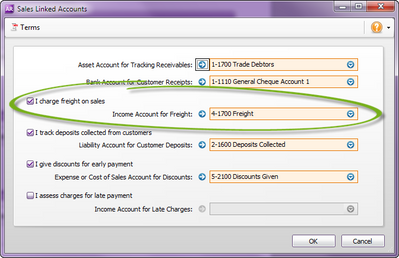
(If you're not sure which account you use to track freight, go to Setup > Linked Accounts > Sales Accounts. The freight account is listed under I charge freight on sales.
If you use Service invoices, you can select simply select your freight account when you create the freight charge on the invoice.
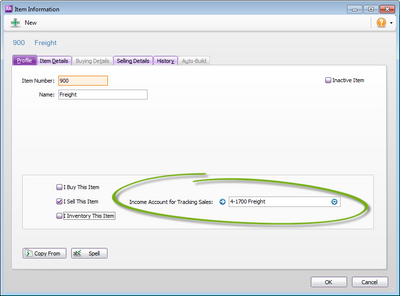
If you use Item invoices, you'll need to set up a freight item with the freight account already linked, like below.
Hope this helps.
Please drop me a line if you have further questions.
Thanks,
Merrin