Blog Post

The AccountRight Blog
2 MIN READ

Helping you get the big picture - Windows 8 companion app

Merrin's avatar
Merrin
Former Staff
12 years ago

Sometimes when you're running a company, it's good to take a step back and look at the big picture. And if you're the kind of person who likes to get your business information from visuals, we think you'll love our new Windows 8 companion app for AccountRight Live.


It's designed to show you the information you need to make better decisions for your business. So now you can keep a constant eye on your Profit & Loss and Balance Sheet, as well as seeing who owes you money and who you owe money to.


Dashboard.png


All your information is presented on your Windows 8 device in easy to read graphs that automatically update every 15 minutes (or whenever you refresh it), so the data you're viewing is always the latest.


As far as viewing your information, you can move between calendar year and financial year and change from graphs to tables, depending on your personal preference. 
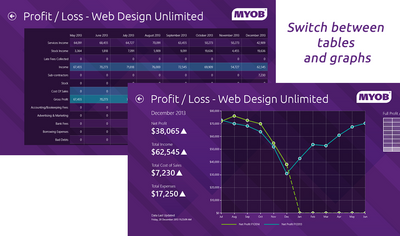
 

Profit and Loss grid v chart.fw.png


You can compare last year's figures to this year's, which is a nifty way of seeing how well you're performing, or where you might be being held back.


What I really like is that you can pin any of the tiles, like your debtors, to the start page, where you can keep a constant eye on them.


StartScreen.png


So that quick coffee break between meetings can be turned into a chance to check that your cashflow is all okay.


The app was developed in partnership with Microsoft using the MYOB API. It's currently in beta, so we'd love to hear what you think of it. Drop me a line with your thoughts.

(As an aside, if you haven't checked out the great stuff our API team are working on, or you want to get your geek on and develop something to go with AccountRight, get yourselves into their world.)


Does this app sound like something you'd like to get your hands on?

Then head to the Windows Store (Australia) (New Zealand) and download it for free. 


WindowsStore_badge_en_English_Green_small_154x40.png


To use the app, you need to have a Windows 8 device, running Windows 8.1. You also need to have an AccountRight Live subscription, with your file in the cloud. (Although you don't need to have AccountRight installed on your Windows device.)


Then keep an eye on the big picture view of your company - wherever you are, whatever you're doing.

Updated 12 years ago
Version 4.0

18 Comments

  • Suja_P's avatar
    Suja_P
    Former Staff
    11 years ago

    Thank you for the update, GazzaA.


    I'm sorry to hear that refreshing the Balance Sheet figures by logging out and back into the file did not resolve the issue for you.


    We are currently investigating the cause of the issue with the liability accounts. I will give you an update as soon as available.


    Thank you again for your patience in this matter.


    Regards,

    Suja
    MYOB Support 

  • GazzaA's avatar
    GazzaA
    Experienced Cover User
    11 years ago

    Thanks Suja, Sorry for the late reply. I have been away.


    I have done as you suggested with no change.


    When drilling down to see the Full Balance Sheet  ALL the B/S accounts in my Accounts List are shown whether they are inactive or Nil balances.

    The Asset accounts show correct figures (including Nil balances & inactive a/c’s) however the Liability accounts show some very weird amounts!!


    By further investigation I find all the Liability amounts including the Accumulated Depreciation show the movement in the accounts since June 30 NOT the actual balance as at the date of the B/S


    Any other suggestion I should try?

  • Suja_P's avatar
    Suja_P
    Former Staff
    11 years ago

    Thank you for your patience, GazzaA


    In order to refresh your Balance Sheet could you please log out of your company file in the Windows app and then log back in.


    Please let us know how you go with this.


    Regards,

    Suja

    MYOB Support

  • Suja_P's avatar
    Suja_P
    Former Staff
    11 years ago

    Hi GazzaA,


    Thank you for your feedback.


    I have forwarded the details of your findings to our Developers to investigate further.


    We will keep you posted of our findings.


    We do appreciate your patience in this matter.


    Regards,

    Suja
    MYOB Support 

  • GazzaA's avatar
    GazzaA
    Experienced Cover User
    11 years ago

    Thanks for the feed back.


    I have now found another issue with the Balance Sheet.


    A number of Liability amounts which were correct at July 2013 continue to incorrectly carry through month by month  to June 2014.

    The B/S still balnces but is showing these incorrect resuts in the current month.


    Is this also something your developers are investigating?


    Your comment would be appreciated.


  • Suja_P's avatar
    Suja_P
    Former Staff
    11 years ago

    Hi GazzaA,


    I'm sorry about the issues that you are experiencing with the Windows 8 companion app for AccountRight.


    Our developers are aware of the issue resulting in these reports intermittently coming up with the error message that you are receiving.


    We are investigating this at the moment and hope to have it resolved at the earliest.


    I'm sorry for the inconvenience caused by this and thank you for your patience.


    We will keep you posted on the progress. 


    Regards,

    Suja

    MYOB Support

  • GazzaA's avatar
    GazzaA
    Experienced Cover User
    11 years ago

    I have now dicovered the reason I could not log in & all is OK.


    I have now been unable to access both the 'Money I am Owed" & Money that I owe" Detail Reports, they return an error message of: "Unable to load report. An unknown error occured. Retry"


    Is this a bug in the Beta version?


    Would welcome some feed back please.

  • GazzaA's avatar
    GazzaA
    Experienced Cover User
    11 years ago

    After down loading this app I have been unable to log into my file using the same Username & Password I use to access my in cloud file.


    What am I doing wrong????