Default date is 2018
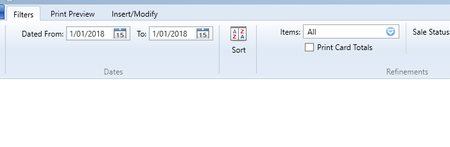


Hi nuggetsnoodles,
The problem you're experiencing with the date always defaulting to 2018 could be due to incorrect settings on your computer or within your AccountRight settings. First, make sure your computer's date and time settings are correct. Then, double-check your financial year settings by going to the Setup menu > Company Information.
If everything seems correct but the date still defaults to 2018, you should reach out to our support team for further assistance. You can connect with them via live chat through the virtual assistant MOCA or submit a support ticket through MyAccount.
Cheers,
Princess

Hi Princess,
I have checked and it's 2024.
Just double checking that this is the information you are referring to?

Hi there nuggetsnoodles,
Since the financial year on your file is the current one, check the region settings on your computer. If you're still experiencing the 2018 issue when generating reports, it's best to reach out to our support team directly. You can reach them on Live Chat via our virtual assistant, MOCA, or by submitting a support case via MyAccount.
Best regards,
Doreen
Also my computer's region settings

Hi nuggetsnoodles,
To better assist you with this matter, you need to reach out to our live chat support through our virtual assistant MOCA or submit a case via MyAccount.
Regards,
Sai
I have reached out now, thank you.
Search the Community Forum for answers or find your topic and get the conversation started!
Level up your skills and find answers across all MYOB products


