Forum Discussion


Shella_A
2 years agoMYOB Moderator
Hi ss1,
Thanks for your post, and welcome to the Community Forum.
My apologies for the late response. We value your effort in providing a detailed error message. The reason for the message is that a trusted root certificate is missing. To correct the situation, you will need to install the certificate manually. To do this, please refer to the steps provided below:
- Download the required root certificate. https://symantec.tbs-certificats.com/vsign-universal-root.cer
- Double-click the downloaded.cer file.
- Click Open.
- Click Install Certificate.
- Select Local Machine and click Next.
- Select Place all certificates in the following store.
- Click Browse.
- Select Trusted Root Certification Authorities and click OK.
- Click Next.
- Click Finish.
- You can now open AccountRight Live and login as normal.
Please let us know how it goes on your end.
Otherwise, if my response has answered your inquiry, please click "Accept as Solution" to assist other users in finding this information.
Kind regards,
Shella
 ss12 years agoExperienced User
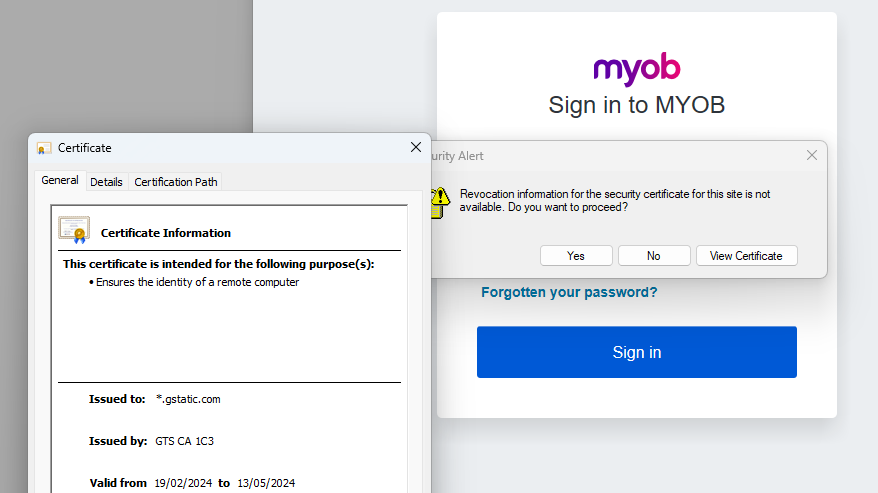
That site itself doesn't seem secure. See attached image.
- Shella_A2 years agoMYOB Moderator
Hi ss1,
Thanks for the response and for providing the screenshot of the page. At MYOB, we take security very seriously and have several measures in place to ensure the safety and reliability of our systems. Your connection is not private, typically due to a problem with the website's security certificate. It's generally advisable not to ignore this warning and not to proceed to the website unless your company's IT is certain it's safe to do so.
For the error message you're receiving, as a workaround, I recommend clicking "yes" to get rid of the warning message and proceed with your file. However, it will still pop up every time you log in, as this is a security alert from your device. To remove this permanently, I recommend seeking the assistance of your company's IT personnel, as this is regarding the internal security of your computer.
Please don't hesitate to reach out or use our online virtual help MOCA in case you still need further assistance.
Kind regards,
Shella
- ss12 years agoExperienced User
So, the question is, why does a website MYOB recommends for downloading the "trusted" root certificate (that is required for their software) itself be not trusted??
This seems a MYOB issue NOT an issue for us. If we cannot trust the "trusted" cert that MYOB AR uses, who can we trust? Asking us to solve the issue seem very bizare to say the least.
I raised a support ticket with MYOB support but they just referenced this questionable download page too.
Someone in MYOB security needs to address this and at least explain why the site MYOB uses is not secure itself.
Looking for something else?
Search the Community Forum for answers or find your topic and get the conversation started!
Learn, solve, grow
Level up your skills and find answers across all MYOB products