Forum Discussion


Shella_A
2 years agoMYOB Moderator
Hi ss1,
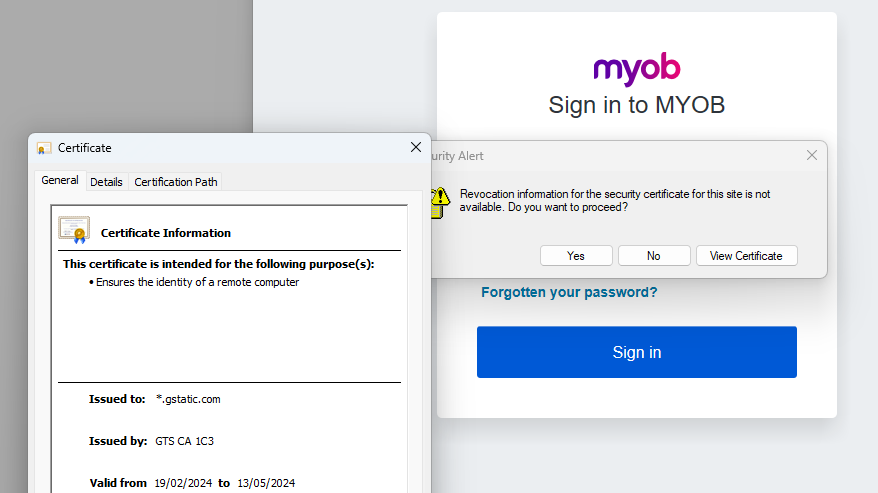
Thanks for the response. The issue isn't caused by MYOB and relates to an issue blocking the client computer from downloading or installing the new certificate. Simply means that the Trusted Root certificate is missing. To confirm this:
Open Internet Explorer and enter the web address login.myob.com.
- Green address bar: A successful connection should not have any issues. (See photo attached below.).
- Red address bar or unable to connect: The connection is not successful, and you will need to follow the resolution provided below.

You will need to install the certificate manually. I recommend following the instructions again. Please note that you'll need to follow this with the help of your IT specialist or department.
Let me know if you require any further assistance with this. I'm happy to assist you.
Otherwise, if my response has answered your inquiry, please click "Accept as Solution" to help other users find this information.
Kind regards,
Shella

ss1
2 years agoExperienced User
Our IT have contacted TBS-certificates (see my quote from them above). The URL for the trusted auth cert you provided has been confirmed BY THEM to be invalid and MYOB should not be providing this to its customers.
If you (or someone in the MYOB Security team) could provide us with a valid link to the trusted root auth cert, we can manually install it (that's not the issue here).
BTW The missing cert looks like it is from Google not TBS.
We also don't use IE 11 as that was made obsolete by MS several years ago. We use WIn Pro 11 with Edge and all the latest security patches.
- Shella_A2 years agoMYOB Moderator
Hi ss1,
Thanks for your response. It's crucial to have a valid and secure, trusted root authentication certificate. I'm sorry for the inconvenience caused by the invalid URL. As we need to investigate it further, I recommend reaching out to our MOCA directly for information about the correct link to the trusted root authentication certificate. They are the best equipped to provide you with the most accurate and secure information.
Please continue to use your current browser and security settings, as you've mentioned they are up-to-date.
Kind regards,
Shella
Looking for something else?
Search the Community Forum for answers or find your topic and get the conversation started!
Learn, solve, grow
Level up your skills and find answers across all MYOB products