Forum Discussion


Earl_HD
5 months agoMYOB Moderator
Hi Omnichannel,
Totally hear you on this one. The good news is, you can turn off automatic matching in MYOB Business to stop those suggestions. You can find all the steps here in this help article: Managing Rules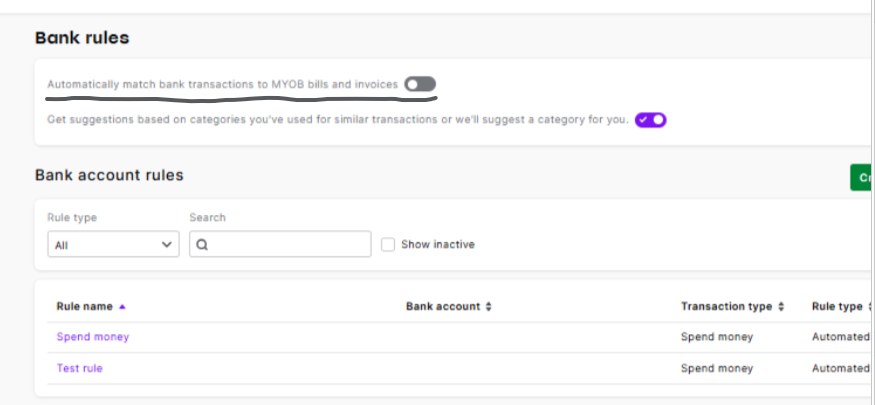
Regards,
Earl

Omnichannel
5 months agoMember
Thanks Earl
I don't think the automatic match is the issue, but it's the recently released feature of "intelligent suggestions" that's the annoyance.
Toggling the suggestions one off has removed the account suggestions which is great.
But unfortunately the screen real-estate hasn't reverted, it's still using the new CSS.
Has something changed in the latest update for transaction descriptions? The row height never use to be this large. Obviously it's dependant on how much transaction information there is, but I swear even with descriptions of this length it never use to cause row heights like this.
 shameron693 months agoExperienced User
The double spacing in almost every screen is very, very annoying. Any way of it reverting back to the ol' days?
Also, the new purple suggestions 'star' is a time waster. I do not have the second toggle to switch off in Bank Rules like you have listed. Is there any other way of turning it off?
Thanks, Shaz.
 AU60002 months agoMember
The amount of characters per line has been reduced drastically (by 10 characters).
Bank Transactions are often spread over 3 lines, which is not ideal when quickly scanning for details, and the amount of transactions that appear per window reduces as a result.
I definitely prefer the interface prior to the introduction of AI & MYOB Suggested Matches.
Screenshots show how much column size has suffered by adding these new features.I agree that the purple star is unnecessary and reached out to MYOB.
In short, this is their response:
"You just can’t remove the suggestions from the UI."
"You’re not doing anything wrong here – this is expected behavior with the new banking experience.
Even with AI category suggestions off, Organize transactions > Match transactions to invoices and bills off, and Bank rules auto?matching off, MYOB will still show non?auto “Suggested matches” / “Possible match found” banners as part of the core bank?matching logic.
Those visual suggestions can’t be fully disabled at the moment."
Looking for something else?
Search the Community Forum for answers or find your topic and get the conversation started!
Find technical support and help for all MYOB products in our online help centre
Dig into MYOB Academy for free courses, learning paths and live events to help build your business with MYOB.


