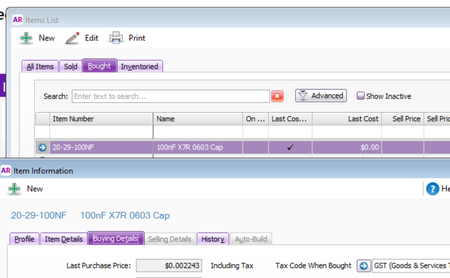
Items List Last Cost being rounded to two decimal places?


Thank you for the response.
Alternatively, is there any way to produce an items list with item last cost that reflects what is shown in the item description?
eg, Should exporting the Item List to Excel include an accurate non-rounded item last cost ?
The Last Cost in a Item detail purchase report is also rounded, surely example below should show $0.006 rather than $0.01 which is 66% more per item

Hi rnik,
Thanks for following up, I can understand why that’d be confusing when you’re trying to rely on those values for reporting.
From what we’ve seen, the Last Cost shown in the overall Items List and in the Purchases [Item Detail] report can round to two decimal places, so very small values may appear as $0.00 or $0.01 even when the item record itself shows a more precise last purchase price. Based on that, exporting that list/report to Excel wouldn’t be expected to return a more precise non-rounded value if the source view is already rounded.
At this stage, there doesn’t appear to be a standard setting in AccountRight to increase the decimal places shown in those views. If you need exact precision for those low-value items, the best next step would be to raise it with support so they can confirm whether there’s any product-side fix or enhancement path available for your file. You can reach them on Live Chat via our virtual assistant, MOCA or by submitting a support case via MyAccount.
Regards,
Earl
Search the Community Forum for answers or find your topic and get the conversation started!
Level up your skills and find answers across all MYOB products


