EQ996
3 years agoContributing User
Pay bills
Hi, team, Just wonder can MYOB AccountRight has function that invoices numbers can be carried on to "Pay Bill" dialogue. My issue is that I have to gasp every single invoice number from Open ...

Hi EQ996
Thanks for your post. I'm not quite understanding what you're trying to achieve so I'll run through the process and if I've misunderstood please let me know.
Prepare electronic payments is used to pay multiple suppliers in one lump sum payment by uploading the ABA file to your bank. The ABA file includes the supplier details, bank details and amount so that your bank transfer the applicable amount to each supplier.
If you're entering the invoice number into the Your Bank Statement Text field in Prepare electronic payments it sounds like you're paying each invoice individually which would be very time consuming. If you're not paying multiple suppliers in one lump sum payment it would be quicker to just record the Pay Bills transaction. You'd need to untick Electronic payment and make sure the Pay from account is your bank account. Enter the date, amount and invoices you're paying. You'll need to manually transfer the payment to the supplier in internet banking and then match the Pay bills transaction with the bank feed transaction.
Please let me know if I've misunderstood or you need further help.
If my response has answered your enquiry please click "Accept as Solution" to assist other users find this information.

Hi, Tracey,
Thank you for your reply.
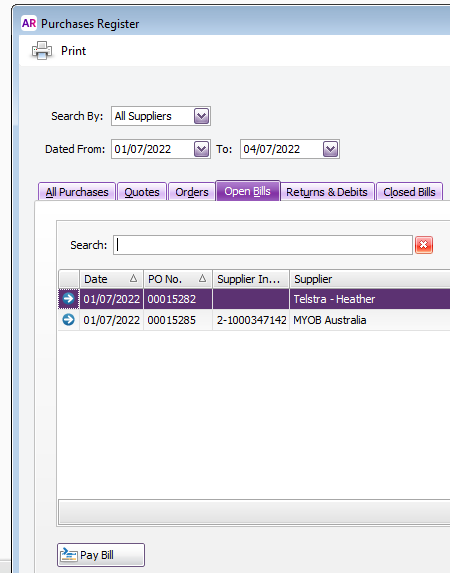
Normally we do not use Pay Bill function on Command Centre. Rather, we click purchase register first and then click Pay bill button down below and make bills individually(picture 1).
My question is when I clicked Pay bill and ticked on Electronic Payment, what shown in Statement text box is not what I expected(picture 2).
For example, it should show supplier invoice number.
Can you give me advice on how to fix that problem?
Thanks.
Picture 1
Picture 2
Hi EQ996
Clicking Pay Bill from the Purchase Register or Payment from an open purchase transaction opens the same window as Purchases Command Centre>>Pay Bills. They're just shortcuts so you don't have to go back to the Command Centre to open that window.
The Statement Text in your screenshot comes from the Cards List>>open the Supplier card>>Payment Details tab>>Statement Text.
Looking at your Pay Bills screenshot you've got the Payroll Clearing account linked to electronic payments. It should be the electronic clearing account. You can check this in Setup>>Linked Accounts>>Accounts & Banking linked accounts>>Bank Account for electronic payments:
Electronic payments are only needed if you are paying multiple suppliers in one lump sum payment. For example, I'm paying 4 different supplier accounts, I tick them all and click on Bank file to record the transaction and create the ABA file. I then upload the ABA file to the bank and authorise the payment. The bank statement will show a withdrawal of $2184.15 and in AccountRight there will be a matching electronic payment transaction for $2184.15.
If you're paying one invoice at a time and not uploading the ABA file to your bank it would be quicker to untick Electronic payment in Pay Bills and link the bank account as the Pay from account. That one you'll only need to record the Pay Bills transaction, instead of Pay Bills and Prepare electronic payments transactions.
Please let me know if you need further help.
If my response has answered your enquiry please click "Accept as Solution" to assist other users find this information.
Search the Community Forum for answers or find your topic and get the conversation started!
Level up your skills and find answers across all MYOB products