Forum Discussion


LDOG
2 years agoExperienced User
Hi Doreen
How do I go about re-inviting an existing user?
Thankyou

Doreen_P
2 years agoMYOB Moderator
Hi, LDOG
Thanks for your response.
When re-inviting an existing user, if they will be using the same email address, you will need to delete or inactive the existing log-ins. To do this, go to Setup > User Access > From the User Access window, kindly highlight the User ID and click the recycle icon to delete. Once done, you can click the New User button. For further information, kindly check The Help Article Invite a user to an online file.
Please let us know if you require further assistance with this.
Best regards,
Doreen
- LDOG2 years agoExperienced User
Hi Doreen
I am not able to delete the user as it has transactions.
My only option would be to invite the user again but use a different email address? But then if I set her up again as per setup of her current login - may result in yet again the same issue?
I will await your advice.
Thanks
Leanne
- Doreen_P2 years agoMYOB Moderator
Hi, LDOG
Thanks for your response.
If you create a new user access with a different email address, the user will no longer receive the same error. Also, make sure to tick the "This user will sign on with a my.MYOB account". Please refer to the screenshot below.
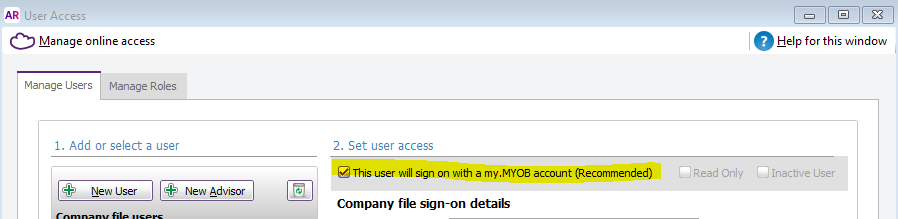
Please let us know how it goes. We are eager to hear back from you.
Best regards,
Doreen
Looking for something else?
Search the Community Forum for answers or find your topic and get the conversation started!
Learn, solve, grow
Level up your skills and find answers across all MYOB products


