Sher4's avatar
Sher4
Member
9 months ago
Status:
Open

Unable to save Recurring Sales Invoice with blank line

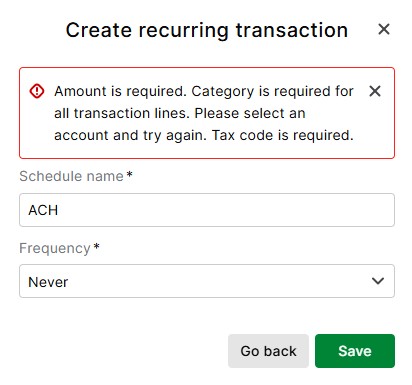
The new Aged Care reform requires us to include the Full Name, Address and Purchase Order to all invoices sent to providers of the aged care services we invoice however, when I tried to add the Name and Address on the first line of the invoice on a "blank line" then save as a Recurring Invoices, I get the message attached. 


Why is it necessary to add an amount, and category to a blank line?  


This issue is going to cause me a huge amount of additional work as I will now need to add this information to every invoice each month!  Yes, I can save and print an invoice with blank lines but not save as a recurring invoice!


If it is not possible to include the ability of saving recurring invoices with blank lines in MYOB Business, I will be moving to other software because I am not prepared to waste my organisation's time. 


4 Comments

  • Status changed:
    New
    to
    Open

    Hey Sher4


    Thanks for your idea! We'll be sharing this one with our product teams and have updated the status to open for other members of our community to vote and add weight to your idea.

  • Durkin's avatar
    Durkin
    Trusted User
    4 months ago

    Hey Sher4​ 


    Did you ever find a solution to this issue?  I'm on here trying to find a solution to the same issue.


    Nevertheless, for your billing issue, I have a couple of ideas.  Rather than trying to save a recurring invocie with the information on a blank line, you could:


    • Save recurring with the information in the description of the first transaction line.  It does skew the invoice appearance somewhat.

    Or

    • Save as a recurring invoice with the required info in the "Notes" section down the bottom.  It will still appear on the invoice, it will just be a separate area to the fees and services charged.
      • To make it stand out, I would title it as something like:
      • PATIENT INFORMATION
      • Name:
      • Address:
      • Patient ID:
      • etc.

    Hope that helps you if you are still having issues.


    Cheers

  • Sher4's avatar
    Sher4
    Member
    4 months ago

    Hi Durkin

    I found out that it is not possibly to save recurring sales invoices with blank lines in Business Pro but, if you'd like to pay more than double the cost of Business Pro you can upgrade to AccountRight Plus for this feature which is ridiculous.  Why have a feature in Business Pro that only half works?   


    I am in the process of evaluating other software with the view to moving away from MYOB for the new financial year as their costs continue to increase but not their features. 


    I have however found a work around which is not perfect, but better than losing the information you want on the Blank Line and luckily for me, I only need one Blank Line so I'm unsure if this work around will be suitable for you and, I don't know if it's possible to save Notes as a recurring sorry.


    1. So, for the work around, I put the information I want on the Blank Line into a normal Transaction Line with an Income Account Code and Zero value then Save the Sales Invoice as a Recurring. 
    2. When using the Recurring Invoice, I add in a Blank Line after the Transaction Line with the stored information then copy and paste the information from the Transaction Line to the Blank Line then Delete the stored Transaction Line, update the other transaction line details then save and export to PDF or send via Email whichever you use. 
    3. Unlike AccountRight, the Recurring Sales Invoice you originally setup is never updated with the new information - it stays the same, so each time you use the Recurring Sales Invoice you need to follow the procedure I listed as 2.  
    4. You can delete the original Recurring Sales Invoice after calling it up and update with a new Recurring Sales Invoice after exporting to PDF or sending via Email but you will need to copy the information from the Blank Line back to a Transaction Line!   

    I hope that all makes sense and best of luck.  

  • penejane's avatar
    penejane
    Experienced Cover User
    3 months ago

    You can also - open the previous invoice and save and duplicate it and amend the new one as you would with a recurring one -  I set up a no value invoice to do this with - blank line for job info at the top , then all the line items needs with no values and address info in the notes section