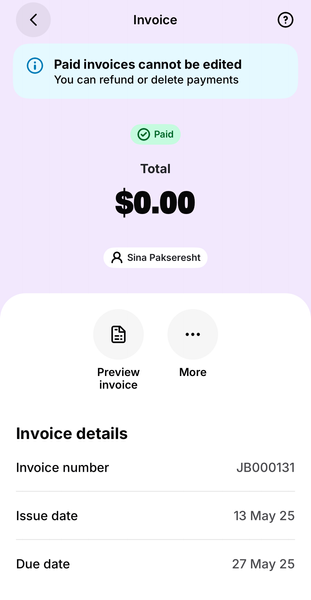
ContributionsMost RecentMost LikesSolutionsPre-saved notes to the customer I recently switched my wife over to Solo, and the one thing she’s really missing is the ability to select from a range of pre-saved customer notes when creating an invoice, or at least have a default note pre-filled, rather than copying and pasting from her iPhone Notes app. Is this something that’s already on the roadmap? Re: Deleting a $0 'paid' invoice I wasn’t able to do it via the Solo app, but I found a workaround. When you invite an accountant or bookkeeper into the file, they can access it with limited permissions via a secure site . From there, they’re able to review invoices and delete any with a $0 balance. Re: Deleting a $0 'paid' invoice Thanks Jay, I tried following this advise, however I can’t work out how to pop a dollar amount in to turn it back into a regular invoice again. I’m faced with a msg saying I can t edit a paid invoice. "Sort by" default When viewing invoices, it always defaults to "Sort by Date created". Are we able to set our default as "Sort by Due date" without it reverting back each time we go to the view invoices screen? Thank you. Deleting a $0 'paid' invoice Hello, I was creating a test invoice and accidentally saved one for $0, which has automatically been marked as 'Paid'. Unfortunately, the app won’t allow me to edit the invoice as it's marked as paid, and it won't allow me to delete this invoice, as there’s no associated payment to remove. Is there a way to have this invoice deleted? It’s now sitting among my regular invoices and is out of sequence with my invoice numbers. Appreciate your help! Solved