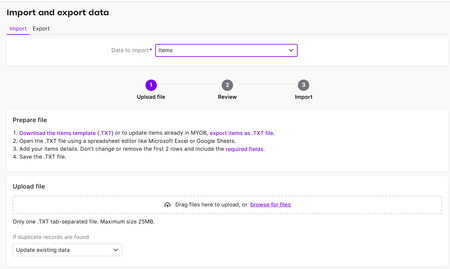
ContributionsMost RecentMost LikesSolutionsRe: "Create recurring transaction" error. Hi Philip You are right, the blank row is causing the problem I will report this to the development team Thanks so much for the feedback Chris Re: "Create recurring transaction" error. Good Morning Thank you for the feedback on this error I have tested this issue and cannot duplicate. Could you check that you don't have another recurring transactions with the same name 'Harvey" Thanks Chris Re: Leave paid not deducting from leave accrual Hi Recommend checking the annual leave pay item/s are linked to the annual leave accrual See below image showing where to look for the pay items within the leave accrual Regards Chris Re: Bank Deposited wrong account how to allocate Hi, checking if the reversal was dated the same day as the original transaction, as I am thinking the reversal is in the next month Thanks Chris Re: Spend Money – Quantity field not functioning (Case 02666678) — longstanding issue, still not fixed Thank you for your feedback and we will pass this onto the developers However, did you know the amount field includes a built‑in calculator—enter expressions like 2*5 and it will return $10. The Quantity field can also be used for audit/record‑keeping, for example logging kilometres travelled for a fuel payment. Re: LSL & AL at half pay Also recommend to check with your states long service leave legislation on how the long service leave can be taken. Re: Updating items to use stock tracking Hi Shelley Well done in getting this far You seem ready to import the spreadsheet under business settings (top right) See below image showing selection of import and items Choose option of browse files to selection your spreadsheet Recommend to check your spreadsheet is saved as a TXT file for import Also if you have not used the item template, recommend to view the template against your spreadsheet to ensure you have all the correct headers Thanks Chris Re: Making a manual payment in payroll Hi Diane, Could you confirm how this employee’s pay was processed? If they’re set up for electronic payments: you can generate an ABA file for a single employee when needed. If they’re set up as a cheque and you’ve already allocated the payment directly to the bank: please pay them directly from your bank using their bank details in online banking. Then update their card to Electronic Payments so they’re included in the next pay run’s electronic file. Hope this helps. Chris Re: Super Reversal Hi Shelley Thanks for reaching out. Regarding the debit and credit appearing in the bank reconciliation, simply tick both to recognise the in and out to clear the bank reconciliation As for the unpaid super, has the super been paid outside the pay super? If so, ignore these payments and move forward using date range of current super to pay. Hope this is helpful Regards Chris Re: Pay run duplication Hi A zero payrun for all employees is generated when a SEND UPDATE EVENT (green button) is selected to update STP data if it differs from your payroll. You do not need to delete these payruns as they of zero value. Hope this is helpful Chris