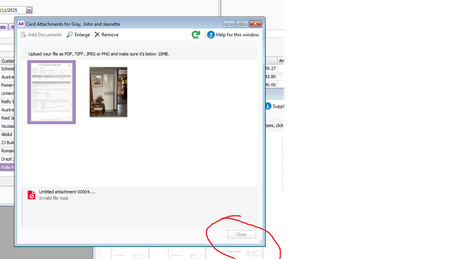
ContributionsMost RecentMost LikesSolutionsRe: Card/Bill Attachment window won't close Hi Sai, No, the X button doesn't work, neither did clearing the cache. Re: Card/Bill Attachment window won't close I understand about the invalid file types, my issue is that suddenly I can't close a window because of the invalid file. Re: Invoices from 1 supplier not in In Tray Same!! I repeat "MYOB, you know this is a problem, how about keeping us informed of where you're at with fixing it?" Re: Card/Bill Attachment window won't close Online support have advised me not to drag in an invalid file type. If I'm dragging an email with multiple attachments, I'm supposed to check? Card/Bill Attachment window won't close I have noticed in the last couple of days, that if an invalid file type attachment is dragged into the Card Attachments or Bill Attachments window or the that the close window button is greyed out and I can't close the window. Re: Invoices from 1 supplier not in In Tray Has anyone had a solution yet? I still can't forward invoices from this one supplier without having to delete the email body or drag and drop the attachment to the intray. MYOB, you know this is a problem, how about keeping us informed of where you're at with fixing it? Re: How to remove "View invoice" link from emails Ditto DJMX5, our invoices get sent via Outlook, not direct from MYOB and we don't want links in them. As soon as we started the verification process, they're on our emails. Not good enough, AGAIN, MYOB. Re: Invoices from 1 supplier not in In Tray The problem is not rectified. I still have this one supplier whose emails I cannot forward directly to the In Tray and have them show up. I can drag and drop their invoices from their emails, or forward the email after deleting the body of the email and sending the pdf attachment only but that is beside the point, I shouldn't have to do this. Hoping someone from MYOB looks at this thread and takes things seriously as this has only begun happening in the last couple of weeks and finding our own work arounds is not good enough. Re: Invoices from 1 supplier not in In Tray Hi profixp2020 I totally agree that it's not good enough, just passing on what has worked for me in the mean time hoping to help others. Re: Invoices from 1 supplier not in In Tray Hi Vector and MelCabs I have discovered this morning that if I delete the body of the email before forwarding, so leave just the pdf attachment, it will show up in the In Tray. Hope this may work for you.